

最上級のNetwork-Security-Essentials試験問題WatchGuardテスト最高成績で最速合格をゲットせよ!
試験準備には最適なNetwork-Security-Essentials試験問題2025年最新のLocally-Managed Fireboxes究極な60問があります
質問 # 22
Which WatchGuard tools can you use to review the traffic log messages generated by your Firebox? (Select three.)
- A. Traffic Monitor
- B. FireWatch
- C. Dimension
- D. Status Report
- E. WatchGuard Cloud
- F. Policy Manager
正解:A、B、C
解説:
* FireWatch: FireWatch provides a visual interface to monitor traffic and review log messages related to network activities on the Firebox. It offers real-time visibility into network usage, highlighting application activity and bandwidth utilization, which helps in analyzing traffic patterns and reviewing logs.
* Traffic Monitor: Traffic Monitor is an integral part of the Firebox System Manager, which displays detailed logs of network traffic. Administrators can use Traffic Monitor to review live traffic logs, filter traffic based on criteria, and troubleshoot network issues by examining these logs.
* Dimension: WatchGuard Dimension is a cloud-based logging and reporting solution that aggregates log messages from multiple Fireboxes. Dimension provides comprehensive reporting and enables administrators to analyze traffic patterns, detect potential threats, and generate detailed log-based reports for security audits and monitoring.
These tools are commonly used in WatchGuard environments for reviewing traffic log messages and ensuring thorough monitoring of network activities.
質問 # 23
You have an existing network infrastructure built out that uses tagged and untagged VLAN networks. Based on the diagram below, which VLANs must you add to the Firebox interface? (Select one.)
- A. VLAN 10 Tagged and VLAN 20 Untagged
- B. VLAN 10 Untagged and VLAN 20 Untagged
- C. VLAN 10 Tagged and VLAN 20 Tagged
- D. VLAN 10 Untagged and VLAN 20 Tagged
- E. VLAN 10 Untagged, VLAN 10 Tagged, and VLAN 20 Tagged
正解:C
解説:
Based on the diagram provided, the Firebox connects to a switch with VLAN 10 and VLAN 20 as tagged traffic. The connection between the Firebox and the switch shows that both VLAN 10 and VLAN 20 are tagged, indicating that traffic for these VLANs will be carried over a single trunk link to the Firebox.
To properly configure the Firebox to handle this setup, you need to addVLAN 10 TaggedandVLAN 20 Taggedto the Firebox interface, as this configuration will allow the Firebox to interpret tagged packets for both VLANs from the switch. Untagged configurations are not applicable here since the Firebox interface expects tagged traffic for both VLANs on the trunk connection.
質問 # 24
You lost access to a Firebox because no one knows the administrator passphrase. How can you regain access to the Firebox? (Select one.)
- A. Restore a backup image of the Firebox
- B. Connect with a console cable to reset the passphrase
- C. Plug in a USB flash drive with the WatchGuard Password Reset utility loaded
- D. Call WatchGuard Support for a passphrase reset
- E. Reset the Firebox to its factory defaults
正解:E
解説:
If the administrator passphrase is lost:
* Option A: Resetting the Firebox to factory defaults is the recommended solution to regain access, as it clears the current configurations, including the admin passphrase, allowing reconfiguration from scratch.
* Option B(USB reset utility) andOption E(console cable reset) are not standard options for passphrase recovery on Firebox.
* Option C(Calling WatchGuard Support) cannot directly reset the passphrase.
* Option D(Restoring a backup) requires access to the device with the current passphrase.
質問 # 25
You have just configured Mobile VPN with IKEv2 for your customer. By default, authenticated Mobile VPN users are allowed to send traffic to all Firebox networks through the VPN.
- A. False
- B. True
正解:A
解説:
In the default configuration ofMobile VPN with IKEv2, authenticated VPN users are only allowed access to specified networks or resources as defined by the VPN policy. They do not automatically have access to all Firebox networks through the VPN. To enable access to specific networks, administrators need to configure access routes explicitly within the Mobile VPN settings.
質問 # 26
What steps must you take to send log messages from a Firebox to WatchGuard Cloud? (Select two.)
- A. Use the WatchGuard Cloud Add Device wizard to add the Firebox to WatchGuard Cloud
- B. Add the FQDN of your WatchGuard Cloud account as a Log Server on the Firebox
- C. Configure Dimension to synchronize log messages with WatchGuard Cloud
- D. Enable WatchGuard Cloud in the Firebox configuration
- E. Define an Authentication Key that all your Fireboxes use to communicate with WatchGuard Cloud
正解:A、D
解説:
* Enable WatchGuard Cloud in Firebox Configuration: To send log messages to WatchGuard Cloud, you need to activate WatchGuard Cloud integration within the Firebox's configuration settings. This action prepares the device to communicate with WatchGuard Cloud and transfer log data.
* Use the WatchGuard Cloud Add Device Wizard: The Add Device wizard in WatchGuard Cloud is used to register and connect the Firebox to WatchGuard Cloud. This wizard guides administrators through the setup and ensures that the device is correctly configured to send logs and other data to the cloud.
These steps are required to establish connectivity and ensure that log messages are sent to WatchGuard Cloud.
Other options, such as adding an FQDN or configuring Dimension synchronization, are not necessary for this task.
質問 # 27
In Firebox System Manager, where can you perform each of these tasks?
正解:
解説:
Explanation:
Here are the correct answers based on the Firebox System Manager interface functions:
* See the routing table and interface statisticsanswer:Firebox System Manager - Status Report Explanation: The Status Report section in Firebox System Manager includes information on network routing and interface statistics, providing insights into network paths and interface performance.
* See a list of users connected to the Fireboxanswer:Firebox System Manager - Authentication List Explanation: The Authentication List displays all active user sessions connected to the Firebox, showing authenticated users and their session details.
* Learn the status of your IPS signature databaseanswer:Firebox System Manager - Subscription Services Explanation: Subscription Services in FSM gives information on the status of services like IPS, showing the update status and version of the signature database.
* Ping the source of a denied packetanswer:Firebox System Manager - Traffic Monitor Explanation: The Traffic Monitor tool allows administrators to track packet details and offers functionality to ping sources directly, aiding in network troubleshooting.
* Block all traffic for an IP addressanswer:Firebox System Manager - Blocked Sites List Explanation: The Blocked Sites List feature in FSM lets administrators add IP addresses to a blacklist, blocking all incoming and outgoing traffic for specified addresses.
These answers utilize standard Firebox management features for performing administrative and diagnostic tasks efficiently. Let me know if you need further assistance with Firebox System Manager capabilities.
質問 # 28
Your network was the target of an attack last week. You want to learn more about the source of the attack.
What monitoring tools can you use to get started? (Select one.)
- A. Log Search and reports in WatchGuard Cloud or Dimension
- B. Traffic Monitor in Firebox System Manager
- C. Discovery in Fireware Web UI
- D. FireWatch in Fireware Web UI
- E. WatchGuard Log Catalog
正解:A
解説:
To investigate an attack and learn more about the source,Log Search and reports in WatchGuard Cloud or Dimensionoffer detailed logs and analytical reports. These tools provide historical data, allowing you to review traffic, pinpoint the source of the attack, and analyze patterns.
While other tools like Traffic Monitor or FireWatch offer real-time monitoring, they do not provide the in- depth historical analysis and reporting features required for post-incident investigation.
質問 # 29
The Audit Trail report shows information about Firebox configuration changes. How can you makesure the Audit Trail report includes the names of the specific person that made each change? (Select one.)
- A. Configure your RADIUS server to send accounting messages to the Firebox
- B. Configure all Firebox administrators to use the Authentication Portal to log in to the Firebox
- C. Create unique device administrator accounts for each Firebox administrative user
- D. Install the SSO Client on each computer used by Firebox administrators
- E. Enable the Logging > AuditTrack feature
正解:C
解説:
To ensure that the Audit Trail report in Firebox includes the specific names of administrators making configuration changes, it is essential to have unique device administrator accounts. This setup allows each administrative action to be associated with a specific user, enabling detailed tracking of configuration modifications. By differentiating user accounts, the system can log the specific username associated with each change, fulfilling audit and compliance requirements.
質問 # 30
Which of these statements are true for this log message? (Select three.)
- A. The URL path matched the proxy content type restrictions
- B. Gateway AntiVirus detected a virus
- C. The connection was denied
- D. The connection used an HTTP Packet Filter
- E. Application Control detected the application as a virus
- F. The connection used an HTTP Proxy
正解:B、C、F
解説:
Analyzing a typical Firebox log message for a denied connection with an associated virus detection involves recognizing multiple elements:
* HTTP Proxy Detection (C): If the connection utilized an HTTP proxy, this is typically noted in the log. Firebox's HTTP proxy is often used to inspect and manage web traffic, including scanning for malicious content.
* Gateway AntiVirus Detection (D): This service scans HTTP traffic for malware and will generate log messages if it identifies a virus. When a virus is detected, the action taken is generally to block the connection.
* Connection Denial (E): When a threat is detected (e.g., a virus via Gateway AntiVirus), Firebox policies are configured to deny the connection to prevent potential infection or data breaches. This is logged as a denied connection.
Other options, such as Application Control detecting a virus or the use of an HTTP Packet Filter, are not relevant in this context based on the function of HTTP proxies and Gateway AntiVirus in Firebox logs.
質問 # 31
You recently installed network monitoring software on your server and then performed a port scan for each IP address in the network. When the scan finishes, you notice that the server lost access to the Internet. What is the most likely cause of this issue? (Select one.)
- A. The policy that handles outbound traffic was automatically disabled because the Firebox was port scanned
- B. The server IP address was added to the Blocked Sites list because of the default packet handling port scan rule
- C. The server IP address was added to the Blocked Sites list because an IPS signature was matchedduring the port scan
- D. The server IP address was added to the Blocked Sites list because the network was flooded with ESP traffic during the port scan
- E. The port scan traffic matched a default HTTP proxy content type rule configured with a Block action
正解:B
解説:
When a port scan is detected, Firebox devices with default settings often include a rule to add the source IP address of the scan to the Blocked Sites list to prevent potential threats. This is a standard security measure in Firebox configurations, aimed at mitigating the risk of network scanning attempts. Consequently, if the server you used to perform the port scan was added to the Blocked Sites list, it would lose Internet access as the device blocks any outgoing connections from that IP. This behavior aligns with Firebox's handling of port scan detection through default security rules.
質問 # 32
You can run TCP Dump directly from the Firebox.
- A. False
- B. True
正解:A
解説:
You cannot runTCP Dumpdirectly from a Firebox device. While Firebox has various monitoring tools such as Traffic Monitor and Firebox System Manager, it does not natively support TCP Dump, which is a command-line tool primarily available on Linux-based systems. Instead, packet captures and traffic monitoring need to be handled through Firebox-specific tools or by exporting logs to external devices for further analysis.
質問 # 33
Users cannot download a PDF file from your intranet. You know the file is safe to download. When you review the log messages, you see that IntelligentAV identified the file as malicious. The only way to resolve this is to change the file extension.
- A. False
- B. True
正解:A
解説:
When IntelligentAV identifies a file as malicious, users have options other than changing the file extension to resolve the issue. IntelligentAV relies on AI-driven detection, and if the PDF file isknown to be safe, an administrator can manually adjust the IntelligentAV settings or add an exception for the specific file.
Changing the file extension alone does not address the root of the detection and is not a reliable solution to bypass IntelligentAV checks.
質問 # 34
You configured email notifications in WatchGuard Cloud for your Firebox Device Alarms and want to receive an email when your users download any .exe files through an HTTP proxy. You must enable what type of log message in the Firebox configuration? (Select one.)
- A. Allowed traffic logs for the HTTP proxy policy
- B. Alarm logs for when a virus is detected in the HTTP proxy
- C. Denied traffic logs for the HTTP proxy policy
- D. Alarm logs for the EXE/DLL Body Content rule in the HTTP proxy
- E. Diagnostic logs for Gateway AntiVirus
正解:D
解説:
To receive email notifications when users download .exe files through an HTTP proxy, you need to enable Alarm logs for the EXE/DLL Body Content rulein the HTTP proxy configuration on the Firebox. This setting ensures that alerts are triggered whenever executable files are detected, and WatchGuard Cloud can send notifications based on these alarms.
Other logging options, such as allowed or denied traffic logs, would not provide the specific alerts required for .exe file downloads through the proxy.
質問 # 35
Match the "network server to the protocol and port it uses."
正解:
解説: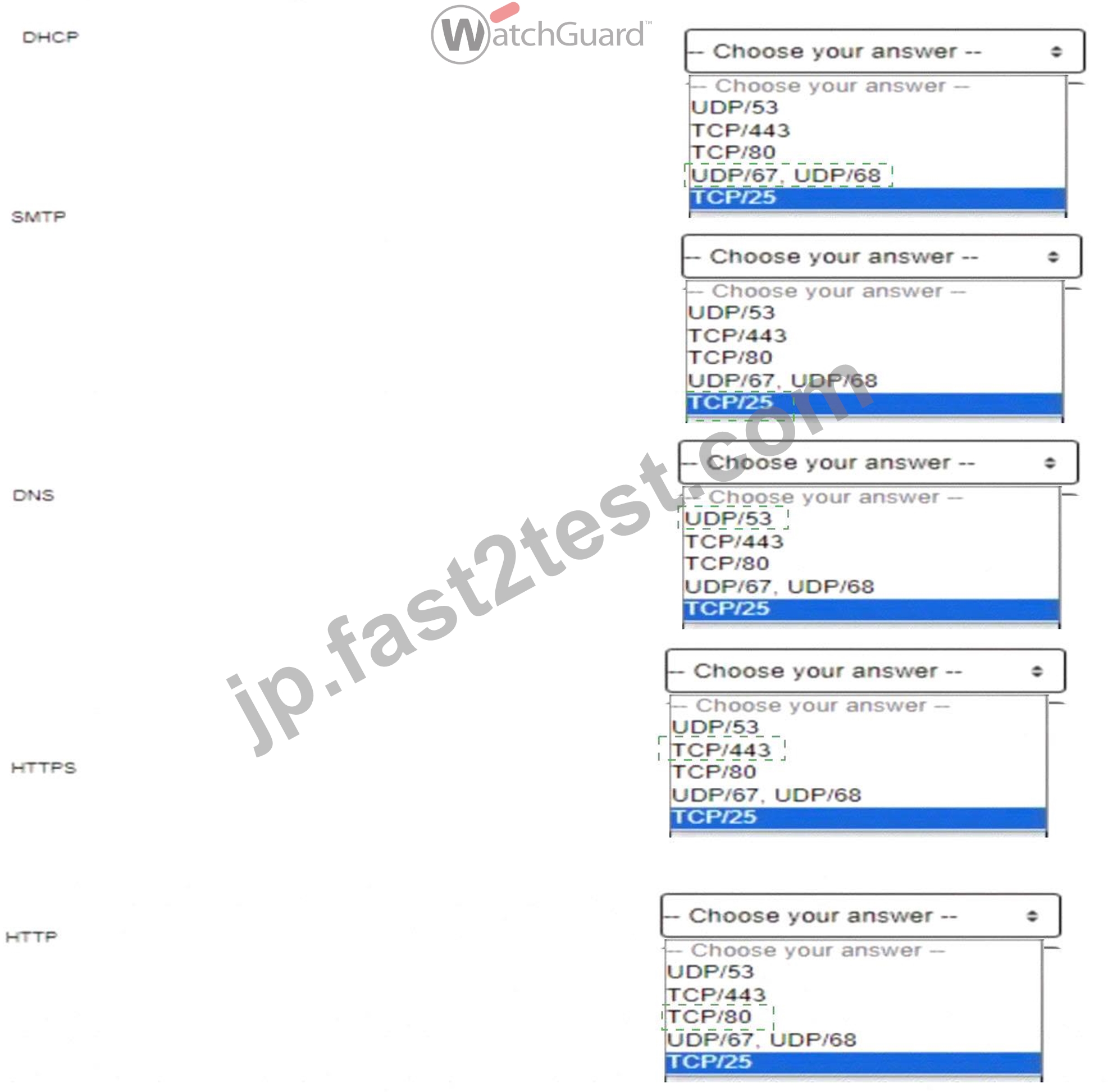
Explanation: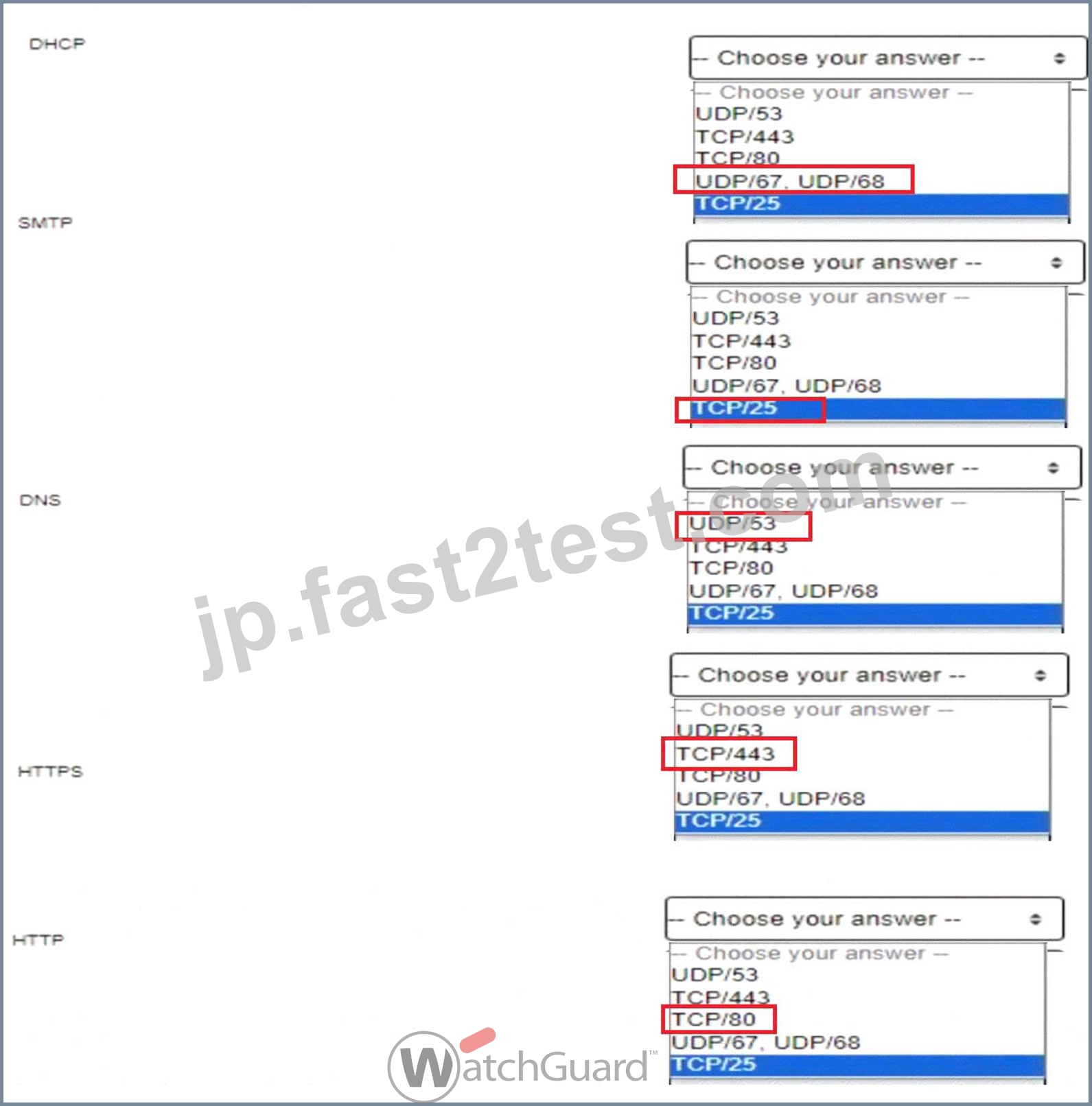
DHCP (Dynamic Host Configuration Protocol):DHCP operates over UDP ports 67 and 68. Port 67 is used by the DHCP server to listen for client requests, and port 68 is used by the DHCP client. This allows devices to automatically receive IP addresses and other network configuration details on a network, essential for automating IP management. [Referenced from multiple sources on network fundamentals] SMTP (Simple Mail Transfer Protocol):SMTP uses TCP port 25 for sending emails from client to server or between mail servers. SMTP is integral for email transmission, allowing efficient communication across mail servers within and outside organizational networks. [Referenced in standard protocols documentation in network management guides] DNS (Domain Name System):DNS typically runs on UDP port 53 for standard queries, with TCP/53 used for zone transfers and other larger requests. DNS is critical for resolving human-readable domain names into IP addresses, which allows users to connect to websites using easily remembered names rather than numerical IP addresses. [Foundational knowledge as detailed in network security and management resources] HTTPS (Hypertext Transfer Protocol Secure):HTTPS, an encrypted version of HTTP,operates on TCP port 443. It provides secure communication over the internet by encrypting data between the client and server using SSL/TLS, protecting data integrity and privacy. [Security essentials for network communications as found in secure web traffic documentation] HTTP (Hypertext Transfer Protocol):HTTP operates on TCP port 80 and is used for unencrypted web traffic. HTTP is the foundation of data exchange on the World Wide Web, supporting basic client-server interactions for retrieving resources from the web. [Basic networking knowledge referenced across multiple network essentials texts]
質問 # 36
You configured a Firebox for a school environment. Students must have more restricted access than teachers, and unauthenticated users cannot have any Internet access. You added Student and Teacher groups to your proxy policies that handle web traffic. Based on the image below, this configuration can accomplish your goals.
- A. True
- B. False
正解:A
解説:
The image shows a configuration for a school environment with separateHTTPandHTTPS proxy policiesfor StudentsandTeachers. This separation allows for different levels of access control based on group membership, providing more restrictive access for students compared to teachers.
* Studentsare restricted by specific HTTP and HTTPS proxy policies, limiting their access to designated content and sites.
* Teachershave their own policies, which can be configured with more permissive rules.
* Unauthenticated users are not included in any policy, effectively blocking their internet access, as the firewall denies traffic not explicitly allowed by a policy.
This configuration meets the requirements by:
* Allowing teachers and students access as per their respective policies.
* Blocking unauthenticated users from internet access entirely.
質問 # 37
After you enable content inspection, your users cannot connect to the business-critical website www.example.
com/account.html hosted by a trusted partner. To try to resolve this issue, you added a Domain Name exception of www.example.com/account.html, but users still cannot connect to the website. What is the Domain Name exception format to add to the HTTP proxy to correctly resolve this issue? (Select two.)
- A. /account.html
- B. example.com/
- C. www.example.com
- D. /example.com/
- E. *.example.com
正解:C、E
解説:
When using domain exceptions to bypass content inspection for specific websites on a Firebox, the format is critical. For the domain www.example.com/account.html, two viable exception formats are:
* A. *.example.com: This wildcard format will include all subdomains of example.com, covering www.
example.com as well as any other subdomains like api.example.com. This format is useful when you need to exclude an entire domain and its subdomains from content inspection.
* D. www.example.com: This specifies the exact domain. Adding this as an exception will directly match www.example.com, making it suitable for bypassing content inspection on that specific subdomain.
Other formats, like /example.com/ or /account.html, do not match the required structure for domain name exceptions in the Firebox HTTP proxy settings.
質問 # 38
You routinely ship Fireboxes directly to remote offices without configuring them first. What is the zero-touch deployment method you can use to apply a configuration file after a Firebox arrives at a remote office? (Select one.)
- A. RapidDeploy
- B. Fireware Web UI
- C. Dimension Command
- D. Firebox Deployment Manager
- E. WatchGuard System Manager
正解:A
解説:
When shipping Fireboxes to remote offices without pre-configuration, theRapidDeployfeature is designed to facilitate zero-touch deployment. RapidDeploy enables network administrators to apply a pre-configured setup file after the device arrives at its destination.
* Process of RapidDeploy: Administrators can upload a configuration file to the WatchGuard Cloud or another accessible location, from which the Firebox downloads its initial configuration upon connection. This method ensures that even with remote deployment, the Firebox will automatically configure itself based on predefined settings, eliminating the need for manual on-site setup.
* Advantages: RapidDeploy streamlines setup for large-scale, geographically distributed environments where physical access may be limited. This feature is specifically useful for organizations seeking a scalable, efficient deployment process for devices in remote locations.
質問 # 39
What is true about this log message? (Select three.)
- A. The HTTPS proxy identified a TLS v1.3 connection to the inbox.google.com SNI domain
- B. The Application Control service has identified the traffic as Gmail
- C. The traffic is allowed inbound through the Firebox
- D. The traffic is allowed outbound through the Firebox
- E. The Gateway AntiVirus service denied the email traffic because it matches the 18.254 virus signature
正解:A、B、D
解説:
Application Control Identifying Gmail Traffic: Application Control is capable of identifying and categorizing applications based on traffic patterns and signatures. In this case, it recognizes Gmail traffic, which is a typical function of Application Control for managing and monitoring web applications. This functionality allows administrators to monitor and control access to applications based on organizational policies.
HTTPS Proxy Identifies TLS v1.3 Connection: The HTTPS proxy in Firebox can inspect and manage encrypted traffic by recognizing details such as the Server Name Indication (SNI) field in TLS connections.
By identifying a TLS v1.3 connection to the inbox.google.com domain, the HTTPS proxy provides additional monitoring and control capabilities over encrypted connections.
Traffic Allowed Outbound Through the Firebox: Given that the log indicates outbound traffic, this confirms that the connection is permitted by the Firebox's policies for outbound traffic. Outbound traffic control is crucial for managing access to external resources and ensuring that only authorized traffic exits the network.
質問 # 40
You configured your Firebox as a DHCP server and want to verify the status of the leased addresses. You found this information in Firebox System Manager > Status Report. What is true about DHCP leases in this deployment? (Select two.)
- A. DHCP leases for the 10.0.1.0/24 network are valid for 8 hours
- B. The MAC address for the host using 10.0.1.2 is 00:50:56:9a:75
- C. DHCP leases for the 10.20.1.0/24 network are valid for 24 hours
- D. 252 IP addresses are currently available in the address pool for the 10.0.1.0/24 network
- E. The hostname Server1 is associated with the IP address 10.20.1.100
正解:A、D
解説:
Analyzing the DHCP lease information from the provided image:
* Lease Duration for 10.0.1.0/24 Network:
* The lease for IP address 10.0.1.2 on interface eth1 starts at 2023/03/09 21:42:33 and ends at 2023
/03/10 05:42:33, showing a lease duration of 8 hours. Thus, DHCP leases for the 10.0.1.0/24 network are set to be valid for 8 hours.
* Available IP Addresses in 10.0.1.0/24 Pool:
* The summary indicates that 1 out of 253 IPs is leased for the 10.0.1.0/24 subnet, meaning 252 IPs remain available in the address pool.
These details confirm the correct answers:BandD.
Other options, such as MAC address and hostname associations, do not match the data provided in the image, making them incorrect choices. Let me know if you need further assistance analyzing DHCP configurations on Firebox devices.
質問 # 41
......
注目のNetwork-Security-Essentials豪華セット試験ガイドで最速合格を目指そう:https://jp.fast2test.com/Network-Security-Essentials-premium-file.html