

更新された2025年03月28日検証済み!MB-820問題集と解答で100%合格できる
2025年最新のの問題MB-820問題集を試そう!更新されたMicrosoft試験合格させます
質問 # 21
You need to define the properties of the comments field of the Non-conformity page.
How should you complete the code segment? To answer, select the appropriate options in the answer area.
NOTE; Each correct selection is worth one point.
正解:
解説:
Explanation:

質問 # 22
Hotspot Question
You are writing a procedure to block all inventory items with numbers that do not start with the letter S.
You need to complete the procedure.
How should you complete the code expressions? To answer, select the appropriate options in the answer area.
NOTE: Each correct selection is worth one point.
正解:
解説:
質問 # 23
You need to populate the Incident Date and Status fields in the Room Incident table.
Which instructions or trigger should you use? To answer, select the appropriate options in the answer area NOTE: Each correct selection is worth one point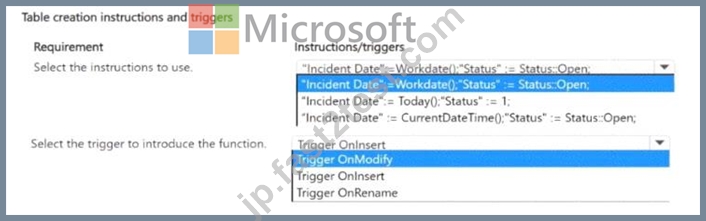
正解:
解説:
Explanation:
* Instructions to use for Incident Date and Status fields:
* The correct instruction is "Incident Date" := Workdate(); "Status" := Status::Open;. This ensures that when a new record is created, the Incident Date is set to the current work date, and the Status field is initialized to 'Open'. This is essential for ensuring that the incident data is always timestamped and correctly marked upon creation.
* Trigger to introduce the function:
* The correct trigger is Trigger OnModify. This trigger ensures that when a record is modified, such as when an update to the status is made (e.g., from Open to Closed), the necessary logic will be executed to handle the update of fields like Incident Date and Status.
Step-by-Step References:
* Workdate Function in AL
* Triggers in AL
質問 # 24
You ate creating a view for a Business Central app.
The view requires a custom layout that displays only customer records with a balance greater than 500 in local currency.
You need to configure the view to specify that it has a custom layout.
Which property combination should you use?
- A. SharedLayout - false; Filters - where ("Balance (ICY)" - filter (> 500));
- B. SharedLayout - true; Filters - where (Balance # filter (> 506), "Currency Code" - filter ('LCY')>;
- C. Sharediayout = true; Filters - where ("Balance (ICY)" - filter (> 500));
- D. shareLayout = false; Filters = where (Balance = filter (> 500), "Currency Code" = filter ("ICY*));
正解:B
解説:
* SharedLayout = true allows for the layout to be shared across views, and it is often used when defining a custom layout that should follow specific filtering conditions.
* The Filters property specifies the exact filter criteria for the view, in this case, filtering on Balance >
500 and the Currency Code = LCY (local currency).
* A uses incorrect filter syntax and shareLayout = false, which doesn't allow the layout to be shared, so it's not ideal for this use case.
* C and D both have issues with the filter syntax and do not use proper Currency Code filtering or share layout settings.
For more details, check Creating Views in Business Central.
質問 # 25
Case Study 1 - Contoso, Ltd
Background
Contoso, Ltd. is a sales company in the manufacturing industry. It has subsidiaries in multiple countries/regions, each with its own localization. The subsidiaries must be data-independent from each other. Contoso. Ltd. uses an external business partner to manage the subcontracting of some manufacturing items. Contoso, Ltd. has different sectors with data security between sectors required.
Current environment
Contoso, Ltd. uses Business Central online as the main ERP for financials, sales, purchase, warehouse, and manufacturing processes. It has employees that use the Business Central web application and external applications. The company has a custom external mobile app under development.
The IT department and its partners installed custom extensions to satisfy the company's requirements where the functionality is not available natively.
Contoso, Ltd. interacts with external services provided by customers and partners. Different applications interact with SOAP and OData endpoints exposed from Business Central.
An external business partner of Contoso, Ltd. exposed a REST API for receiving details about new subcontracting orders and for sending the planned release date of each subcontracting order received.
Contoso, Ltd. has not activated the monitoring of the tenant and has no internal telemetry for its apps.
Custom reporting must be created to meet the requirements of the different departments.
Tenant management
Contoso, Ltd. has the following tenant management considerations:
IT department
The IT department requires the ability to monitor the tenant to prevent performance problems and detect possible anomalies.
The IT department plans to use Azure Application Insights and Log Analytics to inspect the ingested telemetry signals.
All tenant upgrades are automatically handled by Microsoft. The IT department does not check for update availability or for tenant-related notifications.
The IT department has not configured the receipt of tenant-related notifications from the Business Central admin center.
External business partner
The external business partner must add custom telemetry to an application created for Contoso, Ltd. to monitor a business process.
Custom telemetry signals for the application must be visible only on the partner's telemetry.
SOAP
Contoso, Ltd. plans to dismiss using the SOAP protocol for integrations.
Contoso, Ltd. must be able to detect if external applications are using its Business Central SOAP endpoints.
Issue
The Business Central tenant is upgraded by Microsoft to a new major version during the night.
Users report that one of the Contoso, Ltd. extensions disappeared from the tenant. The IT department confirms that the extension is still published.
Custom mobile application requirements
Contoso, Ltd. plans to create a custom mobile application that has the following requirements:
The app must be used by employees to check item details from the ERP in real time and to report issues that occur during the manufacturing process.
An AL extension must be created for handling archived issues.
Business Central development guidelines must be followed when implementing modules.
A module must be implemented for the reporting and tracking of issues information. You plan to call this module Issue Management. The module must expose a method named PostIssue.
Code modifications will be required over time.
The Issue Management process must be split into two extensions:
ISSUE BASE: main extension
ISSUE EXT: second extension with dependency from ISSUE BASE
In the version 1.0.0.0 of the ISSUE BASE extension, you plan to create an Issue table that contains a global Decimal variable named IssueTotal.
In the version 1.0.0.0 of the ISSUE BASE extension, you plan to define a table named Issue Category with a Description field defined as follows:
The Issue table defined in ISSUE BASE extension contains a Clone procedure defined as follows:
In the ISSUE EXT extension, you create a tableextension object of the Issue table.
The tableextension object of the Issue table must access the IssueTotal: Decimal variable.
After weeks of usage, you discover that you must remove the Description field and the Clone procedure because they are no longer required.
In a new version of the ISSUE BASE extension, you create a new Issue Type table. You must move data row by row from a previously obsolete Issue Category table to the new Issue Type table. Because a large amount of data must be moved, you must write an Upgrade codeunit by using the DataTransfer object.
The IT department creates a custom API for exposing the custom Issue table. The API provides an action for copying an issue to a new table. The action is defined as follows:
Contoso, Ltd. must create an API in Business Central to expose item details to the mobile application.
The API must have the lowest possible impact on the production environment when used during working hours.
The API must only support Get operations.
Debugging problems
A user of the ISSUE BASE extension in Business Central reports a problem.
To debug the problem, snapshot debugging with the following configuration was activated:
You discover that the debugging is not triggering.
Integration with business partner for subcontracting
Contoso, Ltd. must connect Business Central to the external API provided by the business partner. This will be used for the partner to send the details of new subcontracting orders to fulfill the sales demand, and for receiving the planned release date of each order sent. The integration requirements are as follows:
The business partner will provide a REST API secured with basic authentication. Credentials to access the API will be shared with Contoso, Ltd.
The API for sending subcontracting orders must be called by sending an authenticated POST request to the given endpoint.
The API for retrieving the order no. and planned release date of each subcontracting order responds with the following JSON:
Each order no. must be retrieved.
You need to call the Issue API action from the mobile application.
Which action should you use?
- A. POST /issues(88122e0e-5796-ec11-bb87-000d3a392eb5)/Copy
- B. POST /issues(88122e0e-5796-ec11-bb87-000d3a392eb5)/Microsoft.NAV.copy
- C. PATCH /issues(88122e0e-5796-ec11-bb87-000d3a392eb5)/Microsoft.NAV.Copy
- D. POST /issues(88122e0e-5796-ec11-bb87-000d3a392eb5)/copy
- E. POST /issues(88122e0e-5796-ec11-bb87-000d3a392eb5)/Microsoft.NAV.Copy
正解:A
解説:
In the context provided by the case study, when calling an API action from a mobile application, the correct format for a POST request to an action in Business Central typically involves specifying the entity (/issues), the ID of the entity (88122e0e-5796-ec11-bb87-000d3a392eb5), and the action to be called (/Copy). The action name should match the exact name as defined in the AL code, which is case-sensitive.
質問 # 26
Drag and Drop Question
You are developing an XMLport to export data from the parent Item table and a related child
"Item Unit of Measure" table.
The XMLport configuration must provide the following:
- Link the child table to its parent.
- Display a confirmation message after the XMLport runs.
You need to generate the XMLport.
What should you do? To answer, move the appropriate triggers to the correct requirements. You may use each trigger once, more than once, or not at all. You may need to move the split bar between panes or scroll to view content.
NOTE: Each correct selection is worth one point.
正解:
解説:
質問 # 27
You need to define the properties of the comments field of the Non-conformity page.
How should you complete the code segment? To answer, select the appropriate options in the answer area.
NOTE; Each correct selection is worth one point.
正解:
解説:

質問 # 28
You are developing a test application to test the posting process of a sales order. You must provide the following implementation:
* Specify the value of post options (dialog: Ship, Invoice, Ship & Invoice) as Invoice.
* Perform calculations and values checking.
You need to complete the development of the test codeunit.
Which methods should you use? To answer, move the appropriate methods to the correct implementation.
You may use each method once, more than once, or not at all. You may need to move the split bar between panes or scroll to view content.
NOTE: Each correct selection is worth one point.
正解:
解説:
Explanation:
Specify the value of the post options as Invoice:
* Test
Perform calculations and values checking:
* Handler
In the context of Microsoft Dynamics 365 Business Central testing, the 'Test' attribute is used to mark a method as a test method. This is where you would specify the action or the behavior you're testing - in this case, setting the post options as Invoice. It's within these test methods that you would simulate setting the posting option to "Invoice" programmatically.
For performing calculations and checking values, you would use 'Handler' methods to handle specific business events or conditions that occur within the system, such as before or after posting a document. These handlers can ensure that calculations are done correctly and that all validation checks pass before the document is posted.
The 'Normal' method would be a standard method that could be involved in the posting process, ensuring that all business logic is correctly applied and that the calculations and value checks are as expected.
In a test codeunit, you would typically have test methods that call these handler and normal methods to verify the business logic in various scenarios, such as posting with different options or checking the results of calculations under different conditions.
質問 # 29
You need to determine If you have unwanted incoming web service calls in your tenant during the last seven days.
Which two KQL queries should you use? Each correct answer presents a complete solution.
NOTE: Each correct selection is worth one point.
- A.

- B.

- C.

- D.

- E.

正解:C、D
解説:
The task is to identify unwanted incoming web service calls during the last seven days. To do this, we need to look at KQL (Kusto Query Language) queries that would filter out web service calls based on the timestamp (to ensure the calls are within the last seven days) and by certain characteristics that would indicate they are unwanted, such as the wrong type of protocol (SOAP in this case, as Contoso Ltd. plans to dismiss using it).
Looking at the options:
* Option A: This query selects all traces where the timestamp is within the last 7 days and where the custom dimension has a value of 'RT0008', and where the category is either 'ODataV4', 'ODataV3', or
'Api'. This query would show all API calls except SOAP, so it does not directly answer the question about unwanted calls.
* Option B: This query filters for traces with a timestamp within the last 7 days, where 'RT0008' is present, and specifically looks for the category 'SOAP'. This query is correct because it directly targets SOAP calls, which are the unwanted calls according to Contoso Ltd.'s plans.
* Option C: Similar to option B, this query filters for traces within the last 7 days and looks for 'RT0008' but uses the equality operator for the category 'SOAP'. This would also correctly return the unwanted SOAP calls.
* Option D: This query also filters for traces within the last 7 days, but it excludes the 'ODataV4' category, which doesn't necessarily target the unwanted SOAP calls.
* Option E: This query selects traces where the timestamp is within the last 7 days and the custom dimension has 'RT0008'. However, it filters out categories 'ODataV4' and 'Api', which does not directly help in identifying the unwanted SOAP calls.
Therefore, the queries that should be used to determine if there are unwanted incoming web service calls (SOAP calls) in the tenant during the last seven days are Options B and C. These queries are specific to identifying SOAP protocol usage, which is what Contoso Ltd. considers unwanted.
質問 # 30
You create a procedure to check if a purchase order has lines.
The procedure returns false for purchase order PO-00001 even though it has purchase lines.
You need to fix the code to get the correct result.
For each of the following statements, select Yes if the statement is true Otherwise, select No.
NOTE- Each correct selection is worth one point.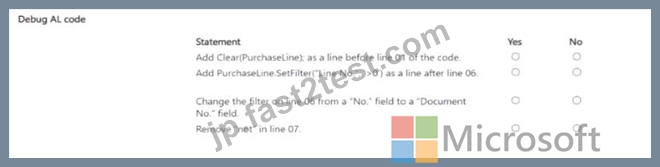
正解:
解説:
Explanation:
Add Clear(PurchaseLine); as a line before line 01 of the code: No
Add PurchaseLine.SetFilter("Line No."; '>0') as a line after line 06: Yes Change the filter on line 06 from a "No." field to a "Document No." field: No Remove "not" in line 07: No Add Clear(PurchaseLine); as a line before line 01 of the code.
* No
* You do not need to clear the PurchaseLine record before running the query, because the SetRange filters will take care of setting the correct context.
Add PurchaseLine.SetFilter("Line No."; '>0') as a line after line 06.
* Yes
* Adding a SetFilter on the "Line No." field ensures that you're checking for actual purchase lines greater than 0, which are valid lines. This would fix the issue where the check might return false even when lines exist.
Change the filter on line 06 from a "No." field to a "Document No." field.
* No
* The filter on the No. field is correct, as it's filtering based on the purchase order number. Changing this to Document No. is unnecessary.
Remove "not" in line 07.
* No
* The not in line 07 is necessary because IsEmpty() returns true when no lines are found. To correctly return a boolean indicating whether the purchase order has lines, you need to negate the result of IsEmpty().
質問 # 31
You plan to create a table to hold client data.
You have the following data integrity requirements:
* Lookups into other records must be established.
* Validate if a record exists in a destination record.
You need to select the table field property to use for each requirement.
Which table field property should you use? To answer, select the appropriate options in the answer area.
NOTE: Each correct selection is worth one point.
正解:
解説:
Explanation:
For the data integrity requirements, the table field properties to use are:
* To establish lookups into other records, use the TableRelation property.
* To validate if a record exists in a destination record, use the ValidateTableRelation property.
In Business Central, when creating tables to hold data, maintaining data integrity is crucial:
* TableRelation Property:This property is used to create a relationship between the field in one table and a field in another table, which is typically used for lookups. When you set the TableRelation property on a field, it allows users to select from a list of values that exist in the related table.
* ValidateTableRelation Property:This property is used to ensure that the value entered in a field matches one of the values in a related table. If a user tries to enter a value that doesn't exist in the related table, an error will occur.
質問 # 32
Why is it important to adhere to development standards in Business Central?
- A. To allow for higher data storage capacity
- B. To increase the number of users that can be supported
- C. To decrease the software license costs
- D. To ensure code quality and maintainability
正解:D
質問 # 33
You have a decimal variable named AmountlCY.
You need to round up the variable to four decimal places.
Which result value should you use?
- A. Result: = Round (AmountLCY. 0.0001. '<'):
- B. Result: = Round (AmountLCY, 0.0001, >');
- C. Result: = Round (AmountLCY,A. '>"}:
- D. Result: = Round {AmountLCY. 0.0001. =');
正解:D
解説:
To round up a decimal variable to four decimal places in Microsoft Dynamics 365 Business Central, you should use the Round function with specific parameters. The correct formula is Result := Round(AmountLCY, 0.0001, '=') (B). This function rounds the AmountLCY variable to the nearest value based on the second parameter, which is 0.0001 in this case, representing four decimal places. The third parameter, '=', specifies that the function should round to the nearest value, which effectively rounds up the value when it's halfway between two possible rounded values. This approach ensures that the AmountLCY variable is accurately rounded to four decimal places, which is essential for financial calculations and reporting to maintain precision.
質問 # 34
You ate creating a test codeumt for a company that uses Business Central. The company requites the following list of choices while posting a sales order:
* Ship
* Invoice
* Ship & Invoice
You must create a test codeunit that automatically selects one of these options. You need to create the test codeunit Which handler should you use?
- A. Recall Notification Hand let
- B. SendNotificationHandler
- C. SessionSettings Handle'
- D. StrMenuHandler
正解:D
解説:
* StrMenuHandler is used to simulate the selection of an option from a string-based menu, such as the
"Ship," "Invoice," or "Ship & Invoice" options when posting a sales order. This handler allows you to programmatically select an option during automated testing.
* Other handlers, such as SessionSettingsHandler or SendNotificationHandler, do not simulate the selection of menu choices, which is specifically required in this scenario.
For more details on StrMenuHandler and how it simulates user interaction with menu choices, refer to the Test Handlers in Business Central.
質問 # 35
You need to select the appropriate page types to solve the reporting requirements.
Which page types should you use? To answer, select the appropriate options in the answer area.
NOTE; Each correct selection is worth one point.
正解:
解説:
Explanation:
For the requirements provided, the appropriate page types should be selected as follows:
* Display relevant insights in the Housekeeping Role Center: HeadlinePart
* Display the additional information for the Room table: FactBox
* Configure the first installation: StandardDialog
Comprehensive Detailed ExplanationIn the context of Microsoft Dynamics 365 Business Central, page types are crucial for determining how information is presented to the user.
* HeadlinePart: This page type is designed to display key data and insights in a concise and visually appealing manner, often used in Role Centers to highlight important information. It is suitable for the Housekeeping Role Center to display relevant insights.
* FactBox: This page type is used to display supplementary information related to a selected record in the main part of the page. It's often used to show additional details about a record in a list, card, or document page. In this scenario, it is suitable for showing additional information about a specific Room when viewing the Room table.
* StandardDialog: This is a page type that provides a modal dialog for user interaction, commonly used for setup wizards, confirmations, and input forms that require user action before proceeding. This is appropriate for configuring the first installation, where a step-by-step guided interaction is necessary.
質問 # 36
......
最新のMB-820試験問題集でMicrosoftトレーニング試験には:https://jp.fast2test.com/MB-820-premium-file.html
合格できるMicrosoft MB-820のPDF問題集で最近更新された104問あります:https://drive.google.com/open?id=1aOs9zRhSxk4bIPRbodOoCGcPNhypGtIE