

時間限定無料ダウンロード 最新の220-1101日本語問題集で2024年最新の220-1101日本語試験問題
最新のCompTIA 220-1101日本語認定の練習テスト問題
質問 # 282
ユーザーはサポート チケットを作成して、会議室のプロジェクターが動作しないことを報告します。ユーザーは、付属のケーブルを使用しているにもかかわらず、プロジェクター画面に次のエラー メッセージが表示されると言いました。
信号入力がありません
取るべき最初のアクションは次のうちどれですか?
- A. ビデオ ケーブルを確認し、必要に応じて交換します。
- B. プロジェクターのバルブを交換します。
- C. ユーザーが承認された OS を使用していることを確認します。
- D. プロジェクターの電源が入っていることを確認します。
正解:A
解説:
Explanation
The most common reasons you may be seeing the "No Signal" message: The projector and the source device are not connected correctly.
The first action should be to check the video cable and replace it if necessary, as the error message suggests that the projector is not receiving a signal from the laptop. Verifying that the projector is turned on and checking the bulb would come after verifying the video cable.
質問 # 283
企業が在庫管理に導入する可能性が最も高い無線テクノロジーは次のうちどれですか?
- A. NFC
- B. Bluetooth
- C. 5G
- D. RFD
正解:D
解説:
Explanation
RFD stands for Radio Frequency Identification, which is a technology that uses radio waves to identify and track objects that have RFID tags attached to them. RFID tags are small devices that store information and can be read by RFID readers without direct contact or line of sight. RFID can be used for inventory management, as it can provide real-time visibility and accuracy of the location, quantity, and status of the items in a warehouse, store, or supply chain .
質問 # 284
以下の出力を使用します。
デフォルトゲートウェイは次のうちどれですか?
- A. 255.255.255.0
- B. 172.25.1.4
- C. 172.25.1.252
- D. 172.25.1.39
正解:C
解説:
The default gateway is the IP address of the router or device that connects a network to another network or the internet. In the output below, the default gateway is 172.25.1.252, as shown in the line "Default Gateway . . . .
. . . . . : 172.25.1.252". The other IP addresses are not default gateways, but either local IP addresses (172.25.1.39 and 172.25.1.4) or subnet masks (255.255.255.0).
質問 # 285
次のワイヤレス テクノロジーのうち、最も通信範囲とワイヤレス スループットが高いのはどれですか?
- A. 802.11ac
- B. 802.11ax
- C. 802.11g
- D. 802.11b/ジン
正解:B
解説:
802.11ax, also known as Wi-Fi 6, has the longest range and the highest wireless throughput of all the wireless technologies listed. References: CompTIA A+ Certification Exam Guide, 220-1001, Chapter 3
質問 # 286
お客様から、ラップトップの下端にある一部のキーが押しにくく、トラック パッド ボタンをクリックするにはかなりの力が必要であるとの報告がありました。技術者はラップトップを検査しますが、シャーシや画面に亀裂やその他の損傷は見つかりませんでした。問題の原因として最も考えられるのは次のうちどれですか?
- A. お客様がノートパソコンを落としてしまいました。
- B. バッテリーが膨れています。
- C. 開いた消毒用アルコールのボトルがキーボードの上に落ちました。
- D. デジタイザが故障しました。
正解:B
解説:
A swollen battery is the most likely cause of the issue that the customer is reporting. A swollen battery is a battery that has expanded in size due to a chemical reaction, gas buildup, or overheating. A swollen battery can cause pressure on the laptop's chassis, keyboard, track pad, and other components, making them hard to press or click. A swollen battery can also pose a fire hazard and damage the laptop's performance and lifespan.
The other options are not as likely or relevant to the issue. Dropping the laptop may cause cracks or other visible damage to the chassis or screen, but the technician did not notice any. The digitizer is the part of the laptop that converts touch input into digital signals, and it has nothing to do with the keyboard or the track pad buttons. An open bottle of rubbing alcohol falling onto the keyboard may cause liquid damage, corrosion, or short circuits, but it would not affect the track pad buttons or the bottom edge of the keyboard.
To troubleshoot and resolve the issue, the technician should remove the battery from the laptop and inspect it for signs of swelling, such as bulging, deformation, or leakage. The technician should also check the laptop's chassis, keyboard, and track pad for any signs of damage or warping caused by the battery. The technician should then replace the swollen battery with a new one that is compatible with the laptop's model and specifications. The technician should also dispose of the swollen battery properly and safely, following the local regulations and guidelines.
References:
* CompTIA A+ Certification Exam Core 1 Objectives1
* The Official CompTIA A+ Core 1 Student Guide (Exam 220-1101) eBook2
* How to Fix a Swollen Laptop Battery - Lifewire3
* How to Tell If Your Laptop Battery Is Swollen - Techwalla4
質問 # 287
技術者がプリンタのインク カートリッジを交換した後、すべての印刷ジョブにシャドウイングが含まれます。技術者が最初に行うべきことは次のうちどれですか?
- A. メンテナンスキットを取り付けます。
- B. 定着器アセンブリを交換します。
- C. プリンターの位置調整処理を実行します。
- D. 新しいインク カートリッジを取り付け直します。
正解:C
解説:
Running the printer's alignment process is the first step that a technician should do to fix the shadowing problem on the printouts. Shadowing is a print quality issue that occurs when the printer prints a faint duplicate image of the original text or graphics, usually slightly offset from the original position. This can be caused by a misalignment of the printhead, which is the part of the printer that sprays ink onto the paper. The printer's alignment process is a procedure that adjusts the position and angle of the printhead to ensure that the ink is applied accurately and evenly on the paper. The printer's alignment process can be performed from the printer's menu, the printer's software, or the printer's maintenance tool, depending on the model and type of the printer.
The other options are not the best solutions for this problem. Reseating the new ink cartridges may not solve the shadowing issue, unless the cartridges are not properly installed or recognized by the printer. However, this is unlikely to be the case, as the printer would usually display an error message or refuse to print if the cartridges are not compatible or inserted correctly. Replacing the fuser assembly or installing the maintenance kit are more drastic and expensive measures that are usually done when the printer has more serious problems, such as paper jams, smearing, streaking, or fading. The fuser assembly is the part of the printer that heats and melts the toner onto the paper, and the maintenance kit is a set of components that need to be replaced periodically to keep the printer in good condition. These parts are not directly related to the shadowing issue, and replacing them may not fix the problem.
References:
* CompTIA A+ Certification Exam Core 1 Objectives1
* The Official CompTIA A+ Core 1 Student Guide (Exam 220-1101) eBook2
* How to Fix Shadow Printing on My Canon Printer?3
* Fixing A Printer That Creates Shadow Images On Printouts4
質問 # 288
サーバー管理者は、新しいアプリケーション サーバーを構築しています。最大のパフォーマンスと冗長性を提供する RAID レベルは次のうちどれですか?
- A. RAID 0
- B. RAID 1
- C. RAID 10
- D. RAID 5
正解:C
解説:
RAID 10 is a combination of RAID 1 and RAID 0, which provides both performance and redundancy. RAID
1 mirrors data across two or more disks, while RAID 0 stripes data across two or more disks. RAID 10 combines these two methods to create a mirrored stripe set, which can tolerate multiple disk failures as long as they are not in the same mirror. RAID 10 requires at least four disks and offers better performance than RAID
5, which uses parity to provide redundancy. References:
https://www.comptia.org/blog/what-is-raid-0-1-5-6-10
質問 # 289
ヘルプ デスクの技術者は、デスクトップ PC が電源の欠陥により故障したと考えています。技術者が次に実行すべき手順は次のうちどれですか?
- A. 問題を解決するための行動計画を策定し、解決策を実行します。
- B. 環境またはインフラストラクチャの変化について問い合わせます。
- C. 症状に基づいて外部または内部の調査を実施します。
- D. 調査結果、アクション、結果を文書化します。
正解:C
解説:
According to the CompTIA troubleshooting methodology, the next step after establishing a theory of probable cause is to test the theory to determine the cause. However, before testing the theory, the technician may need to conduct some research based on the symptoms and the possible cause. This may involve consulting online resources, manuals, documentation, or colleagues to find out more information about the power supply and how to test it. Research can help the technician confirm or eliminate the theory and avoid unnecessary actions or damage.
Answer A is incorrect because inquiring about environmental or infrastructure changes is part of identifying the problem, which is the first step of the troubleshooting methodology. The technician should have already done this before establishing a theory of probable cause.
Answer C is incorrect because establishing a plan of action to resolve the problem and implement the solution is the fourth step of the troubleshooting methodology. The technician should not jump to this step without testing the theory and verifying the cause.
Answer D is incorrect because documenting the findings, actions, and outcomes is the last step of the troubleshooting methodology. The technician should not do this until the problem is resolved and verified.
質問 # 290
ユーザーの Windows PC が、訪問先の新しいブランチ オフィスのネットワークに接続できません。技術者は、PC がローカル ゲートウェイに ping できないことを発見しました。技術者が次に使用すべきコマンドは次のうちどれですか?
- A. ipconfig
- B. 構成を表示
- C. ifconfig
- D. cd config
正解:A
解説:
ipconfig is a command-line tool that displays the current configuration of the network interfaces on a Windows PC. It can also be used to release and renew the IP address, flush the DNS cache, and display the routing table. If the PC is unable to ping the local gateway, the technician should use ipconfig to check the IP address, subnet mask, default gateway, and DNS servers of the PC. The technician can also use ipconfig
/renew to request a new IP address from the DHCP server, or ipconfig /flushdns to clear the DNS cache.
References
*[CompTIA A+ Core 1 (220-1001) Certification Study Guide], page 78
*How to use the ipconfig command on Windows 10
*How to Ping the Windows Network Router
質問 # 291
ユーザーのスマートフォンがホーム Wi-Fi ネットワークへの接続を繰り返し失います。ユーザーはすでにスマートフォンの再起動、ルーターの再起動、スマートフォンの Wi-Fi ネットワーク設定のリセットを試しています。問題を解決するためにユーザーが次に行うべきことは次のうちどれですか?
- A. ルーターを交換します。
- B. ルーターの範囲を確認します。
- C. ルーターを 5GHz に切り替えます。
- D. スマートフォンのOSをアップデートします。
正解:D
解説:
If a smartphone repeatedly loses connection to a home Wi-Fi network and the common troubleshooting steps like restarting the device, rebooting the router, and resetting the Wi-Fi settings have not resolved the issue, updating the smartphone's operating system (OS) could be the next logical step. OS updates often include fixes for known bugs and improvements in connectivity and compatibility with network hardware, which could resolve persistent connection issues.
References:
* CompTIA A+ Core 1 (220-1101) Exam Objectives, specifically the sections related to troubleshooting mobile devices and connectivity issues, which would cover the importance of maintaining updated OS versions for optimal performance and compatibility.
* General troubleshooting approaches for mobile devices, with an emphasis on the role of software updates in resolving connectivity and performance issues.
質問 # 292
技術者は、オフィス全体が 1 日を通して散発的にネットワーク接続を失うという報告を受けています。技術者は根本原因が EMI であると判断します。システムのパフォーマンスを犠牲にすることなく、最もコスト効率が高いケーブル媒体はどれですか?
- A. 盾猫6
- B. プレナム キャット 5e
- C. 同軸
- D. マルチモードファイバー
正解:A
解説:
Electromagnetic interference (EMI) is unwanted noise or interference in an electrical path or circuit caused by an outside source. Hence shielded Cat 6 is better If a technician determines that the root cause of sporadic network connectivity issues is EMI, the most cost-effective cable medium that can be used without sacrificing system performance is shielded Cat 6 cable. Shielded cables protect against electromagnetic interference (EMI) and radio frequency interference (RFI). Reference: CompTIA A+ Certification All-in-One Exam Guide, Tenth Edition by Mike Meyers (Page 548)
質問 # 293
ユーザーの携帯電話がその日の早い時間に過熱し、ケース内のバッテリーが膨張しました。技術者は次のどれを最初に行うべきかをユーザーにアドバイスしますか?
- A. 携帯電話の健全性ステータスを確認します
- B. 電話機で VPN を無効にする
- C. 電話の電源を切ります
- D. 携帯電話の SIM カードを交換します
正解:C
解説:
When a phone's battery overheats and expands, it poses a significant safety risk, including the potential for fire or the battery bursting. The first and most critical action is to turn off the device to prevent further chemical reactions within the battery that could exacerbate the situation. Turning off the phone halts its operations, minimizing the heat generation and reducing the risk of further damage or danger. This is a precautionary measure to ensure the user's safety and to prevent any additional harm to the phone itself. It's important for the user to not attempt to charge or use the phone in this condition and to seek professional help or replacement of the battery or device as needed.References: Mobile Devices 1101.docx, Safety and Environmental Concerns section.
質問 # 294
医療オフィスのユーザーが、A4 サイズのラベルの印刷に使用されるプリンタについて技術者に問い合わせました。ラベルを印刷した後、ページの中央に誤って空白が含まれてしまいます。原因として考えられる可能性が最も高いのは次のうちどれですか?
- A. ページの向き
- B. 紙づまり
- C. ローラーの磨耗
- D. 定着器の汚れ
正解:A
解説:
Explanation
The most likely cause of the issue is that the page orientation is incorrect. The printer may be set to print labels in a different orientation than the orientation of the label sheet1.
質問 # 295
顧客から 2 台の新しいデスクトップの構築について連絡がありました。最初のデスクトップはゲーム用ワークステーションになります。顧客の要件には次のものが含まれます。
最新のゲームを高フレームレートでプレイする
ゲームのロード時間が速い
複数のゲームを同時にインストールするのに十分なストレージ
ハイエンドオーディオ
コストの心配なし
現在の Windows OS を実行する
2 番目のワークステーションはファミリー ワークステーションになります。要件には次のものが含まれます。
ワードプロセッサ、ビデオ会議、および基本的な Web サーフィンの機能 要件を満たす限り、最小限のコストで現行の Windows OS を実行
正解:
解説:
Explanation
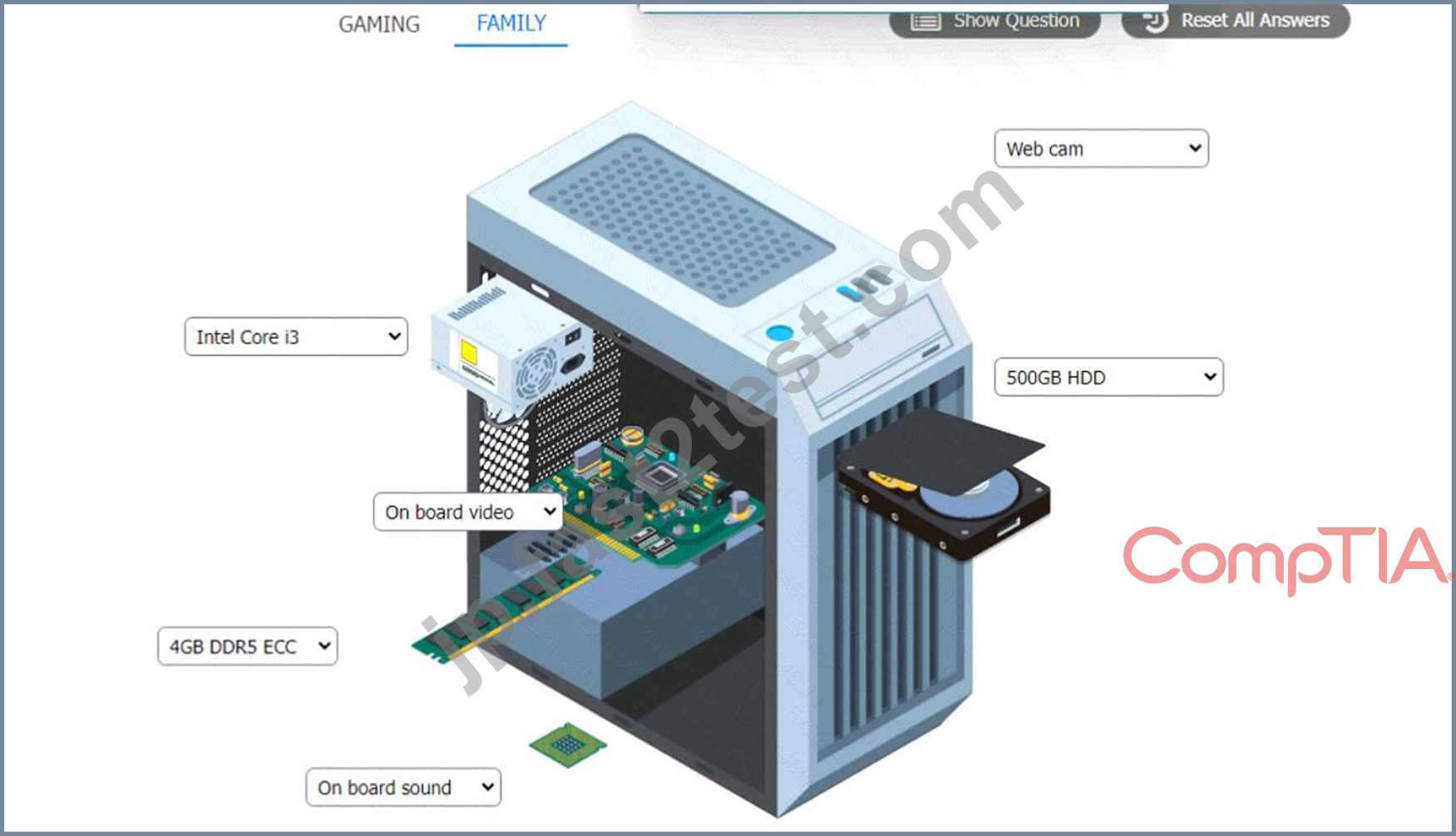
質問 # 296
ユーザーはラップトップをプロジェクターに接続する技術者の助けが必要です。プロジェクターは古く、アナログ入力しかありません。技術者がラップトップをプロジェクターに接続するために使用する必要があるケーブルの種類は次のうちどれですか?
- A. ディスプレイポート
- B. RS-232
- C. HDMI
- D. VGA
正解:D
解説:
VGA stands for Video Graphics Array, and it is a type of cable that can be used to transmit analog video signals between devices, such as laptops, monitors, or projectors. VGA cables have 15 pins arranged in three rows, and they are usually color-coded blue. VGA cables can support resolutions up to 2048 x 1536 pixels, but they have low quality and limited color depth compared to modern digital standards such as HDMI or DisplayPort .
A projector is a device that projects an image or a video onto a large surface, such as a wall or a screen. A projector can have different types of input ports, such as VGA, HDMI, DVI, or USB. A projector can also have different types of output technologies, such as LCD, DLP, or LED .
In this scenario, the user needs a technician's help connecting a laptop to a projector. The projector is old and only has analog input. This means that the projector can only accept analog video signals, and not digital ones.
Therefore, the technician should use a VGA cable to connect the laptop to the projector, as it is the most common type of analog video cable. The technician should also make sure that the laptop and the projector have compatible VGA ports, and that the laptop's display settings are adjusted to match the projector's resolution and aspect ratio.
質問 # 297
技術者がビデオ通話のセットアップを手伝うために会議室に呼ばれました。ユーザーはノートパソコンの画面を室内のテレビにミラーリングすることができません。技術者は、適切な HDMI ケーブルがユーザーのコンピュータに接続されており、テレビの画面にロゴが点滅していることを確認します。問題の原因として考えられる可能性が最も高いのは次のうちどれですか?
- A. テレビは画面ミラーリングをサポートしていません
- B. ユーザーのラップトップは画面ミラーリングをサポートしていません
- C. テレビで間違った入力が選択されています。
- D. テレビの A/C アダプター ケーブルに欠陥があります。
- E. ユーザーはラップトップで Bluetooth を有効にしていません。
正解:C
解説:
When a laptop screen fails to mirror to a television despite being correctly connected via an HDMI cable, a common issue is that the television is set to the wrong input source. Modern televisions have multiple input options (e.g., HDMI 1, HDMI 2, AV, etc.), and selecting the correct input that corresponds to the port the HDMI cable is connected to is essential for displaying the laptop's screen. The blinking logo on the TV screen typically indicates that the TV is functioning but not receiving a signal from the selected input source.
Changing the TV's input to the correct HDMI port should resolve the issue and allow the laptop screen to mirror onto the TV.References: Hardware 1101.docx, "Connecting External Displays" section.
質問 # 298
スイッチを個別の論理ネットワークに分割できるのは次のうちどれですか?
- A. NAT
- B. SSL VPN
- C. 半径
- D. VLAN
正解:D
解説:
Explanation
A Virtual LAN (VLAN) is a network topology that allows a switch to be divided into separate logical networks. This allows for the creation of multiple broadcast domains within a single physical network, improving network segmentation and security. With VLANs, you can segment your network so that different departments, applications, or users are isolated from each other, improving network security and performance.
質問 # 299
新しいグラフィックス カードに適切に電力を供給するには、古いワークステーションの電源をアップグレードする必要があります。電源装置がアップグレードされたワークステーションをサポートしていることを確認するために、技術者は次の基準のうちどれを確認する必要がありますか? (2 つ選択してください)。
- A. モジュラーケーブル配線
- B. ファンタイプ
- C. ワット数
- D. 効率評価
- E. フォームファクター
- F. 放熱性
正解:C、E
解説:
The technician should check the wattage and the form factor of the power supply to ensure it will support the upgraded workstation. These are the two most important criteria for choosing a compatible and adequate power supply.
Wattage: The wattage of a power supply is the maximum amount of power it can deliver to the components of the workstation. The wattage of the power supply should match or exceed the total power consumption of the components, especially the new graphics card, which is usually the most power-hungry part. If the power supply does not have enough wattage, it may cause instability, crashes, or damage to the workstation. To estimate the power consumption of the components, the technician can use a power supply calculator tool, such as the ones found in the web search results123. The technician should also add some headroom to the wattage, such as 20% to 50%, to account for peak power consumption, future upgrades, or power supply degradation.
Form factor: The form factor of a power supply is the physical size and shape of the unit. The form factor of the power supply should fit in the case of the workstation and match the mounting holes and screws. The most common form factor for desktop power supplies is ATX, which measures 150 x 86 x 140 mm. However, some older or smaller workstations may use different form factors, such as SFX, TFX, or FlexATX. The technician should check the specifications of the workstation case and the power supply to ensure they have the same form factor.
Other criteria, such as efficiency rating, heat dissipation, fan type, and modular cabling, are not essential for supporting the upgraded workstation, but they may affect the performance, noise, or aesthetics of the power supply. The efficiency rating is the percentage of input power that is converted to output power, and it indicates how much power is wasted as heat. The heat dissipation is the ability of the power supply to cool itself and prevent overheating. The fan type is the design and size of the fan that cools the power supply, and it affects the noise level and airflow of the unit. The modular cabling is the feature that allows the user to detach unused cables from the power supply, and it helps to reduce clutter and improve airflow inside the case.
Reference:
How to Choose the Right Power Supply for Your PC - Lifewire4
How to Choose a Power Supply: 7 Steps (with Pictures) - wikiHow5
How to pick the best PC power supply - PCWorld6
Power Supply Calculator - PSU Wattage Calculator | Newegg1
Power Supply Calculator | Cooler Master2
Power Supply Calculator - PSU Calculator | OuterVision3
質問 # 300
機密データを扱うユーザーは、ハード ドライブ暗号化が構成されたコンピュータを使用しています。TPM はアクティブで、暗号化キーをホストしています。マザーボードのアップグレード後。RAM とビデオ カード、ハード ドライブが起動せず、ハード ドライブからデータにアクセスできません。システムを再度起動して保存されたデータにアクセスできるようにするには、技術者が行うべきことは次のうちどれですか?
- A. BIOS にアクセスし、劣化した RAID アレイの再構築を選択します。
- B. BIOS を起動し、新しいマザーボードの TPM を有効にします。
- C. データ回復ソフトウェアを使用して、ハードドライブ情報を検索して回復します。
- D. 交換したマザーボードをコンピュータに戻します。
正解:B
解説:
Explanation
The technician should boot into the BIOS and enable the TPM on the new motherboard to enable the system to boot again and get access to the stored data Boot into the BIOS and enable the TPM on the new motherboard. Explanation: After upgrading the motherboard, the TPM may need to be enabled in the BIOS in order to access the encrypted key and boot the system. Enabling the TPM on the new motherboard should allow the system to boot and provide access to the encrypted data. References: CompTIA A+ Certification Exam Guide, 220-1001, Chapter 13
質問 # 301
......
検証済みの220-1101日本語問題集と解答で一年間無料最速更新:https://jp.fast2test.com/220-1101J-premium-file.html