

[完全版]2025年最新のFast2test AZ-140日本語のPDFで最近更新された問題です
AZ-140日本語試験には保証が付きます。更新されたのは280問があります
質問 # 95
Azure Virtual Desktop がデプロイされています。
次の要件を満たす新しいホスト プールを作成する予定です。
* 最大25人のユーザー接続をサポート
* 10 個の Windows 11 マルチセッション ホストが含まれています
* ユーザーセッションをセッションホスト間で均等に分散します
使用するホスト プールと負荷分散アルゴリズムのタイプを推奨する必要があります。
何を推奨すべきでしょうか? 適切なオプションを適切なターゲットにドラッグしてください。各オプションは1回、複数回、または全く使用されない場合があります。コンテンツを表示するには、ペイン間の分割バーをドラッグするか、スクロールする必要がある場合があります。
注意: 正しい選択ごとに 1 ポイントが付与されます。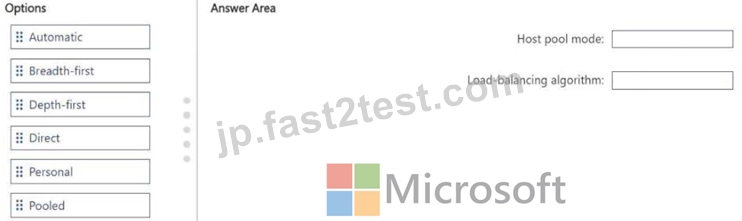
正解:
解説: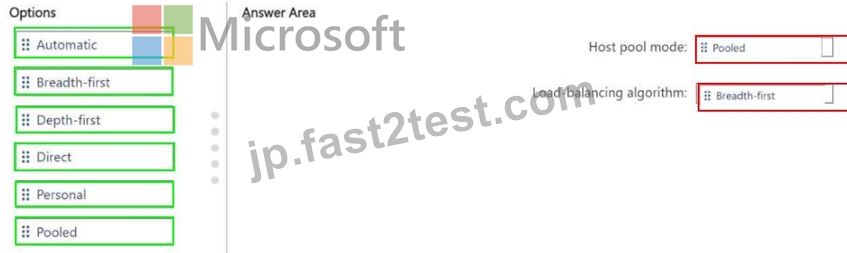
質問 # 96
Windows VirtualDesktopを展開する予定です。
FSLogixプロファイルコンテナーを格納するには、AzureNetAppファイルストレージを作成する必要があります。
ネットアップリソースプロバイダーを登録した後、順番に実行する必要がある4つのアクションはどれですか。回答するには、適切なアクションをアクションのリストから回答領域に移動し、正しい順序に並べます。
注:回答の選択肢の複数の順序が正しいです。選択した正しい注文のいずれかに対してクレジットを受け取ります。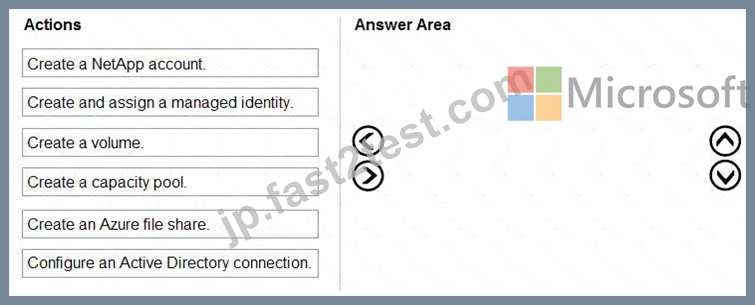
正解:
解説: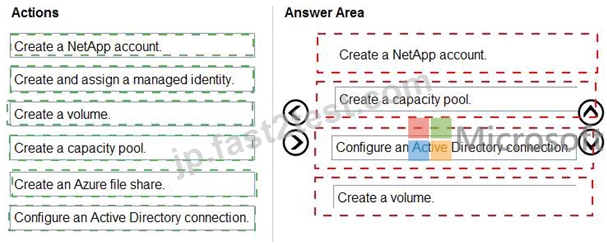
Explanation:
1. Set up Azure NetApp Files account
2. Create capacity pool
3. Join Active Directory connection
4. Create new volume
https://docs.microsoft.com/en-us/azure/virtual-desktop/create-fslogix-profile-container
質問 # 97
次の表に示す仮想マシンを含むAzureサブスクリプションがあります。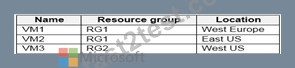
SharedGallery1の展示に示されているように、共有画像ギャラリーを作成します。 (SharedGallery1タブをクリックします。)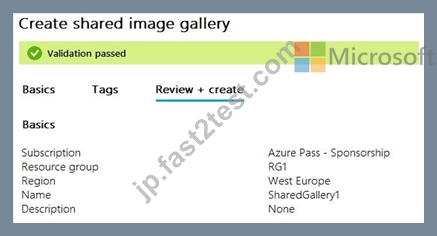
Image1の展示に示されているように画像定義を作成します。 ([Image1]タブをクリックします。)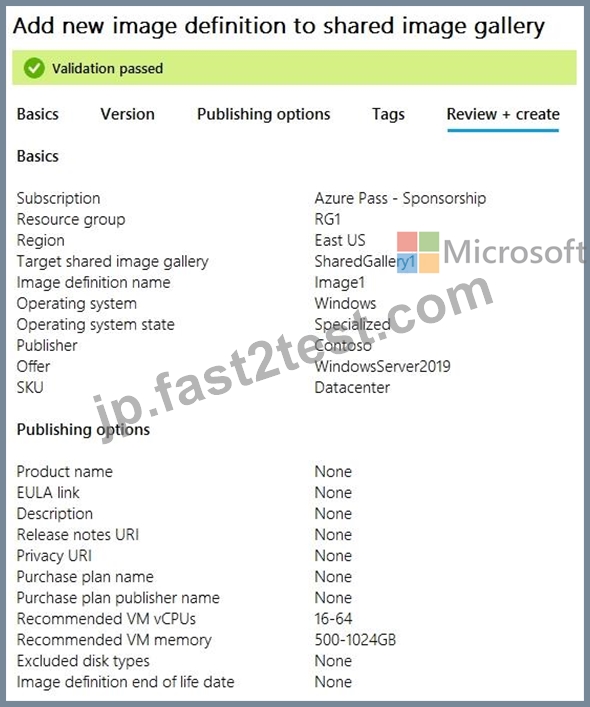
次の各ステートメントについて、ステートメントがtrueの場合は、[はい]を選択します。それ以外の場合は、[いいえ]を選択します。
注:正しい選択はそれぞれ1ポイントの価値があります。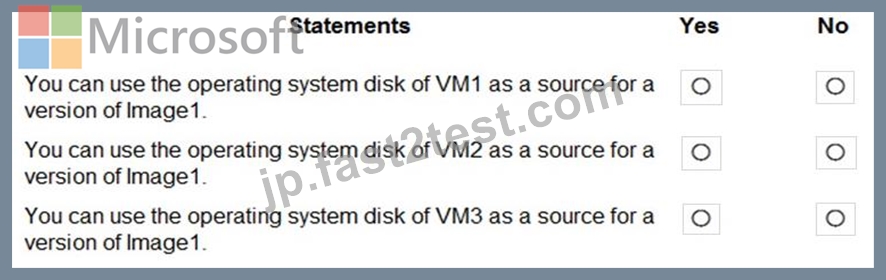
正解:
解説: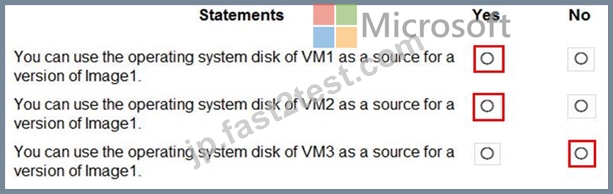
Reference:
https://www.robinhobo.com/windows-virtual-desktop-wvd-image-management-how-to-manage-and-deploy-custom-images-including-versioning-with-the-azure-shared-image-gallery-sig/
質問 # 98
Windows VirtualDesktopを展開しています。
展示に示されているディスクレイアウトを持つHost1という名前のセッションホストがあります。 ([展示]タブをクリックします。)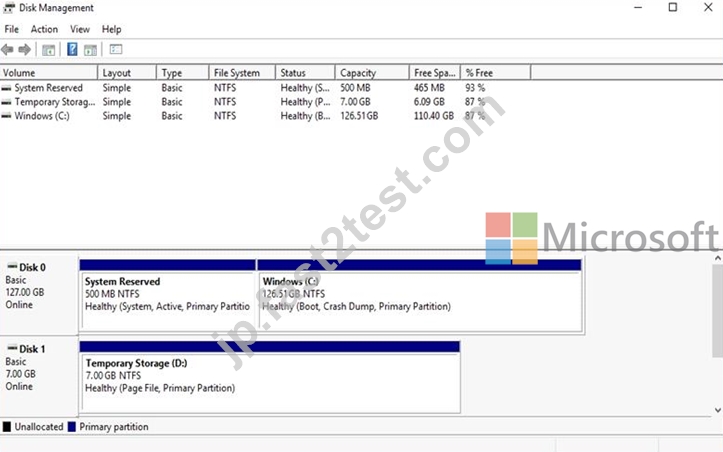
Dにインストールする必要があるアプリをデプロイする予定です。アプリには500GBのディスク容量が必要です。
ドライブ文字Dが割り当てられる新しいデータディスクを追加する必要があります。ソリューションは、Host1の現在のパフォーマンスを維持する必要があります。
順番に実行する必要がある4つのアクションはどれですか?回答するには、適切なアクションをアクションのリストから回答領域に移動し、正しい順序に並べます。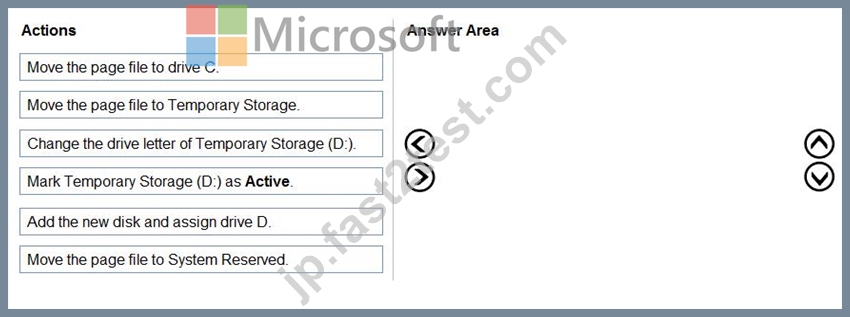
正解:
解説: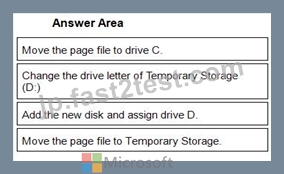
1 - Move the page file to drive C.
2 - Change the drive letter of Temporary Storage (D:)
3 - Add the new disk and assign drive D.
4 - Move the page file to Temporary Storage.
Reference:
https://www.azurecorner.com/change-temporary-drive-azure-vm-use-d-persistent-data-disks/
質問 # 99
次の表に示すリソースを含むAzureサブスクリプションがあります。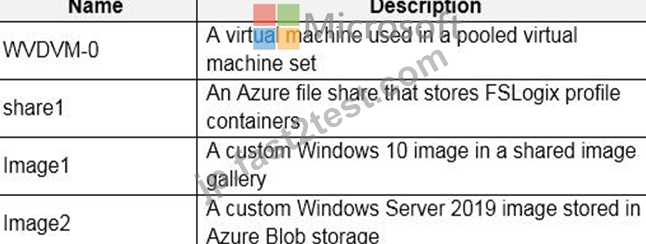
Azure Backupを使用してバックアップできるリソースはどれですか?
- A. WVDVM-0およびshare1のみ
- B. WVDVM-0、share1、およびImage1のみ
- C. WVDVM-0、Image1、およびImage2のみ
- D. WVDVM-0のみ
- E. WVDVM-0、share1、Image1、およびImage2
正解:A
解説:
Reference:
https://docs.microsoft.com/en-us/azure/backup/backup-afs
https://docs.microsoft.com/en-us/azure/backup/backup-azure-vms-introduction
質問 # 100
次の資料に示すように、Azure Virtual Desktop ホスト プールを作成します。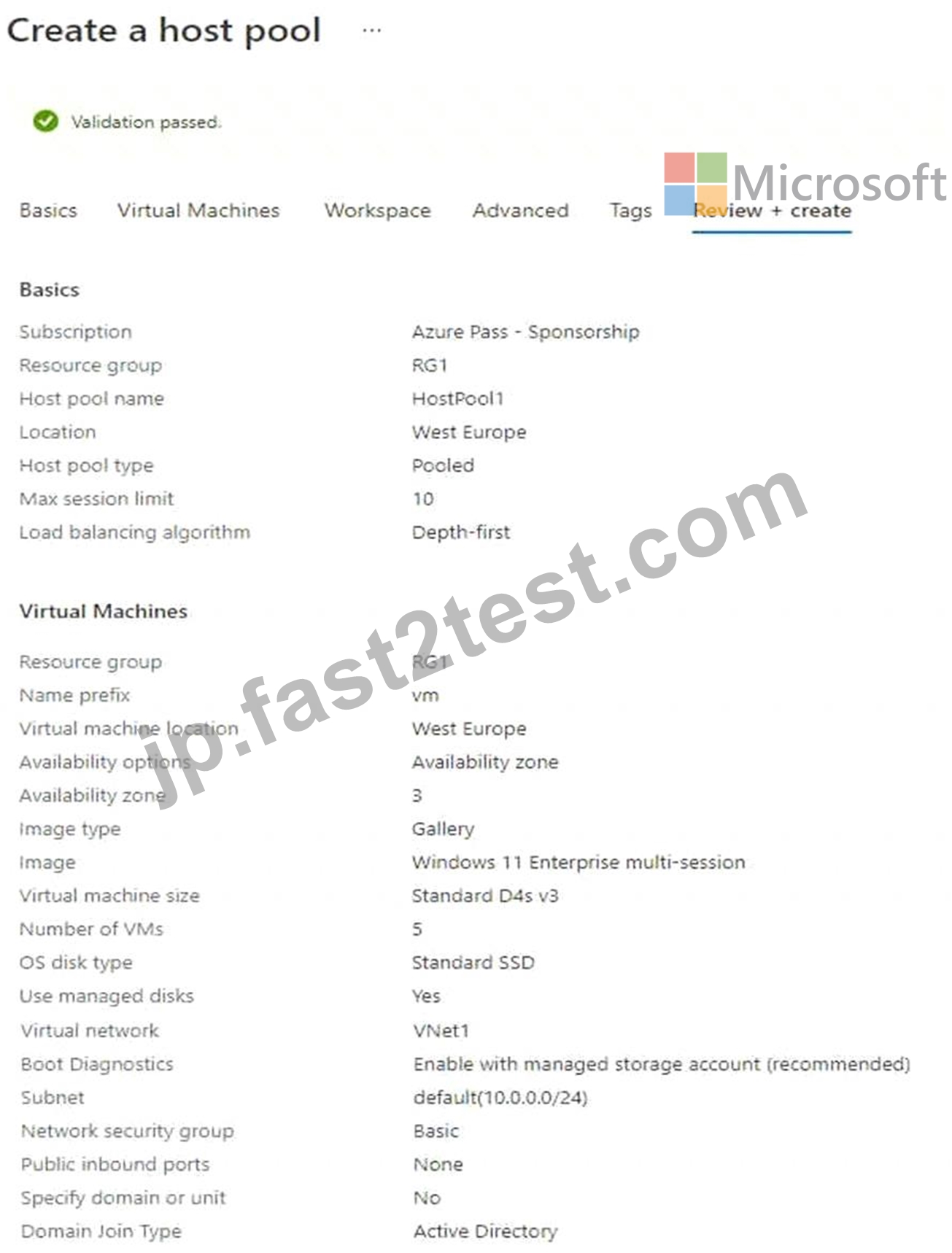
ドロップダウン メニューを使用して、図に示されている情報に基づいて各質問に回答する回答の選択肢を選択します。
注: それぞれの正しい選択は 1 ポイントの価値があります。
ホットエリア: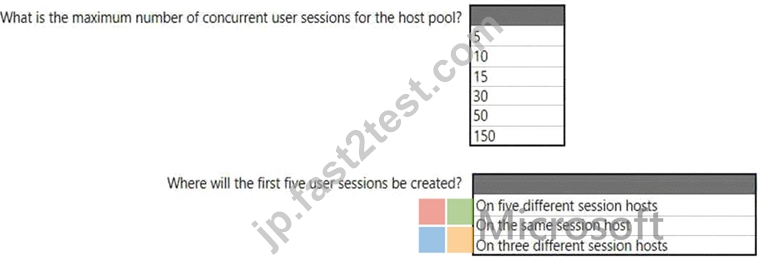
正解:
解説: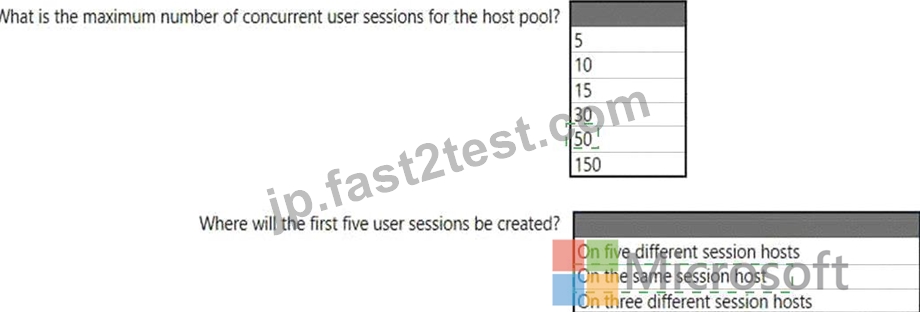
Explanation:
Graphical user interface, text, application Description automatically generated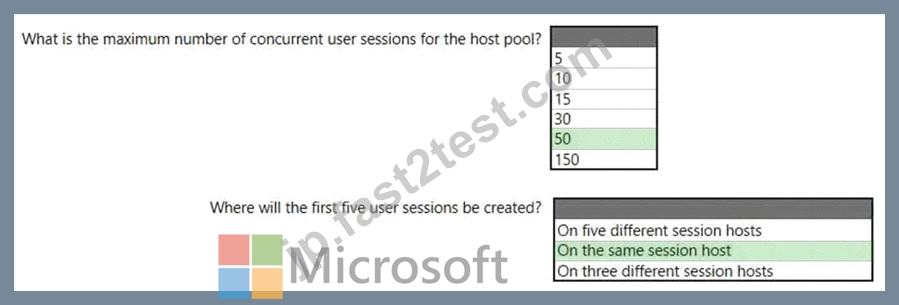
質問 # 101
Workspace1という名前のワークスペースとUser1という名前のユーザーを含むAzureVirtual DesktopDeploymentがあります。 Workspace1には、Pool1Desktopという名前のデスクトップアプリケーショングループが含まれています。
09:00に、次の設定を持つ条件付きアクセスポリシーを作成します。
*割り当て:
-ユーザーとグループ:User1
-クラウドアプリまたはアクション:Azure Virtual Desktop
-条件:0の条件が選択されました
*アクセス制御
-許可:アクセスを許可し、多要素認証を要求する
-セッション:サインイン頻度1時間
User1は、次の表に示すアクションを実行します。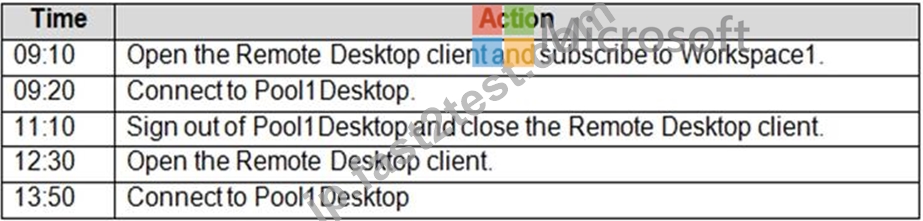
次の各ステートメントについて、ステートメントがtrueの場合は、[はい]を選択します。それ以外の場合は、[いいえ]を選択します。
注:正しい選択はそれぞれ1ポイントの価値があります。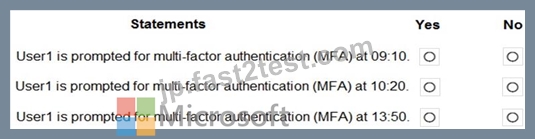
正解:
解説: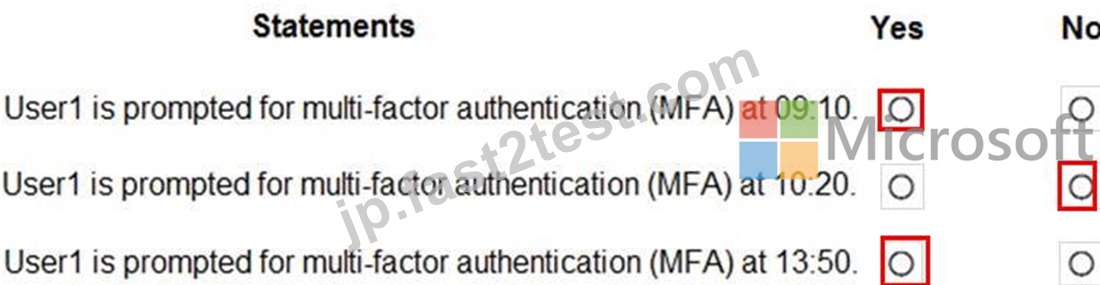
Reference:
https://docs.microsoft.com/en-us/azure/virtual-desktop/set-up-mfa
質問 # 102
ネットワークには、Azure Active Directory(Azure AD)テナントと同期するcontoso.comという名前のオンプレミスのActiveDirectoryドメインが含まれています。
Azure VirtualDesktopホストプールを含むAzureサブスクリプションがあります。
storage1という名前のAzureStorageアカウントを作成します。
Group1という名前のグループのユーザープロファイルを保存するには、storage1のFSLogixプロファイルコンテナを使用する必要があります。ソリューションは、最小特権の原則を使用する必要があります。
ソリューションに何を含める必要がありますか?回答するには、回答領域で適切なオプションを選択します。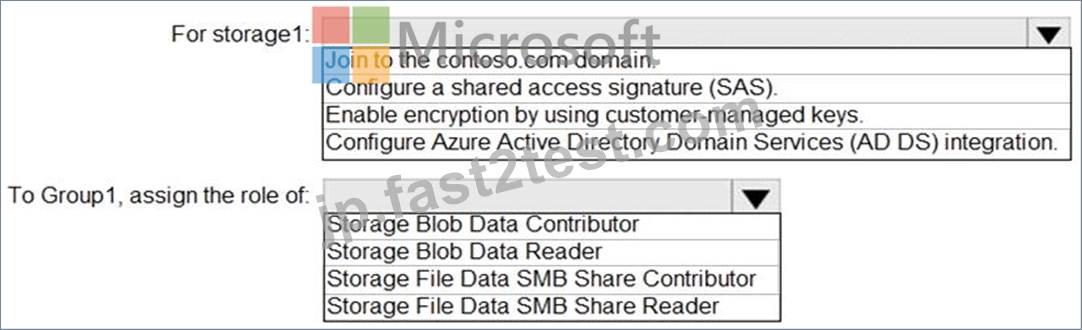
正解:
解説: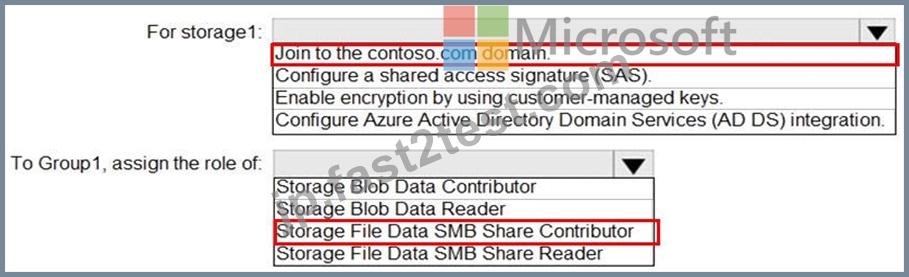
Reference:
https://docs.microsoft.com/en-us/azure/storage/files/storage-files-identity-ad-ds-enable
https://docs.microsoft.com/en-us/azure/virtual-desktop/create-file-share
質問 # 103
Pool 1 という名前のホスト プールを含む Azure Virtual Desktop の展開があります。Pool 1 には、5 つの Windows 11 セッション ホストが含まれています。
Pool1 内のセッション ホストに接続するために使用される Azure Virtual Desktop クライアント アプリのバージョンを特定する必要があります。
何を使うべきでしょうか?
- A. アプリケーションインサイト
- B. Azure 仮想デスクトップ インサイト
- C. プール1の洞察
- D. 仮想マシンの分析情報
正解:B
質問 # 104
あなたの会社には、次の表に示すオフィスがあります。
この会社には、User1という名前のユーザーを含むcontoso.comという名前のAzure Active Directory(Azure AD)テナントがあります。
ユーザーは、WVD1という名前のWindows VirtualDesktop展開に接続します。 WVD1には、52.166.253.0 / 24サブネットからのパブリックIPアドレスを持つセッションホストが含まれています。
Contoso.comには、次の設定を持つ条件付きアクセスポリシーがあります。
*名前:Policy1
*割り当て:
*ユーザーとグループ:User1
*クラウドアプリまたはアクション:Windows Virtual Desktop
アクセス制御:
*許可:アクセスを許可し、多要素認証を要求する
ポリシーを有効にする:オン
次の各ステートメントについて、ステートメントがtrueの場合は、[はい]を選択します。それ以外の場合は、[いいえ]を選択します。
注:正しい選択はそれぞれ1ポイントの価値があります。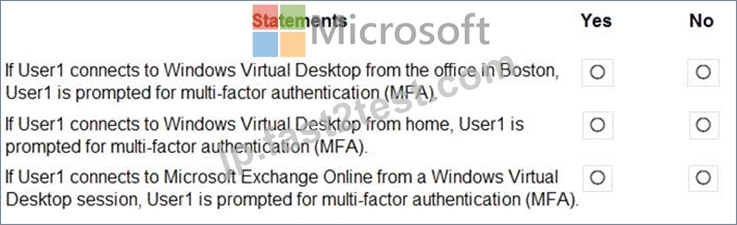
正解:
解説: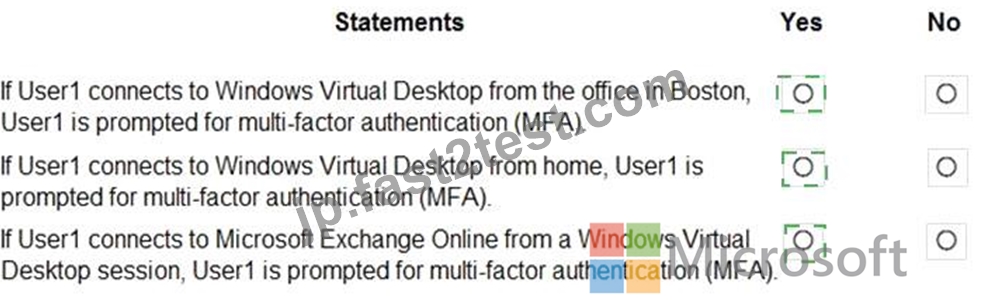
Explanation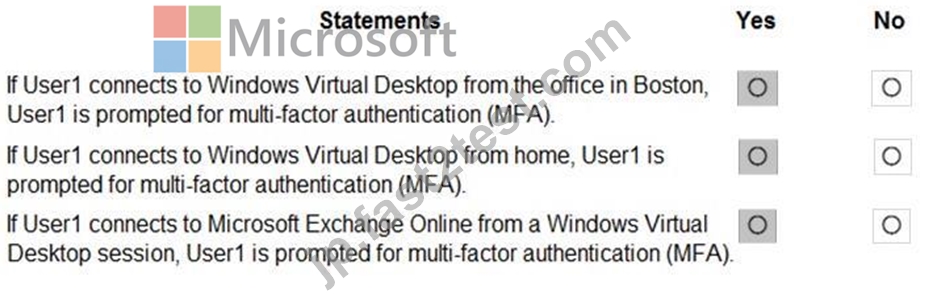
Reference:
https://docs.microsoft.com/en-us/azure/active-directory/authentication/tutorial-enable-azure-mfa
質問 # 105
RG1 という名前のリソース グループを含む Azure サブスクリプションがあります。RG1 には、次の表に示すリソースが含まれています。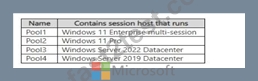
オンプレミスネットワークのIPアドレス範囲は192.168.10.0/24です。Host1のユーザーはネットワーク上のリソースに正常に接続できます。
IPアドレス範囲が192.168.11.0/24でサブネットを含む新しいオンプレミスネットワークを追加します。サブネットにはApp1というアプリケーションサーバーが含まれています。
ユーザーから、Host1 が App1 に接続できないという報告がありました。
Host1 上のユーザーが App1 にアクセスできることを確認する必要があります。
何を変更する必要がありますか?
- A. プール1、プール2、プール3、プール4
- B. プール1、プール2、プール3のみ
- C. Pooi1とPool2のみ
- D. Pooi1のみ
- E. プール1とプール3のみ
正解:A
質問 # 106
Windows VirtualDesktopを展開しています。
展示に示されているディスクレイアウトを持つHost1という名前のセッションホストがあります。 ([展示]タブをクリックします。)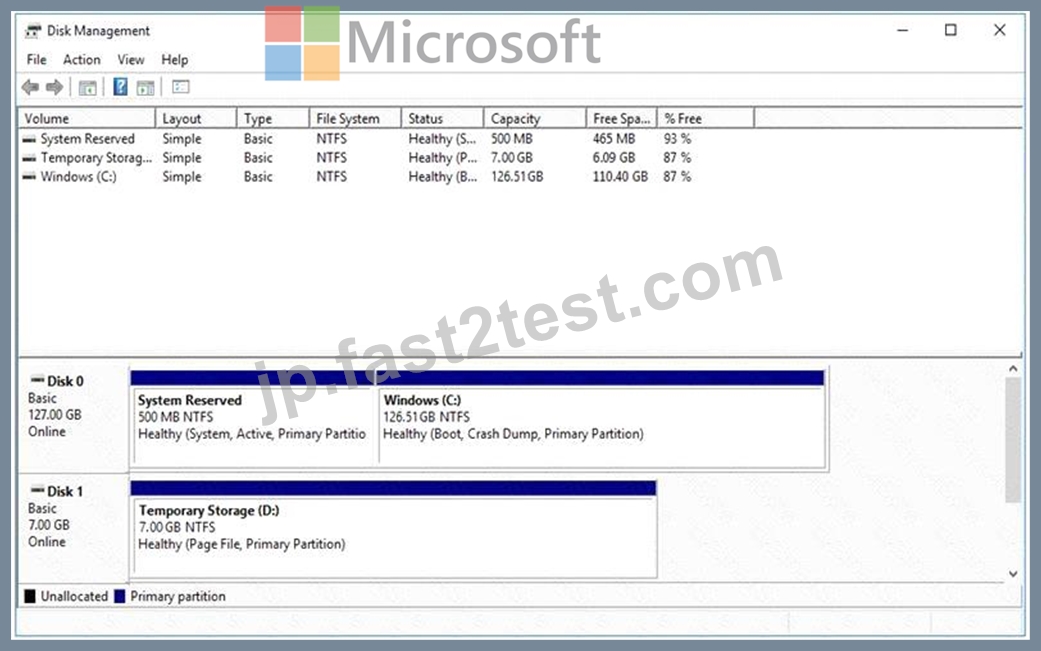
Dにインストールする必要があるアプリをデプロイする予定です。アプリには500GBのディスク容量が必要です。
ドライブ文字Dが割り当てられる新しいデータディスクを追加する必要があります。ソリューションは、Host1の現在のパフォーマンスを維持する必要があります。
順番に実行する必要がある4つのアクションはどれですか?回答するには、適切なアクションをアクションのリストから回答領域に移動し、正しい順序に並べます。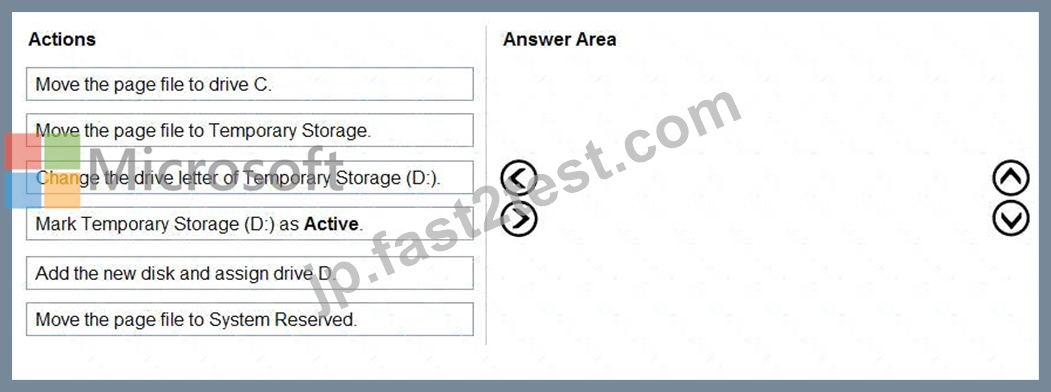
正解:
解説: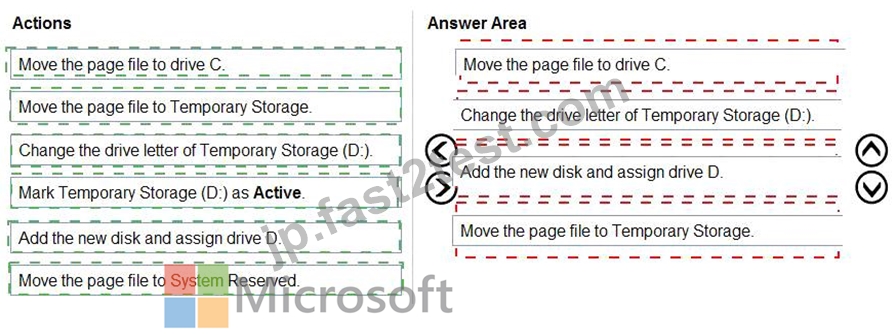
Explanation: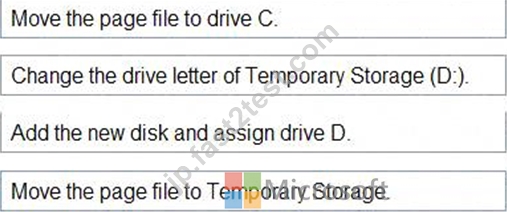
Reference:
https://www.azurecorner.com/change-temporary-drive-azure-vm-use-d-persistent-data-disks/
質問 # 107
次の表に示すリソースを含む Azure Virtual Desktop のデプロイがあります。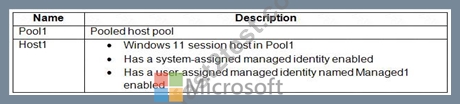
Pool1 の Start VM on connect を有効にする予定です。
オンデマンドで仮想マシンを起動するのに十分なアクセス許可を持つ、Role1 という名前のカスタム Azure ロールを作成します。
Pool1 のセッション ホストがオンデマンドで開始できることを確認する必要があります。
Role1 をどのサービス プリンシパルに割り当てる必要がありますか?
- A. ホスト1
- B. マネージド1
- C. Azure 仮想デスクトップ
- D. Azure 自動化
- E. Azure コンピューティング
正解:C
質問 # 108
Pool4の展開を計画しています。
Pool4に接続できるユーザーの最大数と、5つの同時ユーザーセッションをサポートするために必要なセッションホストの数はいくつですか?回答するには、回答領域で適切なオプションを選択します。
注:正しい選択はそれぞれ1ポイントの価値があります。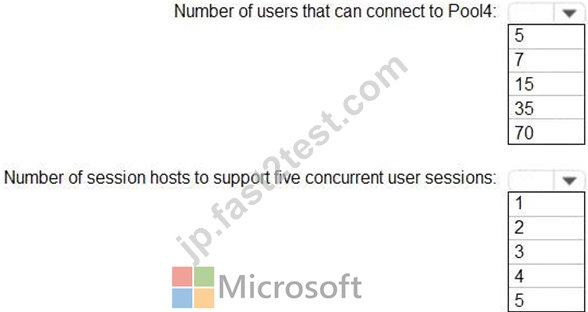
正解:
解説: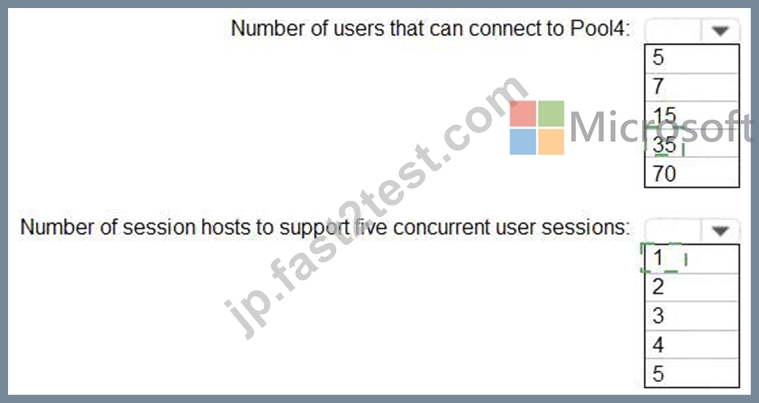
Explanation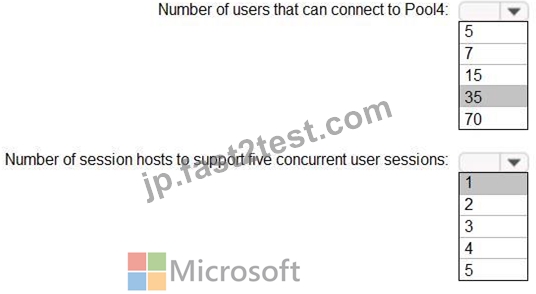
質問 # 109
Azure VirtualDesktopホストプールがあります。
ホストプール内の各セッションホストにフランス語の言語パックを追加します。
数日後、ユーザーはAzure VirtualDesktopに接続すると英語が表示されると報告しています。
調査の結果、フランス語の言語パックが削除され、セッションホストが英語に戻ったことがわかりました。
フランス語の言語パックがセッションホストで常に利用可能であることを確認する必要があります。
あなたは何をするべきか?
- A. 各ホストにデフォルトのタイムゾーンを割り当てます。
- B. 各ホストで国際設定を構成します。
- C. グループポリシー設定を適用して、時間と言語の設定を無効にします。
- D. 未使用の言語パックのクリーンアップをブロックするグループポリシー設定を適用します。
正解:C
質問 # 110
ネットワークには、Azure Active Directory (Azure AD) テナントに同期するオンプレミスの Active Directory ドメインが含まれています。ドメインには、次の表に示すドメイン コントローラが含まれています。
DNS サーバーは、要求を外部 DNS サービスに転送するように構成されています。
VNET1 にピアリングされ、ゲートウェイ転送が有効になっている VNET2 という名前の新しい仮想ネットワークを作成します。
VNET2 に Azure Virtual Desktop ホスト プールを実装する予定です。セッション ホストは Active Directory ドメインに参加します。
次の要件を満たすように DNS を構成する必要があります。
Azure Virtual Desktop ユーザーがオンプレミス サーバーと Azure リソースを解決できることを確認します。
DNS サーバーに障害が発生した場合でも、Azure Virtual Desktop が動作し続けることを確認します。
管理作業を最小限に抑えます。
何を設定する必要がありますか?
- A. Azure DNS サービスを利用するための VNET2 の DNS 設定
- B. Server2 と Served を使用するための VNET2 の DNS 設定
- C. Server2 と Server1 を使用する仮想マシンの DNS 設定
- D. Azure DNS サービスを使用するための仮想マシンの DNS 設定
正解:C
解説:
Reference:
https://docs.microsoft.com/en-us/azure/virtual-network/virtual-networks-name-resolution-for-vms-and-role-insta
質問 # 111
どのユーザーがPool4を作成でき、どのユーザーがセッションホストをドメインに参加できますか?回答するには、回答領域で適切なオプションを選択します。
注:正しい選択はそれぞれ1ポイントの価値があります。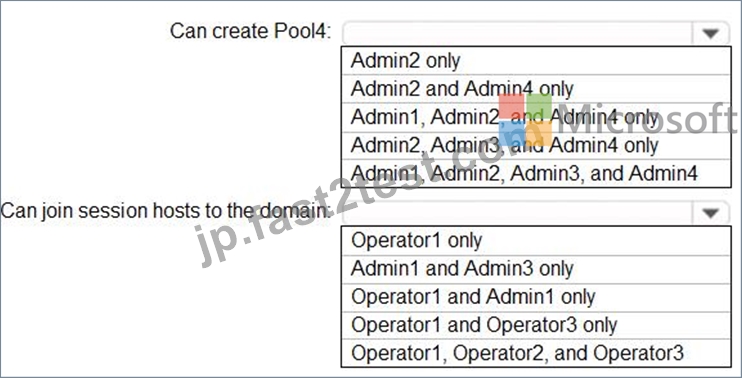
正解:
解説: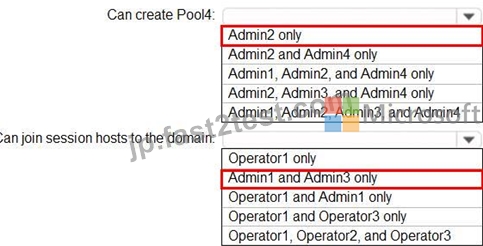
Topic 2, Litware, Inc
Existing Environment
Identity Environment
The network contains an on-premises Active Directory domain named litware.com that syncs to an Azure Active Directory (Azure AD) tenant named litware.com.
The Azure AD tenant contains the users shown in the following table.
All users are registered for Azure Multi-Factor Authentication (MFA).
Existing Environment. Cloud Services
Litware has a Microsoft 365 E5 subscription associated to the Azure AD tenant. All users are assigned Microsoft 365 Enterprise E5 licenses.
Litware has an Azure subscription associated to the Azure AD tenant. The subscription contains the resources shown in the following table.
Litware uses custom virtual machine images and custom scripts to automatically provision Azure virtual machines and join the virtual machines to the on-premises Active Directory domain.
Network and DNS
The offices connect to each other by using a WAN link. Each office connects directly to the internet.
All DNS queries for internet hosts are resolved by using DNS servers in the Boston office, which point to root servers on the internet. The Chennai office has caching-only DNS servers that forward queries to the DNS servers in the Boston office.
Requirements. Planned Changes
Litware plans to implement the following changes:
Deploy Windows Virtual Desktop environments to the East US Azure region for the users in the Boston office and to the South India Azure region for the users in the Chennai office.
Implement FSLogix profile containers.
Optimize the custom virtual machine images for the Windows Virtual Desktop session hosts.
Use PowerShell to automate the addition of virtual machines to the Windows Virtual Desktop host pools.
Requirements. Performance Requirements
Litware identifies the following performance requirements:
Minimize network latency of the Windows Virtual Desktop connections from the Boston and Chennai offices.
Minimize latency of the Windows Virtual Desktop host authentication in each Azure region.
Minimize how long it takes to sign in to the Windows Virtual Desktop session hosts.
Requirements. Authentication Requirements
Litware identifies the following authentication requirements:
Enforce Azure MFA when accessing Windows Virtual Desktop apps.
Force users to reauthenticate if their Windows Virtual Desktop session lasts more than eight hours.
Requirements. Security Requirements
Litware identifies the following security requirements:
Explicitly allow traffic between the Windows Virtual Desktop session hosts and Microsoft 365.
Explicitly allow traffic between the Windows Virtual Desktop session hosts and the Windows Virtual Desktop infrastructure.
Use built-in groups for delegation.
Delegate the management of app groups to CloudAdmin1, including the ability to publish app groups to users and user groups.
Grant Admin1 permissions to manage workspaces, including listing which apps are assigned to the app groups.
Minimize administrative effort to manage network security.
Use the principle of least privilege.
Requirements. Deployment Requirements
Litware identifies the following deployment requirements:
Use PowerShell to generate the token used to add the virtual machines as session hosts to a Windows Virtual Desktop host pool.
Minimize how long it takes to provision the Windows Virtual Desktop session hosts based on the custom virtual machine images.
Whenever possible, preinstall agents and apps in the custom virtual machine images.
質問 # 112
Azure Virtual Desktop のデプロイがあります。
Azure Monitor で Azure Virtual Desktop Insights ソリューションを使用してデプロイを監視する必要があります。
ホスト プールの診断設定の宛先として何を使用する必要がありますか?
- A. ストレージ アカウント
- B. Log Analytics ワークスペース
- C. イベント ハブ
正解:B
質問 # 113
Azure Virtual Desktop がデプロイされています。
次の表に示すホスト プールを作成する予定です。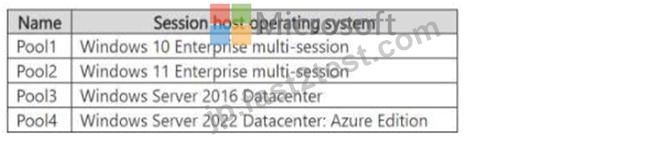
外部ユーザーにセッション ホストへのアクセスを提供する予定です。
Azure Virtual Desktop への接続が、ユーザーごとのアクセス価格を使用してライセンスされていることを確認する必要があります。
ユーザーごとのアクセス料金はどのホスト プールに適用されますか?
- A. プール1とプール2のみ
- B. プール4のみ
- C. プール1のみ
- D. プール1とプール4のみ
- E. プール3とプール4のみ
正解:A
質問 # 114
......
最新のAZ-140日本語合格保証付き試験問題集の認定サンプル問題:https://jp.fast2test.com/AZ-140J-premium-file.html