

合格させるMicrosoft PL-400日本語試験最速合格
準備PL-400日本語問題解答でPL-400日本語試験問題集
質問 # 111
ユーザーのグループにセキュリティ ロールを割り当てる必要があります。
どのセキュリティ ロールを使用する必要がありますか? 回答するには、適切なセキュリティ タイプを正しいロールにドラッグします。各セキュリティ タイプは、1 回だけ使用することも、複数回使用することも、まったく使用しないこともできます。コンテンツを表示するには、ペイン間で分割バーをドラッグするか、スクロールする必要がある場合があります。
注: 正しく選択するたびに 1 ポイントの価値があります。
正解:
解説:
Explanation
Graphical user interface, text, application Description automatically generated
Scenario: The company identifies the following job roles: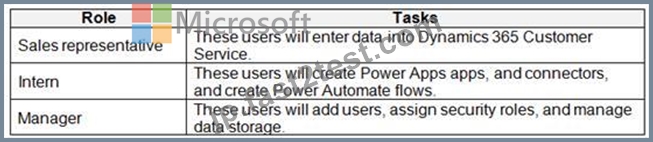
You must grant users the minimum permissions required to perform their job tasks.
Intern: Environment Maker
Environment Maker: Can create new resources associated with an environment, including apps, connections, custom APIs, gateways, and flows using Microsoft Power Automate. However, this role doesn't have any privileges to access data within an environment.
Manager: System Administrator:
System Administrator: Has full permission to customize or administer the environment, including creating, modifying, and assigning security roles. Can view all data in the environment.
Sales representative: Common Data Service User
Basic User/ Common Data Service User: Read (self), Create (self), Write (self), Delete (self) Can run an app within the environment and perform common tasks for the records that they own.
質問 # 112
あなたは、企業のサポート デスク チーム向けにモデル駆動型アプリを設計しています。
リマインダータスクを作成するボタンをアプリに追加する必要があります。このボタンは、サービス ケースが少なくとも 7 日間オープンしている場合にのみユーザーに表示されます。
App Designer が開いているときにボタンを作成する手順を定義する必要があります。
どの順序でアクションを実行する必要がありますか? 回答するには、アクションのリストから適切なアクションを回答領域に移動し、正しい順序で並べます。
注: 回答の選択肢は複数の順序で正解です。選択した正しい注文に対してクレジットを受け取ります。
正解:
解説:
1 - Edit the command bar.
2 - Add a command button.
3 - Add a data source to the component library.
4 - Configure a visibility expression.
5 - Create a task by using and OnSelect expression.
質問 # 113
要件を満たすためにセキュリティを設定する必要があります。
セキュリティをどのように設定すればよいでしょうか? 答えるには、適切なセキュリティ メカニズムを正しいユーザーにドラッグします。各セキュリティ メカニズムは、1 回だけ使用することも、複数回使用することも、まったく使用しないこともできます。コンテンツを表示するには、ペイン間で分割バーをドラッグするか、スクロールする必要がある場合があります。
注: 正しく選択するたびに 1 ポイントの価値があります。
正解:
解説:
Reference:
https://docs.microsoft.com/en-us/powerapps/developer/data-platform/field-security-entities
https://docs.microsoft.com/en-us/power-platform/admin/database-security
https://docs.microsoft.com/en-us/power-platform/admin/database-security
https://docs.microsoft.com/en-us/power-platform/admin/manage-teams - types-of-teams
https://docs.microsoft.com/en-us/power-platform/admin/manage-teams#types-of-teams
質問 # 114
モデル駆動型アプリの展開をテストしています。Microsoft Entra ID グループは、環境レベルおよびチーム レベルのアクセス許可を管理するためにのみ使用されます。
ユーザーは、アプリのテストを妨げるアクセス関連の問題にいくつか遭遇します。
最小権限の原則を使用して、各問題を解決するために使用するコンポーネントを選択する必要があります。
各問題を解決するために何を割り当てる必要がありますか? 答えるには、適切な解決策を正しい問題に移動します。各解決策は 1 回、複数回、またはまったく使用しない場合があります。コンテンツを表示するには、ペイン間の分割バーを移動したり、スクロールしたりする必要がある場合があります。
注意: 正しい選択ごとに 1 ポイントが付与されます。
正解:
解説:
Explanation:
質問 # 115
あなたは会社用のキャンバス アプリを作成しています。営業担当者用に 1 つのセキュリティ ロールが作成され、営業マネージャー用に 2 番目のセキュリティ ロールが作成されています。
キャンバス アプリには次の要件があります。
営業マネージャーは、自分の事業部門の営業担当者の記録を表示できる必要があります。
商談レコード内の販売確率データを表示できるのは、営業マネージャーだけである必要があります。
同じ地域に割り当てられた営業担当者と新入社員は、販売記録へのアクセスを共有します。
アプリに権限を割り当てる必要があります。
どのセキュリティ オプションを使用する必要がありますか? 答えるには、適切なセキュリティ オプションを正しいシナリオにドラッグします。各セキュリティ オプションは、1 回だけ使用することも、複数回使用することも、まったく使用しないこともできます。コンテンツを表示するには、ペイン間で分割バーをドラッグするか、スクロールする必要がある場合があります。
注: 正しく選択するたびに 1 ポイントの価値があります。
正解:
解説:
Explanation:
Box 1: Role-based security
Dataverse uses role-based security to group together a collection of privileges. These security roles can be associated directly to users, or they can be associated with Dataverse teams and business units.
Box 2: Field-level security
Sometimes record-level control of access is not adequate for some business scenarios. Dataverse has a field- level security feature to allow more granular control of security at the field level. Field-level security can be enabled on all custom fields and most system fields.
Box 3: Record-level security
Reference:
https://docs.microsoft.com/en-us/power-platform/admin/wp-security-cds
質問 # 116
フォームにイベント データを入力するにはスクリプトを追加する必要があります。
どのコードセグメントを使用する必要がありますか?
- A. formContext.data.addOnLoad(myFunction)
- B. formContext.data.entity.addOnSave(myFunction)
- C. formContext.data.removeOnLoad(myFunction)
- D. addOnPreProcessStatusChange
- E. formContext.data.isValid()
正解:A
質問 # 117
衣料品店は Power Apps アプリを使用して顧客と対話します。顧客データは Microsoft Dataverse に保存されます。
その店は顧客に割引を提供します。カテゴリ内のすべての顧客にグループ割引を割り当てます。該当するグループ割引は、お客様固有の割引に加算されます。割引情報は次の列に保存されます。
注文の合計割引が 30% を超える場合、注文が履行されて配送される前に、マネージャーは注文を承認する必要があります。
承認が必要なときにマネージャーに通知するフローを作成する必要があります。
フロートリガーはどのように設定すればよいでしょうか? 回答するには、回答領域で適切なオプションを選択してください。
注: 正しく選択するたびに 1 ポイントの価値があります。
正解:
解説:
Explanation:
Box 1: store_totaldiscount
If the total discount on an order exceeds 30 percent, a manager must approve the order before the order is fulfilled and delivered.
Box 2: @greater(add(triggerBody()..
When to use triggerBody() ? - When you want to fetch attributes from the body of the trigger.
Reference:
https://d365demystified.com/2020/09/06/using-triggerbody-triggeroutput-to-read-cds-trigger-metadata- attributes-in-a-flow-power-automate/
質問 # 118
ある会社は Dynamics 365 Sales を使用しています。
販売手数料はご注文時に計算していただきます。計算を実行するための Azure 関数を作成します。Azure 関数には HTTP トリガーがあります。
注文時にデータを Azure 関数に送信するようにプラグイン登録ツールを構成する必要があります。プラグイン登録ツールを開き、Dynamics 365 Sales に接続します。
どの 3 つのアクションを順番に実行する必要がありますか? 回答するには、アクションのリストから適切なアクションを回答領域に移動し、正しい順序で並べます。
正解:
解説:
Explanation
Step 1:SelectRegister New Web Hook.
Configure Dynamics 365 Sales to Call Your Webhook in Azure Functions
1. Open the Plug-in Registration Tool and connect to your organization.
2. Select Register->Register New Web Hook
Step 2: Enter the endpoint URL
Step 3: Register a New Step for Create of SalesOrder.
Register a new webhook, and then tie that webhook to an event in Dynamics 365 Sales. Select your newly registered webhook, right-click it, and then choose "Register New Step." Note that the webhook here is set to execute whenever a change to an account record is detected within Dynamics 365 Sales.
Reference:
https://docs.microsoft.com/en-us/powerapps/developer/common-data-service/tutorial-write-plug-in
質問 # 119
ある会社にはモデル駆動型アプリがあります。
入力された日付を検証するフォームにはカスタム ボタンが必要です。ボタンは特定の条件下でのみ使用可能にする必要があります。
ボタンの条件を満たすように、RibbonDiffXML で CommandDefinition を定義する必要があります。
どの要素を使用する必要がありますか? 答えるには、適切な要素を正しい条件にドラッグします。各要素は 1 回使用することも、複数回使用することも、まったく使用しないこともできます。コンテンツを表示するには、ペイン間で分割バーをドラッグするか、スクロールする必要がある場合があります。
注: 正しく選択するたびに 1 ポイントの価値があります。
正解:
解説:
Explanation
Box 1: Display Rule
When configuring ribbon elements, you can define specific rules to control when the ribbon elements will display.
Box 2: Action
Define the actions to be performed by a command bar or ribbon control in a <CommandDefinition> element together with rules that control whether the control is enabled or visible in the ribbon.
Box 3: Enable Rule
When configuring ribbon elements, you can define specific rules to control when the ribbon elements are enabled.
Reference:
https://docs.microsoft.com/en-us/powerapps/developer/model-driven-apps/define-ribbon-enable-rules
https://docs.microsoft.com/en-us/powerapps/developer/model-driven-apps/define-ribbon-display-rules
https://docs.microsoft.com/en-us/powerapps/developer/model-driven-apps/define-ribbon-display-rules
https://docs.microsoft.com/en-us/powerapps/developer/model-driven-apps/define-ribbon-actions
https://docs.microsoft.com/en-us/powerapps/developer/model-driven-apps/define-ribbon-actions
質問 # 120
あなたは、既存のモデル駆動型アプリの新しい機能を設計しています。
フィールドには複数の選択肢がユーザーに表示され、ユーザーが値を選択できるようにする必要があります。
どの列タイプが必要なシナリオをサポートできるかを判断する必要があります。
どの列タイプを使用する必要がありますか? 答えるには、適切な列タイプを正しいシナリオにドラッグします。各列タイプは、1 回使用することも、複数回使用することも、まったく使用しないこともできます。コンテンツを表示するには、ペイン間で分割バーをドラッグするか、スクロールする必要がある場合があります。
注: 正しく選択するたびに 1 ポイントの価値があります。
正解:
解説:
Explanation:
質問 # 121
5 つの小売店を持つパン屋のために、Power Platform ベースの注文管理キャンバス アプリのスイートを作成します。各店舗ではタブレット端末を使用して在庫管理や注文処理を行っております。
元の注文追跡アプリに次の変更を加える必要があります。
オンラインで配達の注文を受け取ると、注文先の最寄りのベーカリーに注文を送ります。
オンラインでの受け取り注文を受け取ったら、店舗スタッフにアプリに予想時間を入力するよう要求します。スタッフは注文を準備し、注文の準備ができたらアプリを使用して顧客に通知する必要があります。
店長が会社の週刊ニュースレターをカスタマイズし、店舗固有の特典を追加できるようにします。
ソリューションの実装に必要なカスタム コードと構成の量を最小限に抑える必要があります。
何を使えばいいのでしょうか?回答するには、回答領域で適切なオプションを選択してください。
注: 正しく選択するたびに 1 ポイントの価値があります。
正解:
解説:
Reference:
https://docs.microsoft.com/en-us/powerapps/maker/portals/portal-templates
https://global.hitachi-solutions.com/blog/canvas-vs-model-driven-apps
https://docs.microsoft.com/en-us/powerapps/maker/portals/configure/invite-contacts#invitation-attributes
質問 # 122
Common Data Service (CDS) を使用するモデル駆動型アプリがあります。Account エンティティと多対 1 の親関係にある 3 つのカスタム エンティティを作成します。
自分が所有するアカウントを別のユーザーに割り当てるリアルタイム ワークフローを実行します。「エラー メッセージ」に示されているようなエラー メッセージが表示されます。(「エラーメッセージ」タブをクリックします。)
「ユーザー ロールの管理」の展示に示されているように、ユーザーのセキュリティ ロールを確認します。(「ユーザー役割の管理」タブをクリックします。)
Common Data Service ユーザー セキュリティ ロールの展示に示されているように、そのロールの権限も確認します。
(「セキュリティ ロール」タブをクリックします。)
エラーが再発しないようにする必要があります。
次の各ステートメントについて、そのステートメントが true の場合は [はい] を選択します。それ以外の場合は、「いいえ」を選択します。
注: 正しく選択するたびに 1 ポイントの価値があります。
正解:
解説:
Explanation
Box 1: No
There is a read error.
Box 2: No
Note: The Environment Maker role can create resources within an environment including apps, connections, custom connectors, gateways, and flows using Power Automate.
Box 3: Yes
The System Customizer role is similar to the System Administrator role which enables non-system administrators to customize Dynamics 365. A Customizer is a user who customizes entities, attributes and relationships.
Box 4: Yes
質問 # 123
あなたは、Power Automate を使用するためにメーカーのグループをトレーニングしています。
次のような表現があります。
それぞれの式が何を行っているかを特定する必要があります。
それぞれの式は何をするのでしょうか? 回答するには、回答領域で適切なオプションを選択してください。
注: 正しく選択するたびに 1 ポイントの価値があります。
正解:
解説:
Reference:
https://powerusers.microsoft.com/t5/Building-Flows/How-to-determine-status-code-for-a-condition/td-p/355653
https://blogs.msmvps.com/windsor/2019/04/25/microsoft-flow-error-handling/
質問 # 124
Microsoft Power Automate フローを作成しました。
フローはユーザーに何らかの入力を促し、ユーザーの入力に基づいてアプリのフィールドに入力する必要があります。ユーザーからの入力が High の場合に User1 を返す式を追加する必要があります。それ以外の場合、式は User2 を返す必要があります。
どのように式を完成させればよいでしょうか? 回答するには、回答領域で適切なオプションを選択してください。
注意: 正しい選択ごとに 1 ポイントが付与されます。
正解:
解説:
Explanation:
質問 # 125
Microsoft Power Platform を使用してモデル駆動型アプリを開発しています。アプリは次の機能を実行する必要があります。
* 発注書システムから更新を自動的に受信します。
* 新しい発注書のみを追加します。
アプリを実装する必要があります。
どのコンポーネントを使用する必要がありますか? 回答するには、回答領域で適切なオプションを選択してください。
注: 正しく選択するたびに 1 ポイントの価値があります
正解:
解説:
質問 # 126
ある企業は、入学希望者からの応募を取り込むモデル駆動型アプリを持っています。
Power Apps コンポーネント フレームワーク (PCF) を使用して、新しい再利用可能なカスタム コンポーネントを作成するように求められます。
カスタム コンポーネントでは、生年月日の入力を許可し、申請者が未成年者ではないことを検証する必要があります。
TypeScript ファイル Index.ts とスタイル シート DatePicker.css にクラス AuditDatePicker を作成します。
コンポーネントをフォームで使用する場合、関連するフィールドとそのプロパティに対してのみ使用できるように定義する必要があります。
マニフェストをどのように完成させるべきでしょうか? 回答するには、回答領域で適切なオプションを選択してください。
注: 正しく選択するたびに 1 ポイントの価値があります。
正解:
解説:
Explanation
Box 1: AuditDatePicker
Constructor: Constructor of the code component.
Box 2:DateandTime.DateOnly
Box 3: bound
usage: Has two properties, bound and input. Bound properties are bound only to the value of the field. Input properties are either bound to a field or allow a static value.
Reference:
https://docs.microsoft.com/en-us/powerapps/developer/component-framework/manifest-schema-reference/manif
https://docs.microsoft.com/en-us/powerapps/developer/component-framework/implementing-controls-using-type
質問 # 127
企業は Common Data Service ロールアップ フィールドを使用して、顧客の保険エクスポージャとリスク プロファイルを計算します。
ユーザーは、新しい保険契約が作成されるときにシステムが積み上げフィールドの値を更新しないと報告しています。ポリシーの作成
後すぐに、ロールアップ フィールドの値を再計算する必要があります。
あなたは何をするべきか?
- A. ロールアップ フィールドの計算の繰り返しジョブの頻度を 1 時間ごとから 5 分ごとに変更します。
- B. 顧客エンティティに保険エクスポージャとリスク用の新しいフィールドを作成します。トリガーされるプラグインを作成する
- C. 新しいポリシー レコードの作成時にトリガーされるように、ロールアップ フィールドの一括計算ジョブを更新します。
- D. ロールアップフィールドの更新メソッドを使用するプラグインを作成します。このプラグインのポリシー エンティティの作成イベントのステップを構成します。
正解:A
解説:
whenever a new policy record is created.
Explanation:
As a system administrator, you can modify the rollup job recurrence pattern, postpone, pause, or resume the rollup job.
To pause, postpone, resume, or modify the recurrence pattern, you must view the system jobs. More information View Rollup jobs On the nav bar, choose Actions and select the action you want.
For the Calculate Rollup Field job, the available selections are: Modify Recurrence, Resume, Postpone, and Pause.
For the Mass Calculate Rollup Field job, the available selections are: Resume, Postpone, and Pause.
Note: Calculate Rollup Field is a recurring job that does incremental calculations of all rollup columns in the existing rows for a specified table. There is only one Calculate Rollup Field job per table. The incremental calculations mean that the Calculate Rollup Field job processes the rows that were created, updated, or deleted after the last Mass Calculate Rollup Field job finished execution. The default maximum recurrence setting is one hour. The job is automatically created when the first rollup column on a table is created and deleted when the last rollup column is deleted.
Incorrect Answers:
B: Mass Calculate Rollup Field is a recurring job, created per a rollup column. It runs once, after you created or updated a rollup column. The job recalculates the specified rollup column value in all existing rows that contain this column. By default, the job will run 12 hours after you created or updated a column. After the job completes, it is automatically scheduled to run in the distant future, approximately, in 10 years. If the column is modified, the job resets to run again in 12 hours after the update. The 12-hour delay is needed to assure that the Mass Calculate Rollup Field runs during the non-operational hours of the environment.
Reference:
https://docs.microsoft.com/en-us/powerapps/maker/data-platform/define-rollup-fields
質問 # 128
......
リアルMicrosoft PL-400日本語試験問題 [更新されたのは2025年]:https://jp.fast2test.com/PL-400J-premium-file.html