

合格させるLpi 010-160日本語試験最速合格
準備010-160日本語問題解答で010-160日本語試験問題集
質問 # 22
インストールされているソフトウェアパッケージの情報、ドキュメント、および設定ファイルの例が含まれているディレクトリはどれですか。
- A. /usr/share/doc/
- B. /usr/examples/
- C. /etc/defaults/
- D. /var/info/
- E. /doc/
正解:A
解説:
Explanation
The /usr/share/doc/ directory is the standard location for documentation files for installed software packages on Linux systems12. It contains subdirectories for each package, which may include README files, manuals, license information, changelogs, examples, and other useful resources12. The
/usr/share/doc/ directory is part of the Filesystem Hierarchy Standard (FHS), which defines the structure and layout of files and directories on Linux and other Unix-like operating systems3.
The other options are incorrect because:
* /etc/defaults/ is a directory that contains settings for userland applications or services/daemons4.
* /var/info/ is not a standard directory on Linux systems. The /var/ directory is used for variable data files, such as logs, caches, spools, and temporary files3.
* /doc/ is not a standard directory on Linux systems. The / directory is the root of the filesystem hierarchy and contains essential files and directories for booting, restoring, recovering, and/or repairing the system3.
* /usr/examples/ is not a standard directory on Linux systems. The /usr/ directory is used for shareable, read-only data, such as binaries, libraries, documentation, and source code3.
References:
* Linux configuration: Understanding *.d directories in /etc | Enable Sysadmin
* Configuration Files in Linux | Baeldung on Linux
* Filesystem Hierarchy Standard - Wikipedia
* Which of the Following Directories Contains Information, Documentation ...
質問 # 23
/ tmp /ディレクトリに設定されている次の権限のうちどれ?
- A. r-xr-X--t
- B. rwxrwS---
- C. rwSrw-rw-
- D. ------rwX
- E. rwxrwxrwt
正解:E
解説:
Explanation
The correct permissions for the /tmp directory are rwxrwxrwt, which means that the owner, group, and others have read, write, and execute permissions, and that the sticky bit is set. The sticky bit is a special permission that prevents users from deleting or renaming files that they do not own in a shared directory. The /tmp directory is used for storing temporary files that may be created by different users and processes, so it needs to be accessible and writable by all, but also protected from unauthorized deletion or modification of files. The rwxrwxrwt permissions can be set by using the chmod command with either the octal mode 1777 or the symbolic mode a+trwx. References: : [File system permissions] : [Sticky bit] : [chmod]
質問 # 24
空白を埋める
シェルスクリプトでループを開始するために使用されるキーワードは何ですか? (キーワードを 1 つだけ指定し、追加情報は指定しません。)
正解:
解説:
for Explanation The keyword for is used in a shell script to begin a loop that iterates over a list of items or a range of numbers.
The syntax of the for loop is as follows:
for <var> in <list> do <commands> done
The variable <var> is assigned to each element of the <list> in turn, and the <commands> are executed for each iteration. The <list> can be a sequence of words, numbers, filenames, or other values. If the <list> is omitted, the for loop will iterate over the positional parameters ($1, $2, ...). The do and done keywords mark the beginning and the end of the loop body, respectively. The for loop is one of the three types of loops in shell scripting, along with the while and until loops. References: 1: Looping Statements |Shell Script - GeeksforGeeks 1 2: unix - Shell script "for" loop syntax - Stack Overflow 2 3: For Loop Shell Scripting - javatpoint 3
質問 # 25
次の種類のバスのどれがマザーボードとハードディスクドライブを接続することができますか?
- A. RAMバス
- B. AUTOバス
- C. CPUバス
- D. NUMAバス
- E. SATAバス
正解:E
質問 # 26
チームのメンバーはすでにRed Hat Enterprise Linuxの使用経験があります。小さな趣味のプロジェクトでは、チームは購読料を払わずにLinuxサーバーをセットアップしたいと考えています。次のLinuxディストリビューションのどれが、チームメンバーが可能な限り多くのRed Hat Enterprise Linuxの知識を適用できるようにしますか?
- A. CentOS
- B. openSUSE
- C. Debian GNU / Linux
- D. Ubuntu Linux LTS
- E. Raspbian
正解:A
質問 # 27 
- A. Option D
- B. Option E
- C. Option B
- D. Option A
- E. Option C
正解:E
質問 # 28
どのコマンドがファイル名のみを表示し、追加情報を表示しませんか?
- A. ls -l
- B. ls -lh
- C. ls -nl
- D. ls -a
- E. ls -alh
正解:D
質問 # 29 
- A. Option C
- B. Option D
- C. Option E
- D. Option B
- E. Option A
正解:C、E
質問 # 30
次のオプションのどれが圧縮を処理しますか? (正解を2つ選びます。)
- A. -g
- B. -z
- C. -z2
- D. -bz
- E. -j
正解:B、E
解説:
Explanation
The tar command is used to create or extract compressed archive files that contain multiple files or directories.
The tar command has the following syntax: tar [options] [archive-file] [file or directory...]. The options argument specifies how the tar command should operate and what kind of compression should be used. The archive-file argument is the name of the archive file to be created or extracted. The file or directory argument is the name of one or more files or directories to be included in or extracted from the archive file.
The following are some of the common options for the tar command:
* -c: create a new archive file.
* -x: extract files from an existing archive file.
* -t: list the contents of an archive file.
* -v: show the progress of the operation.
* -f: specify the name of the archive file.
* -z: use gzip compression or decompression.
* -j: use bzip2 compression or decompression.
* -J: use xz compression or decompression.
The options -z and -j are used to handle compression with the tar command. The option -z uses the gzip program to compress or decompress the archive file, which usually has the extension .tar.gz or .tgz. The option
-j uses the bzip2 program to compress or decompress the archive file, which usually has the extension .tar.bz2 or .tbz. Both gzip and bzip2 are popular compression programs that reduce the size of files by removing redundant or unnecessary information.
For example, to create a compressed archive file called backup.tar.gz that contains the files and directories in the current directory, the following command can be used:
tar -czvf backup.tar.gz .
To extract the files and directories from the archive file backup.tar.gz to the current directory, the following command can be used:
tar -xzvf backup.tar.gz
To create a compressed archive file called backup.tar.bz2 that contains the files and directories in the current directory, the following command can be used:
tar -cjvf backup.tar.bz2 .
To extract the files and directories from the archive file backup.tar.bz2 to the current directory, the following command can be used:
tar -xjvf backup.tar.bz2
The other options in the question are not related to compression. The option -bz is invalid, as there is no such option for the tar command. The option -g is used to create or update an incremental archive file, which only contains the files that have changed since the last backup. The option -z2 is also invalid, as there is no such option for the tar command. References:
* Linux Essentials Version 1.6 Objectives: 3.1. Archiving Files on the Command Line1
* Linux Essentials Version 1.6 Exam Study Resources: Linux Essentials Manual - Chapter 9. The Power of the Command Line - 9.1. Archiving Files on the Command Line - 9.1.1. The tar Command2
* Linux Essentials Version 1.6 Exam Study Resources: Linux Essentials Manual - Appendix A. Answers to the Exercises - Chapter 9. The Power of the Command Line - 9.1. Archiving Files on the Command Line - Exercise 9.1.12
質問 # 31
フリーソフトウェアライセンスとは何ですか?
- A. 許諾ソフトウェアの使用目的の制限
- B. 各貢献者が提供しなければならない技術文書の詳細。
- C. 許諾ソフトウェアの変更および頒布の条件
- D. ライセンスプログラムを拡張するために使用される可能性があるプログラミング言語。
- E. ライセンスソフトウェアをコンパイルするのに必要なライブラリの完全なリスト。
正解:C
解説:
A free software license is a notice that grants the recipient of a piece of software extensive rights to modify and redistribute that software. These actions are usually prohibited by copyright law, but the rights-holder (usually the author) of a piece of software can remove these restrictions by accompanying the software with a software license which grants the recipient these rights. Software using such a license is free software (or free and open-source software) as conferred by the copyright holder. Free software licenses grant users the freedom to use it for any purpose, study and change the source code and copy and redistribute the software with or without modifications. Free software must come with source code or provide access to it, while the freedom to redistribute includes the right to give away copies gratis as well as sell copies1 Reference: 1: Free-software license - Wikipedia
質問 # 32
LinuxでプロセスIDになり得る値は次のうちどれですか?
- A. fff3
- B. 60b503cd-019e-4300-a7be-922f074ef5ce
- C. /sys/pid/9a14
- D. /bin/bash
- E. 0
正解:E
解説:
A process ID on Linux is a unique integer value that identifies a running process. The process ID can range from 0 to a maximum limit, which is usually 32768 or higher, depending on the system configuration. The process ID of 0 is reserved for the kernel's idle task, and the process ID of 1 is reserved for the init system, which is the first process launched by the kernel. The process IDs are assigned sequentially to new processes, and are recycled when a process terminates. Therefore, the only valid value for a process ID among the given options is 21398, which is an integer within the possible range. The other values are not valid process IDs because they are either strings, hexadecimal numbers, or file paths, which do not match the format of a process ID on Linux. Reference:
Linux Essentials - Linux Professional Institute (LPI)
How Are Linux PIDs Generated? | Baeldung on Linux
質問 # 33
次のコマンドのどれがディレクトリ/ new / dir /をPATH環境変数に追加しますか?
- A. export PATH=/new/dir: PATH
- B. export PATH=/new/dir: $PATH
- C. export $PATH=/new/dir: $PATH
- D. PATH=/new/dir: PATH
- E. $PATH=/new/dir: $PATH
正解:A
解説:
The PATH environment variable is a colon-separated list of directories that the shell searches for commands. To add a new directory to the PATH, you need to append it to the existing value of the variable, using the syntax PATH=new/dir:PATH. However, this only changes the PATH for the current shell session. To make the change permanent, you need to use the export command, which makes the variable available to all child processes of the shell. The export command takes the name of the variable as an argument, without the dollar sign ($). Therefore, the correct command to add /new/dir/ to the PATH and export it is export PATH=/new/dir:PATH. Reference:
Linux Essentials - Linux Professional Institute (LPI)
How to set the path and environment variables in Windows - Computer Hope
質問 # 34
/ proc /ディレクトリには何がありますか?
- A. 実行中のプロセスごとに1つのディレクトリ。
- B. インストールされたプログラムごとに1つのディレクトリ。
- C. 既存のユーザーアカウントごとに1つのファイル。
- D. 実行中のサービスごとに1つのログファイル。
- E. ハードウェアデバイスごとに1つのデバイスファイル。
正解:A
解説:
Explanation
The /proc/ directory is a virtual file system that contains information about the system and the processes running on it. It is not a conventional file system that stores files on a disk, but rather a dynamic view of the kernel's data structures. One of the features of the /proc/ directory is that it contains one subdirectory for each process running on the system, which is named after the process ID (PID). For example, the subdirectory
/proc/1/ contains information about the process with PID 1, which is usually the init process. The process subdirectories contain various files that provide information about the process, such as its status, memory usage, open files, environment variables, command line arguments, and more. The /proc/ directory also contains a symbolic link called 'self', whichpoints to the process that is accessing the /proc/ file system.
Therefore, the correct answer is D. One directory per running process.
The other options are incorrect because:
* A. One directory per installed program. This is not true, as the /proc/ directory does not contain information about installed programs, but only about running processes. Installed programs are usually stored in other directories, such as /bin/, /usr/bin/, /opt/, etc.
* B. One device file per hardware device. This is not true, as the /proc/ directory does not contain device files, but only virtual files that represent kernel data. Device files are usually stored in the /dev/
* directory, which is another special file system that provides access to hardware devices.
* C. One file per existing user account. This is not true, as the /proc/ directory does not contain information about user accounts, but only about processes. User accounts are usually stored in the /etc/ directory, which contains configuration files, such as /etc/passwd/ and /etc/shadow/, that define the users and their passwords.
* E. One log file per running service. This is not true, as the /proc/ directory does not contain log files, but only information files. Log files are usually stored in the /var/log/ directory, which contains various files that record the activities of the system and the services.
References:
* The /proc Filesystem - The Linux Kernel documentation
* A Beginner's Guide to the /proc File System in Linux - Tecmint
* Appendix E. The proc File System Red Hat Enterprise Linux 6 | Red Hat ...
* Chapter 5. The proc File System Red Hat Enterprise Linux 4 | Red Hat ...
* proc file system in Linux - GeeksforGeeks
質問 # 35
次のコマンドのどれが、名前が.txtで終わる現在のディレクトリ内のすべてのファイルを含むZIPアーカイブpoems.zipを作成しますか?
- A. zcat *.txt poems.zip
- B. zip poems.zip *.txt
- C. zip *.txt > poems.zip
- D. zip cfz poems.zip *.txt
- E. cat *.txt | zip poems.zip
正解:B
解説:
The zip command is used to create compressed archive files that can contain one or more files or directories. The zip command takes the name of the archive file as the first argument, followed by the names of the files or directories to be included in the archive. You can also use wildcards to match multiple files or directories with a common pattern. For example, the command zip poems.zip *.txt will create the ZIP archive poems.zip containing all files in the current directory whose names end in .txt. The other commands are either invalid or do not perform the desired operation. The command zip *.txt > poems.zip will try to create an archive for each file ending in .txt and redirect the output to poems.zip, which is not a valid archive file. The command zcat *.txt poems.zip will try to decompress and concatenate the contents of the files ending in .txt and poems.zip, which is not a valid ZIP file. The command zip cfz poems.zip *.txt will fail because the options c, f, and z are not valid for the zip command. The command cat *.txt | zip poems.zip will try to read the contents of the files ending in .txt from the standard input and create an archive named poems.zip, but this will not preserve the file names or attributes of the original files. Reference:
Linux Essentials - Linux Professional Institute (LPI), section 3.1.1
3.1 Archiving Files on the Command Line - Linux Professional Institute Certification Programs, slide
質問 # 36
次のディレクトリのうち、専用のファイルシステムに存在する場合、読み取りおよび書き込みアクセスでマウントする必要があるのはどれですか?
- A. /usr
- B. /lib
- C. /opt
- D. /etc
- E. /var
正解:E
質問 # 37
ユーザーrootのUIDは何ですか?
- A. 0
- B. 1
- C. 2
- D. 3
- E. 4
正解:B
解説:
Explanation
The UID of the user root is always 0 on Linux systems. This is because the kernel uses the UID 0 to check for the superuser privileges and grant access to all system resources. The name of the user account with UID 0 is usually root, but it can be changed or have aliases. However, some applications may expect the name root and not work properly with a different name. The UID 0 is reserved for the root user and cannot be assigned to any other user. The UID 0 is stored in the /etc/passwd file along with other user information. References:
* Linux Essentials Topic 104: The Linux Operating System, section 104.4: Runlevels and Boot Targets.
* Linux Essentials Topic 106: Security and File Permissions, section 106.1: Basic security and identifying user types.
* Linux Essentials Topic 106: Security and File Permissions, section 106.2: Creating users and groups.
質問 # 38
DNS名をIPアドレスに解決するために使用できるコマンドはどれですか。
- A. iplookup
- B. host
- C. query
- D. dns
- E. dnsname
正解:B
質問 # 39
次のコマンドのどれがディレクトリ/ new / dir /をPATH環境変数に追加しますか?
- A. export PATH=/new/dir: PATH
- B. export PATH=/new/dir: $PATH
- C. export $PATH=/new/dir: $PATH
- D. PATH=/new/dir: PATH
- E. $PATH=/new/dir: $PATH
正解:A
解説:
Explanation
The PATH environment variable is a colon-separated list of directories that the shell searches for commands.
To add a new directory to the PATH, you need to append it to the existing value of the variable, using the syntax PATH=new/dir:PATH. However, this only changes the PATH for the current shell session. To make the change permanent, you need to use the export command, which makes the variable available to all child processes of the shell. The export command takes the name of the variable as an argument, without the dollar sign ($). Therefore, the correct command to add /new/dir/ to the PATH and export it is export PATH=/new/dir:PATH. References:
* Linux Essentials - Linux Professional Institute (LPI)
* How to set the path and environment variables in Windows - Computer Hope
質問 # 40 
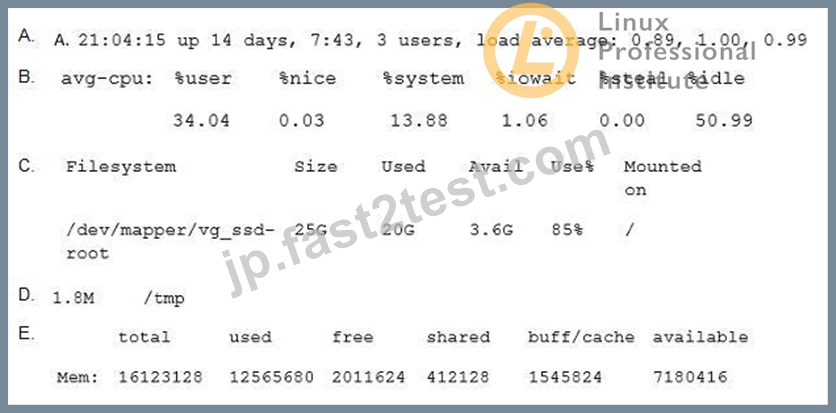

- A. Option C
- B. Option D
- C. Option E
- D. Option B
- E. Option A
正解:C
質問 # 41
新しいLinuxコンピューティングインスタンスは、laaSクラウドでどのようにプロビジョニングされますか?
- A. クラウドホスティング組織は、一般的なLinuxディストリビューションの事前に準備されたイメージのセットを提供します。
- B. 目的のインストールを説明するプロバイダー固有の構成ファイルがクラウドプロバイダーにアップロードされます。
- C. インストールはローカル仮想マシンで準備する必要があり、それはクラウドにコピーされます。
- D. 標準のLinuxインストーラーは、リモートコンソールから実行する必要があります。
- E. Linuxディストリビューションを購入した後、ベンダーはそれをクラウドインスタンスに配信します。
正解:A
解説:
In an Infrastructure as a Service (IaaS) cloud, the provider offers virtualized computing resources such as servers, storage, and network over the internet. The user can provision and manage these resources according to their needs. One of the common ways to provision a new Linux computing instance in an IaaS cloud is to use a pre-prepared image of a Linux distribution provided by the cloud hosting organization. An image is a snapshot of a virtual machine that contains the operating system and other software components. The user can choose from a variety of images that suit their requirements and launch a new instance from the image. This way, the user does not have to install and configure the Linux operating system from scratch, which saves time and effort. Some examples of cloud hosting organizations that provide pre-prepared images of popular Linux distributions are Amazon Web Services (AWS), Microsoft Azure, Google Cloud Platform (GCP), and DigitalOcean. Reference: Linux Essentials - Topic 108: Cloud Computing and Linux Essentials - Topic 108: Cloud Computing - Exam Objectives
質問 # 42
次の例のうち、シェルスクリプトのforループの一般的な構造を示しているのはどれですか?
- A. for ls *.txt exec {} \;
- B. for *.txt as file => echo $file
- C. foreach @{file} { echo $i
} - D. for file in *.txt do
echo $i done - E. for *.txt ( echo $i )
正解:D
解説:
The general structure of a for loop in a shell script is as follows12:
for variable in list do commands done
The variable is the name of a loop counter or iterator that takes on the values of the items in the list. The list can be a sequence of words, numbers, filenames, or the output of a command. The commands are the body of the loop that are executed for each value of the variable. The do and done keywords mark the beginning and the end of the loop body.
The option C. for file in *.txt do echo $i done follows this structure, with the variable being file, the list being *.txt (which matches all the files with the .txt extension in the current directory), and the command being echo $i (which prints the value of the variable i, which is presumably set somewhere else in the script).
The other options are incorrect because:
A . for *.txt as file => echo $file uses an invalid syntax for a for loop. The as keyword is not part of the shell script syntax, and the => symbol is not a valid operator. The correct way to write this loop would be:
for file in *.txt do echo $file done
B . for *.txt ( echo $i ) uses an invalid syntax for a for loop. The parentheses are not part of the shell script syntax, and the loop body is missing the do and done keywords. The correct way to write this loop would be:
for i in *.txt do echo $i done
D . for ls *.txt exec {} ; uses an invalid syntax for a for loop. The ls command is not a valid variable name, and the exec {} ; is not a valid command. This looks like a mix of a for loop and a find command. The correct way to write this loop would be:
for file in *.txt do exec $file done
E . foreach @{file} { echo $i } uses an invalid syntax for a for loop. The foreach keyword is not part of the shell script syntax, and the @{file} and { echo $i } are not valid expressions. This looks like a mix of a for loop and a Perl syntax. The correct way to write this loop would be:
for file in * do echo $file done
Reference:
Looping Statements | Shell Script - GeeksforGeeks
How do I write a 'for' loop in Bash? - Stack Overflow
質問 # 43
Linuxディストリビューションとは何ですか?
- A. すべてのファイルシステムをマウントした後のrootアカウントから見たLinuxファイルシステム。
- B. Linuxをベースにしているが通常のLinuxカーネルとは互換性がないオペレーティングシステム。
- C. Linuxカーネル、システムユーティリティ、その他のソフトウェアのバンドル。
- D. Linuxが他のプロセッサアーキテクチャ上で動作できるようにするためのLinuxへの一連の変更。
- E. Linuxカーネルのソースコードの配布を管理する一連の規則。
正解:C
質問 # 44
次のディレクトリのうち、専用のファイルシステムに存在する場合、読み取りおよび書き込みアクセスでマウントする必要があるのはどれですか?
- A. /usr
- B. /lib
- C. /opt
- D. /etc
- E. /var
正解:E
解説:
The /var directory must be mounted with read and write access if it resides on its own dedicated file system. The reason is that the /var directory contains files and directories that are expected to change in size and content as the normal operation of the system progresses, such as logs, spool files, and temporary files1. Therefore, the /var directory needs to have enough space and permission to accommodate these changes. If the /var directory is mounted as read-only, some system services and applications may fail to start or function properly2.
The other options are not directories that must be mounted with read and write access if they reside on their own dedicated file system. The /opt directory contains optional or third-party software packages that are not part of the default installation1. The /lib directory contains libraries and kernel modules that are essential for the binaries in /bin and /sbin directories1. The /etc directory contains configuration files for the system and applications1. The /usr directory contains user-related programs, libraries, documentation, and data1. These directories are usually mounted as read-only to prevent accidental or malicious modification of their contents3. Reference:
Linux Essentials Exam Objectives, Version 1.6, Topic 102.1, Weight 3
Linux Essentials Certification Guide, Chapter 2, Page 34-35
Linux Filesystem Hierarchy, Chapter 3, Page 17-18
質問 # 45
コマンドchmod 654 file.txtを使用して権限が変更されると、通常のファイルにどの権限が設定されますか。
- A. drw-r-xr--
- B. d-wxr-x--
- C. -rwxrw---x
- D. -wxr-x--x
- E. -rw-r-xr--
正解:E
解説:
Explanation
The chmod command is used to change the permissions of files and directories. The permissions are represented by three sets of three characters, indicating the permissions for the owner, the group, and the others. Each character can be either r (read), w (write), x (execute), or - (no permission). The chmod command can use either symbolic or numeric mode to specify the permissions. In this question, the numeric mode is used, which consists of three digits from 0 to 7. Each digit is the sum of the permissions for each set, where r is 4, w is 2, and x is 1. For example, 7 means rwx, 6 means rw-, and 4 means r-. Therefore, the command chmod 654 file.txt sets the permissions as follows:
* The first digit 6 means rw- for the owner, which means the owner can read and write the file, but not execute it.
* The second digit 5 means r-x for the group, which means the group can read and execute the file, but not write it.
* The third digit 4 means r-- for the others, which means the others can only read the file, but not write or execute it.
The resulting permissions are -rw-r-xr-, which is the correct answer. The other options are incorrect because they either have the wrong permissions or the wrong file type. A regular file does not have the d (directory) prefix, and a directory cannot have the - (no file type) prefix. References:
* Linux Essentials Version 1.6 Objectives: 4.1. Ownership and Permissions1
* Linux Essentials Version 1.6 Exam Study Resources: Linux Essentials Manual - Chapter 8. Security and File Permissions - 8.1. Ownership and Permissions - 8.1.1. The chmod Command2
* Linux Essentials Version 1.6 Exam Study Resources: Linux Essentials Manual - Appendix A. Answers to the Exercises - Chapter 8. Security and File Permissions - 8.1. Ownership and Permissions - Exercise
8.1.12
質問 # 46
......
リアルLpi 010-160日本語試験問題 [更新されたのは2026年]:https://jp.fast2test.com/010-160J-premium-file.html