

リリースVMware 2V0-41.24更新された問題PDF
2V0-41.24問題集と練習テスト(117試験問題)
VMware 2V0-41.24 認定試験の出題範囲:
| トピック | 出題範囲 |
|---|---|
| トピック 1 |
|
| トピック 2 |
|
| トピック 3 |
|
質問 # 12
Which statement is true about an alarm in a Suppressed state?
- A. An alarm can be suppressed for a specific duration in hours.
- B. An alarm can be suppressed for a specific duration in seconds.
- C. An alarm can be suppressed for a specific duration in days.
- D. An alarm can be suppressed for a specific duration in minutes.
正解:A
解説:
An alarm can be suppressed for a specific duration in hours.
According to the VMware NSX documentation, an alarm can be in one of the following states: Open, Acknowledged, Suppressed, or Resolved12 An alarm in a Suppressed state means that the status reporting for this alarm has been disabled by the user for a user-specified duration12 When a user moves an alarm into a Suppressed state, they are prompted to specify the duration in hours. After the specified duration passes, the alarm state reverts to Open. However, if the system determines the condition has been corrected, the alarm state changes to Resolved13 To learn more about how to manage alarm states in NSX, you can refer to the following resources:
VMware NSX Documentation: Managing Alarm States 1
VMware NSX Documentation: View Alarm Information 2
VMware NSX Intelligence Documentation: Manage NSX Intelligence Alarm States 3
https://docs.vmware.com/en/VMware-NSX-Intelligence/1.2/user-guide/GUID-EBD3C5A8-F9AB-4A22- BA40-92D61850C1E6.html
質問 # 13
Which troubleshooting step will resolve an error with code 1001 during the configuration of a time-based firewall rule?
- A. Restarting the NTPservice on the ESXi host.
- B. Changing the time zone on the ESXi host.
- C. Re-installing the NSX VIBs on the ESXi host.
- D. Reconfiguring the ESXi host with a local NTP server.
正解:A
解説:
An error with code 1001 during the configuration of a time-based firewall rule often indicates a time synchronization issue. Restarting the NTP service on the ESXi host can resolve this issue by ensuring that the host's time is synchronized correctly, which is essential for time-based rules to function accurately.
質問 # 14
An NSX administrator is creating a Tier-1 Gateway configured In Active-Standby High Availability Mode. In the event of node failure, the failover policy should not allow the original tailed node to become the Active node upon recovery.
Which failover policy meets this requirement?
- A. Preemptive
- B. Non-Preemptive
- C. Disable Preemptive
- D. Enable Preemptive
正解:B
解説:
According to the VMware NSX Documentation, a non-preemptive failover policy means that the original failed node will not become the active node upon recovery, unless the current active node fails again.
This policy can help avoid unnecessary failovers and ensure stability.
The other options are either incorrect or not available for this configuration. Preemptive is the opposite of non-preemptive, meaning that the original failed node will become the active node upon recovery, if it has a higher priority than the current active node. Enable Preemptive and Disable Preemptive are not valid options for the failover policy, as the failover policy is a drop-down menu that only has two choices:
Preemptive and Non-Preemptive.
質問 # 15
Match the NSX Intelligence recommendations with their correct purpose.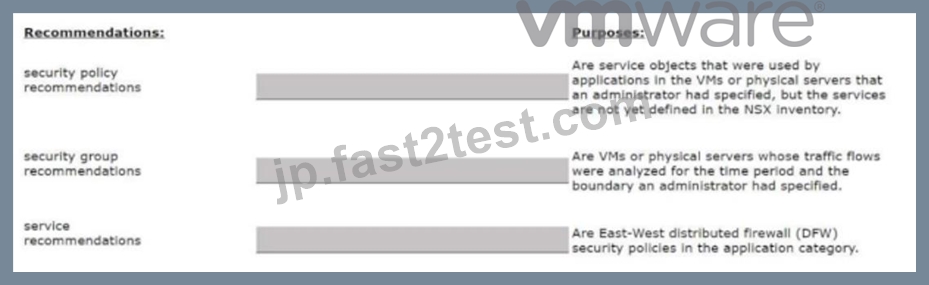
正解:
解説: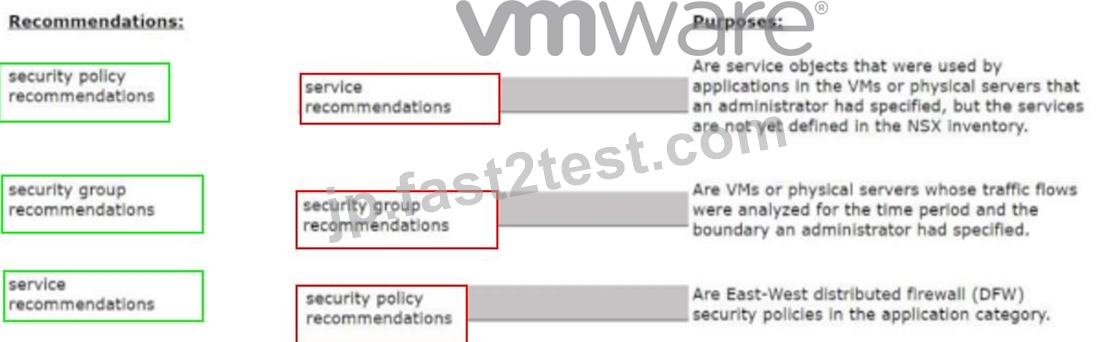
質問 # 16
Which two BGP configuration parameters can be configured in the VRF Lite gateways? (Choose two.)
- A. Route Distribution
- B. Route Aggregation
- C. BGP Neighbors
- D. Local AS
- E. Graceful Restart
正解:C、D
解説:
BGP Neighbors: This parameter is essential for establishing BGP sessions with other routers. Configuring BGP neighbors allows VRF Lite gateways to exchange routing information with adjacent BGP-enabled devices.
Local AS: The Local Autonomous System (AS) number can be set for the VRF Lite gateway, which is necessary for BGP operations within a specific routing domain.
質問 # 17
DRAG DROP
Match the NSX Intelligence recommendations with their correct purpose.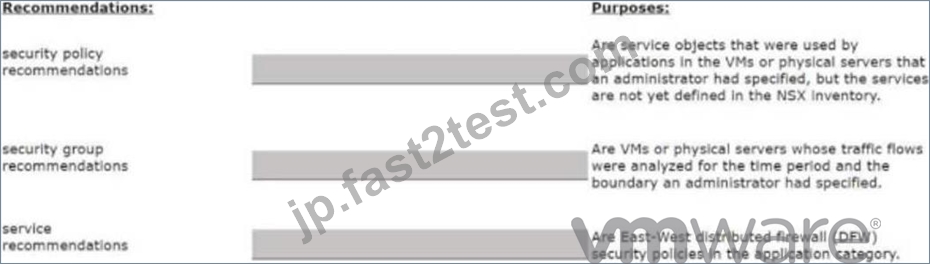
正解:
解説: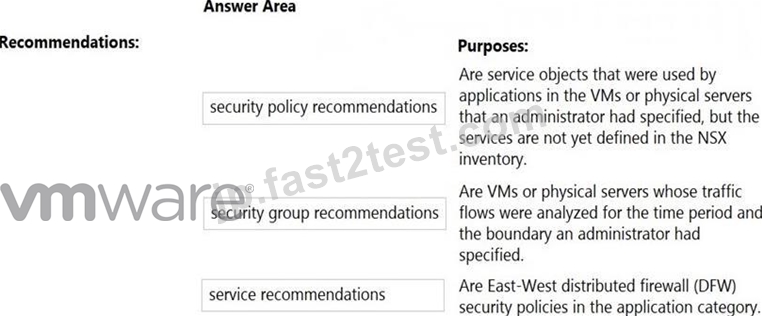
Explanation:
Security policy recommendations: Are East-West distributed firewall (DFW) security policies in the application category12.
Security group recommendations: Are VMs or physical servers whose traffic flows were analyzed for the time period and the boundary you had specified12.
Service recommendations: Are service objects that were used by applications in the VMs or physical servers that you had specified, but the services are not yet defined in the NSX inventory12.
https://docs.vmware.com/en/VMware-NSX-Intelligence/4.1/user-guide/GUID-BA3B0D67-4AA8-439E- A845-4598DAD6B9D0.html
質問 # 18
Which troubleshooting step will resolve an error with code 1001 during the configuration of a time- based firewall rule?
- A. Restarting the NTPservice on the ESXi host.
- B. Reconfiguring the ESXI host with a local NTP server.
- C. Changing the lime zone on the ESXi host.
- D. Reinstalling the NSX VIBs on the ESXi host.
正解:A
解説:
According to the web search results, error code 1001 is related to a time synchronization issue between the ESXi host and the NSX Manager. This can cause problems when configuring a time-based firewall rule, which requires the ESXi host and the NSX Manager to have the same time zone and NTP server settings. To resolve this error, you need to restart the NTP service on the ESXi host to synchronize the time with the NSX Manager. You can use the following command to restart the NTP service on the ESXi host:
/etc/init.d/ntpd restart
The other options are not valid solutions for this error. Reinstalling the NSX VIBs on the ESXi host will not fix the time synchronization issue. Changing the time zone on the ESXi host may cause more discrepancies with the NSX Manager. Reconfiguring the ESXi host with a local NTP server may not be compatible with the NSX Manager's NTP server.
質問 # 19
An administrator has deployed 10 Edge Transport Nodes in their NSX Environment, but has forgotten to specify an NTP server during the deployment.
What is the efficient way to add an NTP server to all 10 Edge Transport Nodes?
- A. Use a Node Profile
- B. Use Transport Node Profile
- C. Use the CLI on each Edge Node
- D. Use a PowerCLI script
正解:B
解説:
Using a Transport Node Profile allows the administrator to apply configuration changes, such as specifying an NTP server, across multiple Edge Transport Nodes efficiently. This method is scalable and avoids the need for manual configuration on each individual node. Once the Transport Node Profile is updated, the configuration can be pushed to all associated nodes.
質問 # 20
What should an NSX administrator check to verify that VMware Identity Manager integration is successful?
- A. From the NSX CLI the status of the VMware Identity Manager Integration must be Configured'
- B. From VMware Identity Manager the status of the remote access application must be green
- C. From the NSX Ul the status of the VMv/are Identity Manager Integration must be Enabled'
- D. From the NSX Ul the URI in the address bar must have locaMalstf part of it.
正解:A
解説:
To verify that VMware Identity Manager integration is successful with NSX, the administrator should check the NSX UI for the integration status. If it is configured correctly, the status should be marked as "Enabled," indicating that the integration is active and functioning.
質問 # 21
Which two of the following are used to configure Distributed Firewall on VDS? (Choose two.)
- A. vSphere API
- B. vCenter API
- C. NSX CU
- D. NSX API
- E. NSX UI
正解:D、E
解説:
According to the VMware NSX Documentation, these are two of the ways that you can use to configure Distributed Firewall on VDS:
NSX API: This is a RESTful API that allows you to programmatically configure and manage Distributed Firewall on VDS using HTTP methods and JSON payloads. You can use tools such as Postman or curl to send API requests to the NSX Manager node.
NSX UI: This is a graphical user interface that allows you to configure and manage Distributed Firewall on VDS using menus, tabs, buttons, and forms. You can access the NSX UI by logging in to the NSX Manager node using a web browser.
https://docs.vmware.com/en/VMware-NSX/4.1/administration/GUID-0DEF9F18-608D-4B5C-9175-5514750E901B.html
質問 # 22
Which two logical router components span across all transport nodes? (Choose two.)
- A. DISTRIBUTED_ROUTER_TIER1
- B. SERVICE_ROUTER_TIER0
- C. SERVICE_ROUTER_TIER1
- D. TIER0_DISTRIBUTED_ROUTER
- E. DISTRIBUTED_ROUTER_TIER0
正解:A、D
解説:
TIER0_DISTRIBUTED_ROUTER: The Tier-0 Distributed Router spans all transport nodes, providing distributed routing capabilities across the NSX environment at the Tier-0 level.
DISTRIBUTED_ROUTER_TIER1: Similarly, the Tier-1 Distributed Router spans all transport nodes, enabling distributed routing at the Tier-1 level, which allows routing functions to occur closer to the workload VMs across the transport nodes.
質問 # 23
A customer is preparing to deploy a VMware Kubernetes solution in an NSX environment.
What is the minimum MTU size for the UPLINK profile?
- A. 0
- B. 1
- C. 2
- D. 3
正解:D
解説:
For a VMware Kubernetes deployment in an NSX environment, the minimum recommended MTU size for the UPLINK profile is 1700. This allows sufficient space for the additional overhead introduced by encapsulation protocols, such as Geneve, used in NSX-T Data Center, ensuring optimal performance and avoiding fragmentation.
質問 # 24
An administrator has been tasked with implementing the SSL certificates for the NSX Manager Cluster VIP.
Which is the correct way to implement this change?
- A. Send an API call to https://<nsx-mgr>/api/v1/node/services/http?
action=apply_certificate&certificate_id=<certificate_id> - B. SSH as admin into the NSX manager with the cluster VIP IP and run nsxcli cluster certificate vip install <certificate_id>
- C. SSH as admin into the NSX manager with the cluster VIP IP and run nsxcli cluster certificate node install <certificate_id>
- D. Send an API call to https://<nsx-mgr>/api/v1/cluster/api-certificate?
action=set_cluster_certificate&certificate_id=<certificate_id>
正解:D
解説:
https://docs.vmware.com/en/VMware-Validated-Design/5.0.1/com.vmware.vvd.sddc-nsxt-domain- deploy.doc/GUID-B7019BCE-4FA1-40BB-8DC2-EE47967A47F1.html You can replace the certificate for a manager node or the manager cluster virtual IP (VIP) by making an API call: * To replace the certificate of a manager node, use the POST API call: https://<nsx- mgr>/api/v1/node/services/http?action=apply_certificate&certificate_id=<certificate_id> * To replace the certificate of the manager cluster VIP, use the POST API call: https://<nsx-mgr>/api/v1/cluster/api- certificate?action=set_cluster_certificate&certificate_id=<certificate_id>
質問 # 25
Which two tools are used for centralized logging in VMware NSX? (Choose two.)
- A. VMware Aria Automation
- B. VMware Aria Operations
- C. VMware Aria Operations for Networks
- D. Syslog Server
- E. VMware Aria Operations for Logs
正解:D、E
解説:
Two tools that are used for centralized logging in VMware NSX are Syslog Server and VMware Aria Operations for Logs. Syslog Server is a standard protocol for sending log messages from various network devices to a centralized server1. VMware NSX supports syslog for long term retention of logs and all NSX components can send syslog messages to a configured syslog server2. VMware Aria Operations for Logs is a VMware product that provides intelligent log analytics for NSX3. It provides monitoring and troubleshooting capabilities and customizable dashboards for network virtualization, flow analysis, and alerts3. The other options are incorrect because they are not tools for centralized logging in VMware NSX. VMware Aria Operations is a VMware product that provides operations management and automation for NSX4, but it is not the same as VMware Aria Operations for Logs. VMware Aria Automation is a VMware product that provides automation and orchestration for NSX5, but it is not related to logging. VMware Aria Operations for Networks is not a valid product name.
Reference: Syslog, NSX Logging and System Events, VMware vRealize Log Insight for NSX, VMware vRealize Operations Management Pack for NSX, VMware vRealize Automation
質問 # 26
Which CLI command would an administrator use to allow syslog on an ESXi transport node when using the esxcli utility?
- A. esxcli network firewall ruleset -e syslog
- B. esxcli network firewall ruleset set -r syslog -e false
- C. esxcli network firewall ruleset set -a -e false
- D. esxcli network firewall ruleset set -r syslog -e true
正解:D
解説:
The esxcli network firewall ruleset set -r syslog -e true command is used to enable the firewall ruleset for syslog on an ESXi host. Setting the -e flag to true allows syslog traffic through the ESXi firewall, enabling remote logging for syslog messages from the transport node.
質問 # 27
NSX improves the security of today's modern workloads by preventing lateral movement, which feature of NSX can be used to achieve this?
- A. Edge Firewalling
- B. Dynamic Routing
- C. Virtual Security Zones
- D. Network Segmentation
正解:D
解説:
According to the web search results, network segmentation is a feature of NSX that improves the security of today's modern workloads by preventing lateral movement. Lateral movement is a technique used by attackers to move from one compromised system to another within a network, exploiting vulnerabilities or credentials. Network segmentation prevents lateral movement by dividing a network into smaller segments or zones, each with its own security policies and controls. This way, if one segment is compromised, the attacker cannot access other segments or resources.
NSX enables network segmentation by using micro-segmentation, which applies granular firewall rules at the virtual machine level, regardless of the physical network topology.
質問 # 28
What should an NSX administrator check to verify that VMware Identity Manager Integration Is successful?
- A. From the NSX UI the status of the VMware Identity Manager Integration must be "Enabled".
- B. From the NSX UI the URI in the address bar must have "locaNfatse" part of it.
- C. From VMware Identity Manager the status of the remote access application must be green.
- D. From the NSX CLI the status of the VMware Identity Manager Integration must be "Configured".
正解:A
解説:
From the NSX UI the status of the VMware Identity Manager Integration must be
"Enabled". According to the VMware NSX Documentation1, after configuring VMware Identity Manager integration, you can validate the functionality by checking the status of the integration in the NSX UI. The status should be "Enabled" if the integration is successful. The other options are either incorrect or not relevant.
質問 # 29
What are four NSX built-in role-based access control (RBAC) roles? (Choose four.)
- A. Full Access
- B. Operator
- C. Network Admin
- D. None
- E. Read
- F. Enterprise Admin
- G. Auditor
正解:A、D、E、G
解説:
None: No permissions are granted, restricting the user's access entirely.
Read: Grants read-only access, allowing the user to view configurations and settings without making changes.
Auditor: Similar to Read, but typically includes access to audit logs and more detailed viewing permissions for compliance purposes.
Full Access: Grants complete control over all NSX configurations and settings, allowing unrestricted access.
質問 # 30
An administrator needs to download the support bundle for NSX Manager.
Where does the administrator download the log bundle from?
- A. System > Settings
- B. System > Settings > Support Bundle
- C. System > Utilities > Tools
- D. System > Support Bundle
正解:D
解説:
https://docs.vmware.com/en/VMware-NSX/4.1/nsx-application-platform/GUID-50FB1A3F-07D8-4125-
9252-DB05C28BE7E1.html: Procedure From your browser, log in with Enterprise Admin privileges to an NSX Manager at https://<nsx-manager-ip-address>. Navigate to System > Support Bundle. In the Request Bundle tab, select NSX Application Platform from the Type drop-down menu.
質問 # 31
Which CLI command would an administrator use to allow syslog on an ESXi transport node when using the esxcli utility?
- A. esxcli network firewall ruleset -e syslog
- B. esxcli network firewall ruleset set -r syslog -e false
- C. esxcli network firewall ruleset set -a -e false
- D. esxcli network firewall ruleset set -r syslog -e true
正解:D
解説:
The esxcli network firewall ruleset set -r syslog -e true command is used to enable the firewall ruleset for syslog on an ESXi host. Setting the -e flag to true allows syslog traffic through the ESXi firewall, enabling remote logging for syslog messages from the transport node.
質問 # 32
A company security policy requires all users to log into applications using a centralized authentication system.
Which two authentication, authorization, and accounting (AAA) systems are available when integrating NSX with VMware Identity Manager? (Choose two.)
- A. LDAP and OpenLDAP based on Active Directory (AD)
- B. RADII 2.0
- C. SecureDAP
- D. RSA SecureID
- E. Keygen Enterprise
正解:A、D
解説:
RSA SecureID: RSA SecureID is a commonly used two-factor authentication (2FA) system that can integrate with VMware Identity Manager for enhanced security during authentication, making it a suitable AAA system for user authentication.
LDAP and OpenLDAP based on Active Directory (AD): VMware Identity Manager can integrate with LDAP and OpenLDAP directories, including Active Directory (AD), for centralized user authentication. This allows users to authenticate against an organization's directory service.
質問 # 33
What are two valid BGP Attributes that can be used to influence the route path traffic will take? (Choose two.)
- A. MED
- B. Cost
- C. AS-Path Prepend
- D. BFD
正解:A、C
解説:
AS-Path Prepend: This attribute allows you to prepend one or more AS numbers to the AS path of a route, making it appear longer and less preferable to other BGP routers. You can use this attribute to manipulate the inbound traffic from your BGP peers by advertising a longer AS path for some routes and a shorter AS path for others.
MED: This attribute stands for Multi-Exit Discriminator and allows you to specify a preference value for a route among multiple exit points from an AS. You can use this attribute to manipulate the outbound traffic to your BGP peers by advertising a lower MED value for some routes and a higher MED value for others.
質問 # 34
Which command is used to set the NSX Manager's logging-level to debug mode for troubleshooting?
- A. sec service nsx-manager log-level debug
- B. sec service nsx-manager logging-level debug
- C. sec service manager logging-level debug
- D. set service manager log-level debug
正解:C
解説:
The set service nsx-manager log-level debug command is used to set the NSX Manager's logging level to debug mode. Setting the log level to debug can provide more detailed logging information, which is useful for troubleshooting issues within the NSX Manager.
質問 # 35
......
2V0-41.24試験問題集合格させるのは更新されたのは2025年年最新の認証済み試験問題:https://jp.fast2test.com/2V0-41.24-premium-file.html
ガイド(2025年最新)実際のVMware 2V0-41.24試験問題:https://drive.google.com/open?id=1Y1VckGTQvyfhNhtUdlLAWWrtz7YaChRV