
試験名称: Certified Kubernetes Security Specialist (CKS)
認証ベンダー: Linux Foundation
対応認証: Kubernetes Security Specialist

オーバー 11426+ 人満足している顧客
最も有効な CKS 試験参考書

インスタントダウンロード: 支払いが完了すると、システムから購入した商品がメールで自動的にメールボックスに送信されます。 (12時間以内に受信されない場合は、ご連絡ください。注意:スパムを確認することを忘れないでください)。
100%返金保証
Fast2testは、顧客の間で初めて合格率99.6%を達成しています。  弊社は製品に自信を持っており、面倒な製品を提供していません。
- 高品質試験問題集参考書
- 三つバージョンは選択可能
- 十年の優位性
- 365日無料アップデット
- いつでもどこで勉強
- 100%安全なショッピング体験

- 印刷可能なCKS PDF版
- Linux Foundation専門家による準備
- インスタントダウンロード
- いつでもどこでも勉強
- 365日無料アップデート
- CKS無料PDFデモをご利用
- 問題と解答: 66
- 最近更新時間: 2026-09-14
- 価格: ¥7500

- 学習を簡単に、便利オンラインツール
- インスタントオンラインアクセス
- すべてのWebブラウザをサポート
- いつでもオンラインで練習
- テスト履歴と性能レビュー
- Windows/Mac/Android/iOSなどをサポート
- 問題と解答: 66
- 最近更新時間: 2026-09-14
- 価格: ¥7500

- インストール可能なソフトウェア応用
- 本番の試験環境をシミュレート
- 人にCKS試験の自信をもたせる
- MSシステムをサポート
- 練習用の2つモード
- いつでもオフラインで練習
- 問題と解答: 66
- 最近更新時間: 2026-09-14
- 価格: ¥7500
Linux Foundation Certified Kubernetes Security Specialist (CKS)の学習では、Linux Foundationが定める出題範囲を外さないことが合格への近道です。Fast2testのCKS練習問題は66問を通じて公式領域を体系的に見直せるため、初学者にも実務経験者にも使いやすい構成です。
CKS試験対策に選べる3つの学習形式
- PDF版:印刷して持ち運べる形式で、専門家が作成した内容をすぐにダウンロードして確認できます。学習場所を選ばず、365日間の無料更新と無料PDFサンプルに対応しています。
- Desktop Test Engine:インストールして使用するソフトウェアで、実際の試験環境を再現した2つの練習モードを利用できます。オフライン学習に対応し、Windowsで動作します。
- Online Test Engine:ブラウザーからすぐにアクセスでき、学習履歴と成績を確認できます。Windows、Mac、Android、iOSで利用できます。
Fast2testの安心な購入・利用サポート
- McAfeeのセキュリティサービスにより、お客様の情報を安全に取り扱います。
- ご購入後365日間は無料で更新版をご利用いただけます。更新期間の終了後も、50%割引で継続更新が可能です。
- ご入金確認後はすぐにダウンロードでき、通常1分以内にメールでもお届けします。2時間経っても届かない場合は、カスタマーサポートへご連絡ください。
- インストール可能なパソコン台数に制限はありません。
Linux Foundation Certified Kubernetes Security Specialist (CKS)の試験情報
Linux Foundation CKS 試験概要:
| 認定ベンダー: | Linux Foundation |
|---|---|
| 試験名: | Certified Kubernetes Security Specialist (CKS) Exam |
| 試験番号: | CKS |
| 関連資格: | Certified Kubernetes Application Developer (CKAD) Certified Kubernetes Administrator (CKA) |
| 対応言語: | 英語 |
| 試験時間: | 120 分 |
| 試験形式: | 実技試験, ターミナルベースのタスク, ハンズオンラボ(Kubernetes環境) |
| 合格点: | 非公開 |
| 認定の有効期間: | 2年間 |
| 出題数: | 実技タスク(問題数は固定されていません) |
| 受験料: | USD 395 |
| 推奨トレーニング: | Kubernetes Security Essentials (Linux Foundation トレーニング) CKS試験準備コース |
| 受験申し込み: | Linux Foundation 受験者ハンドブック Linux Foundation 認定ページ |
| サンプル問題: | デモをダウンロードする |
| 受験方法: | オンライン、プロクター(試験監督)付き、リモート実技試験 |
| 前提条件: | 有効なCertified Kubernetes Administrator (CKA)資格の保有が必須 |
| 公式シラバスのURL: | https://training.linuxfoundation.org/certification/certified-kubernetes-security-specialist/ |
CKS試験の出題範囲
Linux Foundation CKS 試験シラバストピック:
| セクション | 比重 | 目標 |
|---|---|---|
| トピック 1: マイクロサービスの脆弱性の最小化 | 20% | - コンテナの分離とセキュリティコンテキスト - Podセキュリティ基準 |
| トピック 2: クラスターのセットアップ | 15% | - クラスターコンポーネントの堅牢化 - セキュアなインストール設定 |
| トピック 3: システムの堅牢化 | 15% | - ホストのセキュリティ制御 - カーネルおよびノードのセキュリティ設定 |
| トピック 4: クラスターの堅牢化 | 15% | - 認証と認可 - APIサーバーのセキュリティ |
| トピック 5: 監視、ロギング、およびランタイムセキュリティ | 15% | - 監査ロギングと監視 - ランタイム脅威検出 |
| トピック 6: サプライチェーンのセキュリティ | 20% | - イメージのスキャンと検証 - セキュアなCI/CDプラクティス |
Linux Foundation CKSのよくある質問と回答
CKSは、Certified Kubernetes Security Specialist (CKS)を取得するための認定試験です。認定レベルはプロフェッショナルです。関連する認定にはCertified Kubernetes Administrator (CKA)、Certified Kubernetes Application Developer (CKAD)があります。受験前に公式の出題範囲を確認しながら、Fast2testの66問の練習問題で理解度を確かめると効率的です。
CKSの総問題数は実技タスク(問題数は固定されていません)、試験時間は120 分です。1問に使える時間は問題数と試験時間から逆算し、回答しやすい問題から進めながら、見直す時間を残すことが大切です。Fast2testの模擬試験では、本番と同じ制限時間を意識した演習を繰り返し、時間配分の感覚を確認できます。
CKSの合格基準は非公開、公式受験料はUSD 395です。再受験の場合は再度受験料が必要になるため、本番前にFast2testの練習問題で安定して合格基準を上回る解答力があるかを確認しておきましょう。
CKSの受験条件は、有効なCertified Kubernetes Administrator (CKA)資格の保有が必須です。条件は変更される場合があるため、最新情報は公式の試験案内でご確認ください。
CKSの申込方法は、以下の公式窓口から確認できます。
試験方式はオンライン、プロクター(試験監督)付き、リモート実技試験です。
CKSには、以下の公式推奨トレーニングがあります。
公式トレーニングで全体像をつかんだ後は、Fast2testの66問の練習問題で知識の定着と解答速度を確認してください。
はい、Fast2testではCKSの無料サンプルをご用意しています。購入前に問題の傾向や解説の読みやすさを確認できます。ご購入後は365日間無料で更新版をご利用いただけます。更新期間の終了後も、50%割引で継続更新をご利用いただけます。
ご購入後60日以内に対応するCKS試験を受験し、不合格だった場合は、条件を満たすことで全額の返金保証をご利用いただけます。購入後3日以内の受験、教材をダウンロードしたものの未受験の場合、無料資料および更新期限切れのご注文は対象外です。申請には、受験票またはenrollment slipの写しと、受験者氏名が購入者氏名と一致した公式Score ReportのPDFを、受験後2日以内にご提出いただく必要があります。ご提出後、7日以内に手続きを完了します。返金ではなく変更をご希望の場合は、同価値の試験資料2点を無料でご提供し、元の製品の更新サービスも継続します。
商品はご入金確認後すぐにダウンロードでき、通常1分以内にメールでもお届けします。2時間経っても届かない場合はカスタマーサポートへご連絡ください。インストール可能なパソコン台数に制限はありません。
CKS試験の出題範囲は6の領域で構成されています。主な領域は、「クラスターの堅牢化」(15%)、「マイクロサービスの脆弱性の最小化」(20%)、「システムの堅牢化」(15%)などです。詳細な出題範囲は、このページ上部のExam Topicsでご確認ください。
Linux Foundation Certified Kubernetes Security Specialist (CKS) 認定 CKS 試験問題:
SIMULATION
You must connect to the correct host . Failure to do so may
result in a zero score.
[candidato@base] $ ssh cks000023
Task
Analyze and edit the Dockerfile located at /home/candidate/subtle-bee/build/Dockerfile, fixing one instruction present in the file that is a prominent security/best-practice issue.
Do not add or remove instructions; only modify the one existing instruction with a security/best-practice concern.
Do not build the Dockerfile, Failure to do so may result in running out of storage and a zero score.
Analyze and edit the given manifest file /home/candidate/subtle-bee/deployment.yaml, fixing one fields present in the file that are a prominent security/best-practice issue.
Do not add or remove fields; only modify the one existing field with a security/best-practice concern.
Should you need an unprivileged user for any of the tasks, use user nobody with user ID 65535.
正解:
See the Explanation below for complete solution
Explanation:
0) Connect to the correct host
ssh cks000023
sudo -i
PART A - Fix ONE prominent Dockerfile security/best-practice issue
1) Open the Dockerfile
vi /home/candidate/subtle-bee/build/Dockerfile
2) Find the "most obvious" security/best-practice problem and modify ONLY THAT ONE instruction Use / search in vi to quickly find candidates:
Candidate 1 (very common): USER root (or no USER but a USER 0)
Search:
/USER
If you see:
USER root
Change that single instruction to:
USER 65535
(or USER nobody if that exact word is already used in the file-but the task explicitly allows UID 65535, so USER 65535 is safest.)
✅ This is one-instruction change and is a top-tier best practice.
Candidate 2 (very common): FROM <image>:latest
Search:
/FROM
If you see something like:
FROM nginx:latest
Change ONLY that line to a pinned tag (example):
FROM nginx:1.25.5
(Any non-latest pinned version is the point. Don't add a digest line; just modify the existing FROM line.) Candidate 3: ADD http://... (remote URL download) Search:
/ADD
If you see remote URL usage like:
ADD https://example.com/app.tar.gz /app/
Change that single instruction to COPY only if it's copying local files.
If it's a remote URL, the more "correct" fix would normally be using curl with verification, but that would require adding instructions (not allowed).
So in this exam constraint, do NOT pick this unless it's actually a local add like:
ADD . /app
Then change just the word:
COPY . /app
3) Save and exit
:wq
Don't run docker build (task forbids building).
PART B - Fix ONE prominent security/best-practice issue in the Deployment manifest
4) Open the manifest
vi /home/candidate/subtle-bee/deployment.yaml
5) Change ONLY ONE existing field that is a clear security issue
Use / search in vi for the usual "bad fields":
Option 1 (most common): running as root
Search:
/runAsUser
If you see:
runAsUser: 0
Change that one existing field value to:
runAsUser: 65535
✅ This is a single-field change and matches the prompt hint.
Option 2: privileged container
Search:
/privileged
If you see:
privileged: true
Change only that value to:
privileged: false
Option 3: allow privilege escalation
Search:
/allowPrivilegeEscalation
If you see:
allowPrivilegeEscalation: true
Change only that value to:
allowPrivilegeEscalation: false
Option 4: writable root filesystem
Search:
/readOnlyRootFilesystem
If you see:
readOnlyRootFilesystem: false
Change only that value to:
readOnlyRootFilesystem: true
Option 5: image uses :latest
Search:
/image:
If you see:
image: something:latest
Change only that value to a pinned tag, e.g.:
image: something:1.2.3
6) Save and exit
:wq
What to pick (fast decision rule)
If you see run as root in either file, that's usually the highest scoring / most "prominent" security issue.
Dockerfile: USER root → USER 65535
Deployment: runAsUser: 0 → runAsUser: 65535
Those are perfect because you only modify one line/field and it matches the hint.
SIMULATION
Use the kubesec docker images to scan the given YAML manifest, edit and apply the advised changes, and passed with a score of 4 points.
kubesec-test.yaml
apiVersion: v1
kind: Pod
metadata:
name: kubesec-demo
spec:
containers:
- name: kubesec-demo
image: gcr.io/google-samples/node-hello:1.0
securityContext:
readOnlyRootFilesystem: true
Hint: docker run -i kubesec/kubesec:512c5e0 scan /dev/stdin < kubesec-test.yaml
正解:
See the Explanation belowExplanation:
kubesec scan k8s-deployment.yaml
cat <<EOF > kubesec-test.yaml
apiVersion: v1
kind: Pod
metadata:
name: kubesec-demo
spec:
containers:
- name: kubesec-demo
image: gcr.io/google-samples/node-hello:1.0
securityContext:
readOnlyRootFilesystem: true
EOF
kubesec scan kubesec-test.yaml
docker run -i kubesec/kubesec:512c5e0 scan /dev/stdin < kubesec-test.yaml kubesec http 8080 &
[1] 12345
{"severity":"info","timestamp":"2019-05-12T11:58:34.662+0100","caller":"server/server.go:69","message":"Starting HTTP server on port 8080"} curl -sSX POST --data-binary @test/asset/score-0-cap-sys-admin.yml http://localhost:8080/scan
[
{
"object": "Pod/security-context-demo.default",
"valid": true,
"message": "Failed with a score of -30 points",
"score": -30,
"scoring": {
"critical": [
{
"selector": "containers[] .securityContext .capabilities .add == SYS_ADMIN",
"reason": "CAP_SYS_ADMIN is the most privileged capability and should always be avoided"
},
{
"selector": "containers[] .securityContext .runAsNonRoot == true",
"reason": "Force the running image to run as a non-root user to ensure least privilege"
},
// ...
SIMULATION
use the Trivy to scan the following images,
1. amazonlinux:1
2. k8s.gcr.io/kube-controller-manager:v1.18.6
Look for images with HIGH or CRITICAL severity vulnerabilities and store the output of the same in /opt/trivy-vulnerable.txt
正解:
Send us you rsuggestion on it
SIMULATION
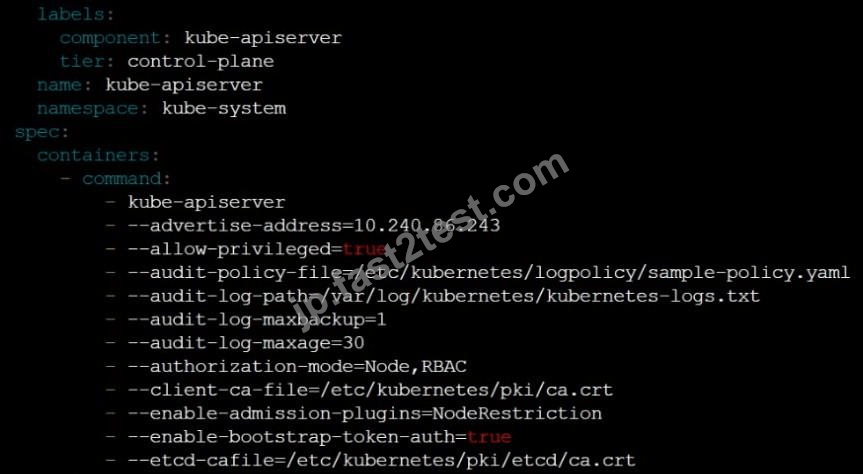
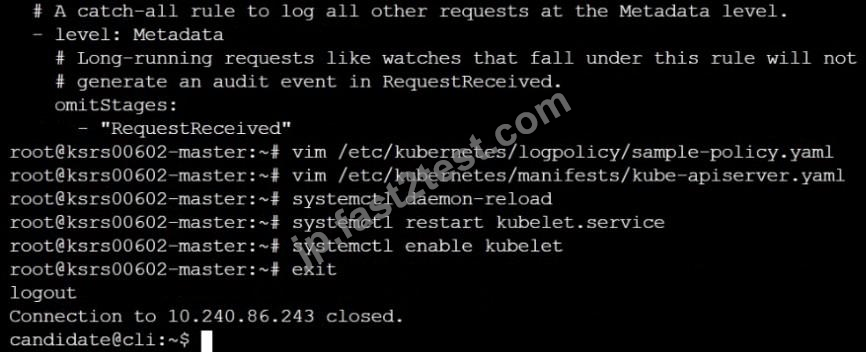
Enable audit logs in the cluster, To Do so, enable the log backend, and ensure that
1. logs are stored at /var/log/kubernetes/kubernetes-logs.txt.
2. Log files are retained for 5 days.
3. at maximum, a number of 10 old audit logs files are retained.
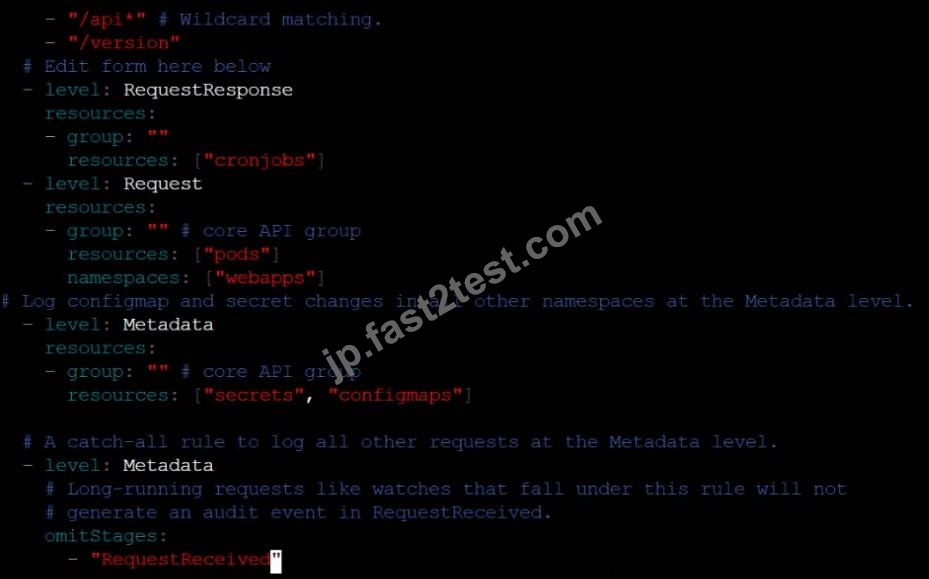
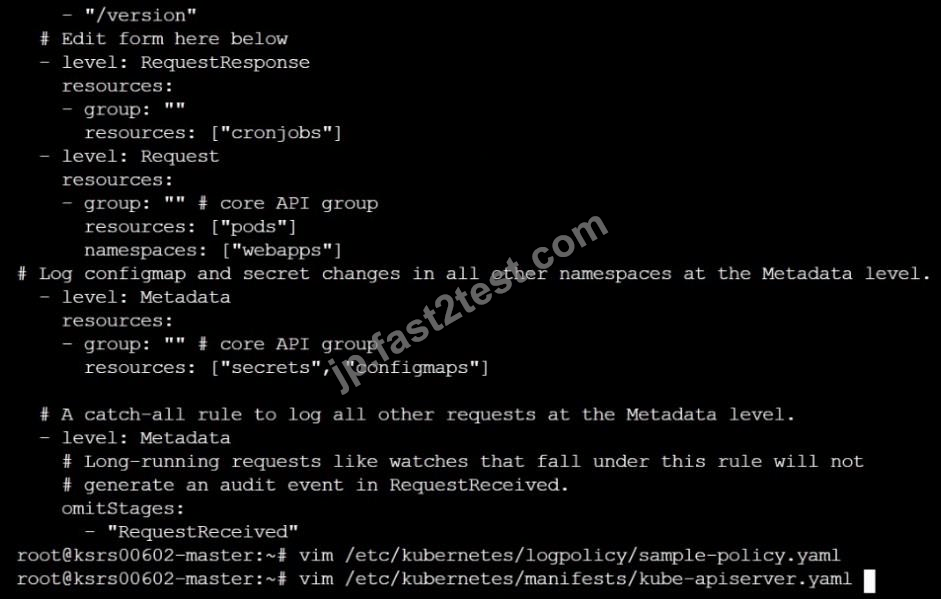
Edit and extend the basic policy to log:
1. Cronjobs changes at RequestResponse
2. Log the request body of deployments changes in the namespace kube-system.
3. Log all other resources in core and extensions at the Request level.
4. Don't log watch requests by the "system:kube-proxy" on endpoints or
正解:
See the Explanation belowExplanation: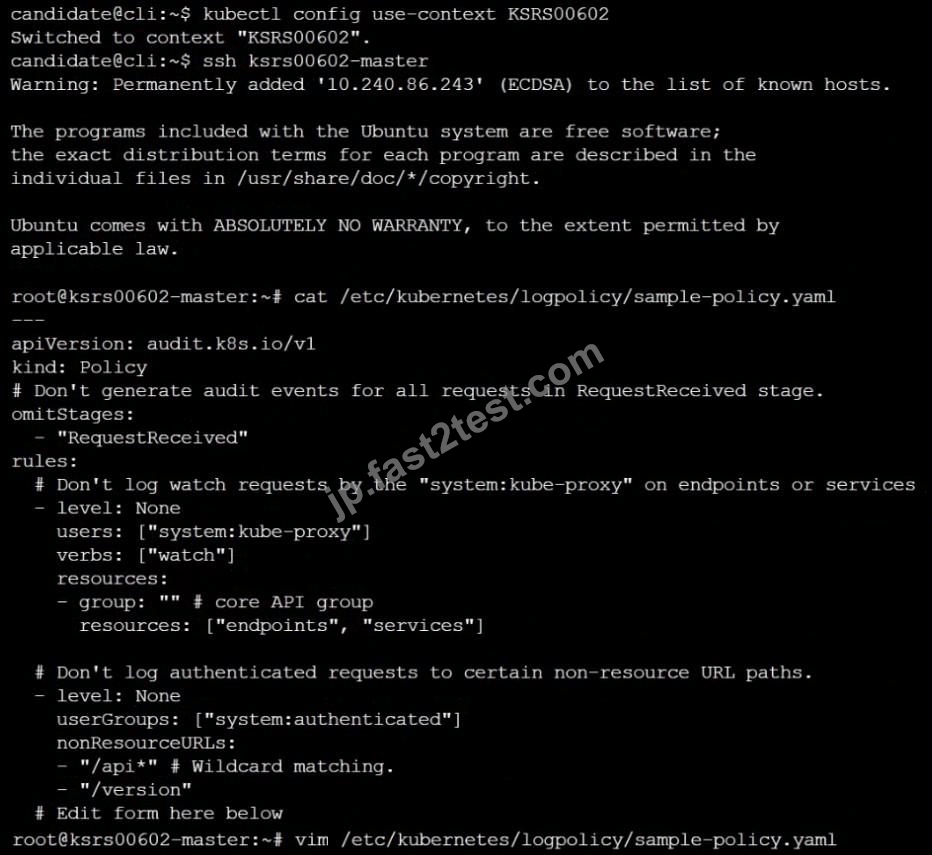
SIMULATION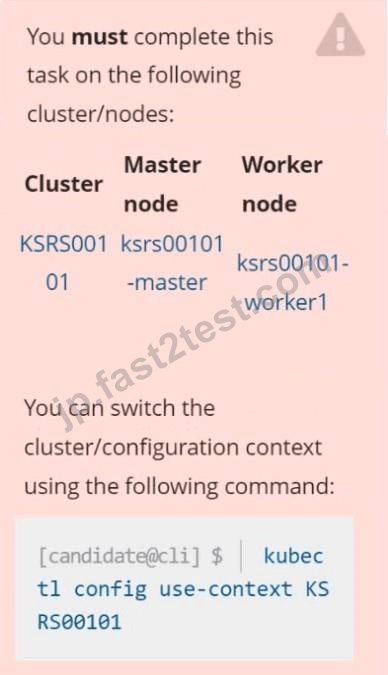
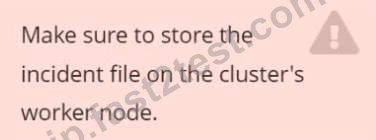
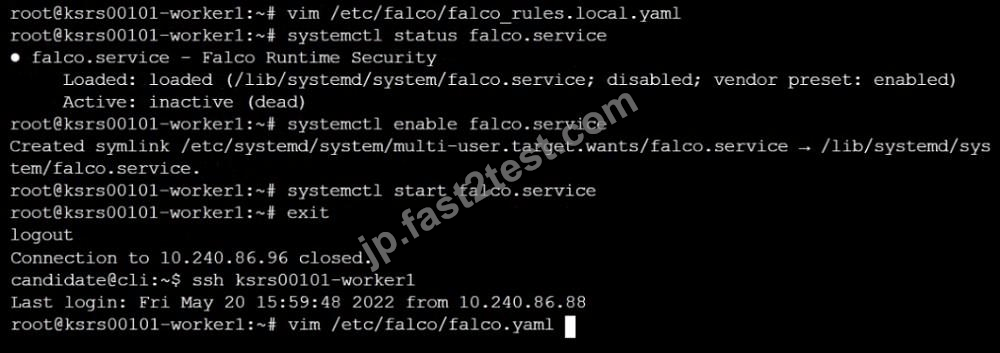
Two tools are pre-installed on the cluster's worker node:
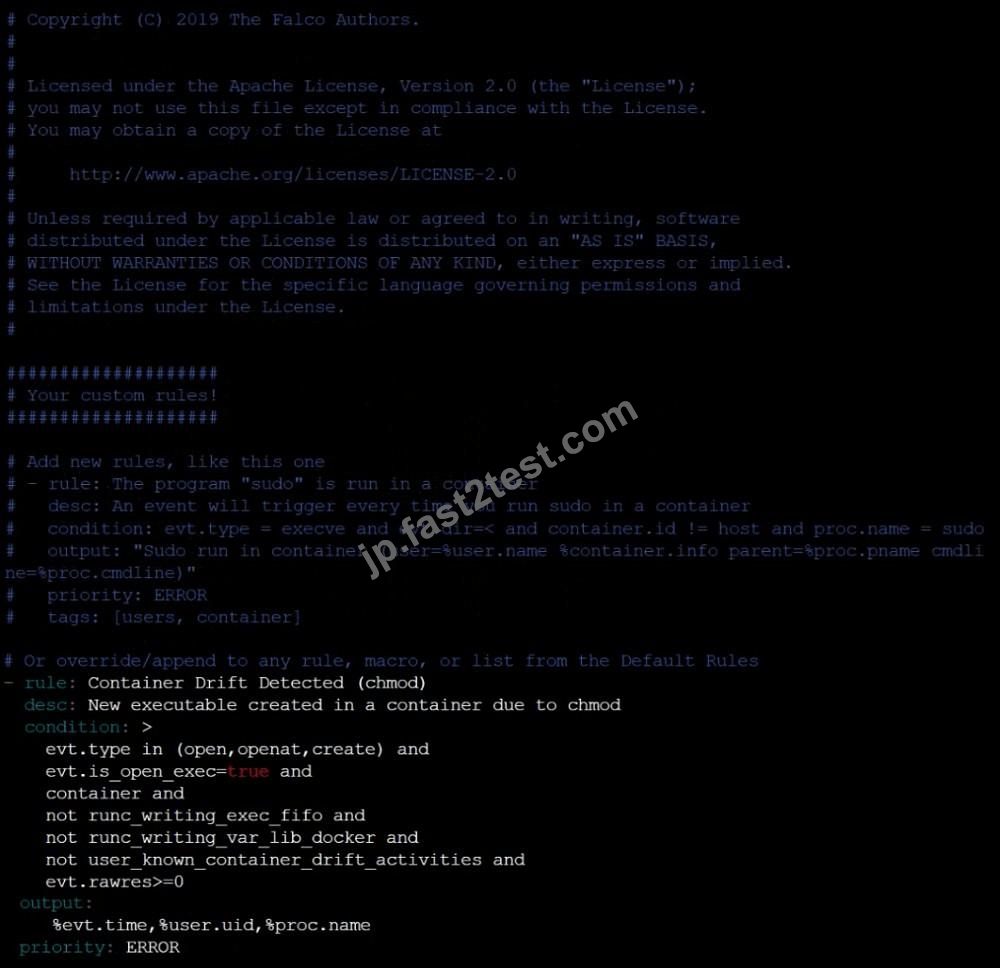
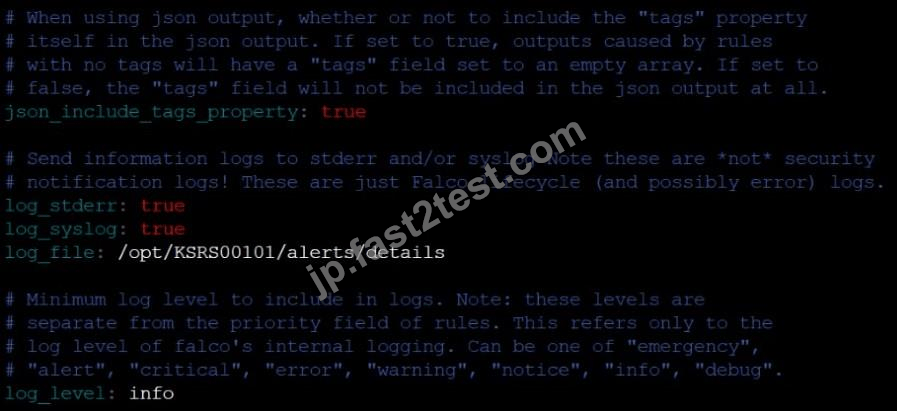
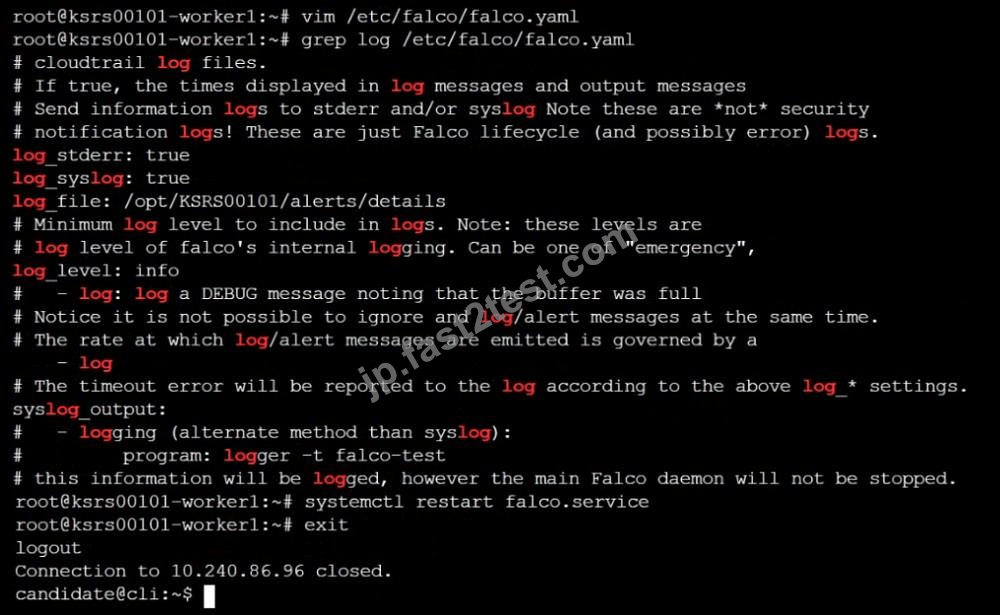
Using the tool of your choice (including any non pre-installed tool), analyze the container's behavior for at least 30 seconds, using filters that detect newly spawning and executing processes.
Store an incident file at /opt/KSRS00101/alerts/details, containing the detected incidents, one per line, in the following format: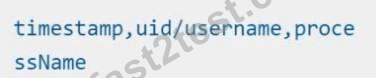
The following example shows a properly formatted incident file: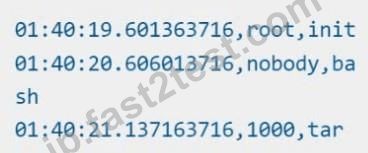

正解:
See explanation below
Explanation: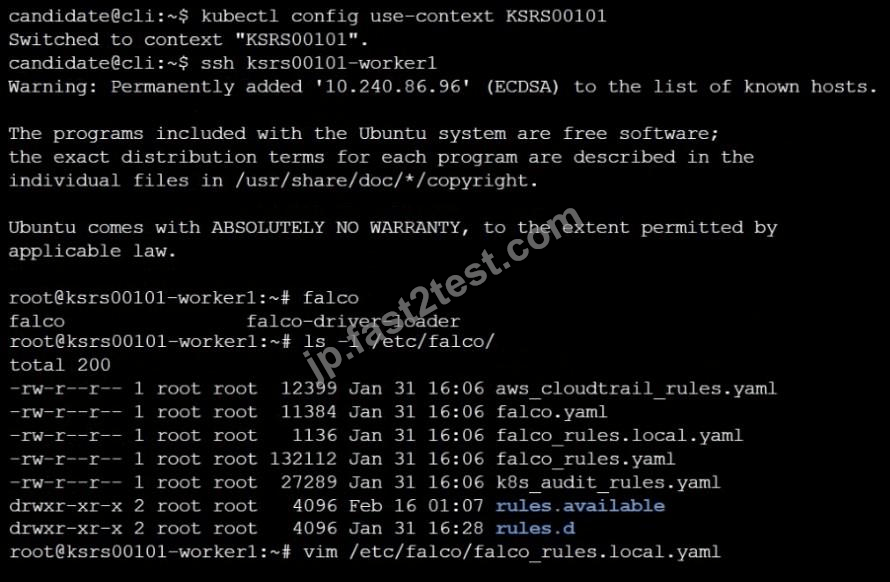
 1446 お客様のコメント最新のコメント 「一部の類似なコメント・古いコメントは隠されています」
合格しました。Fast2testさんのおかげです
内容も濃く、問題や擬似問題集と回答などもあり、CKS1冊で試験に対応できる良い本だと思います。
Satonaka

自習しやすく効率的な勉強をサポートする画期的なCKS問題集です。買ってよかったです
Kuratani
CKS試験は無事に合格することができました。Fast2testサンキュー
Yaguchi
練習問題つきなので、CKS試験勉強に最適。大変受験対策になると思います。CKS問題集しっかりしています。
Asahina
私は先月、Linux Foundation CKS試験参考書でCKS試験に合格しました。今後、引き続きCKS試験参考書を利用します。とても有効的な資料です。
仲根**
自習しやすく効率的な勉強をサポートする画期的なCKS問題集です。
Ootsubo

先日、日本語版のCKS問題集を購入するつもりですが、間違って英語版を入手しました。御社は熱心に私に交換しました。あとで僕は無事に試験に合格しました。大変ありがとうございました。
小山**
仕上げの模擬試験としてもご活用できますね。すごくいいです。CKSに合格できました。
Sawaki
教科書がメインになるので、必要に応じて不安な分野はCKS問題集に当たっても良いと思います。適度な図解もあり、非常に読みやすく分かりやすいです。
Kanetani
CKSの過去問題集です。過去問が大いに役立つ試験です
ティ**
Fast2testのおかげでCKSの試験に合格いたしました、次はKCNAに挑戦行きたいと思います。電車などの隙間時間もデスクでも、効率よくCKS学習できそうです。
Sasabuchi
これを取得するのに短時間で十分でした。試験にももちろん受かりました。
佐藤**
解説が充実しており、とてもわかりやすかったです。このCKS問題集を購入して今回合格出来ました。
青叶**
とっかかりには最高。CKSとても分かりやすかったです。CKSの本番試験にも無事合格しました。
米须**
易しすぎず難しすぎず、絶妙なバランスの解説が分かりやすいCKS試験対策書で本当にFast2testに助かられました。
Nakamura
御社に助かりまして、試験を合格しました!この試験はあまり易いではなく、でも、このFast2testはわたいの需要を満たしました。
誠にありがとうございます。
星*み
網羅性が高い。CKS素敵。高得点で受かりました。
Kajiwara
本書で重要ポイント,テクニックを身に付ければ合格がグッとが近づきると思います。しっかり網羅しているので。
Saitoh
CKSの過去問題集です。過去問が大いに役立つ試験ですので、これだけの量の過去問に対応しているのは素晴らしいです。
河野**
これだけでも良いとは思いますが、万全を期すのなら。解説が丁寧で分かりやすいのでしっかりと頭に入ってきます。
Ishizima
Linux Foundationの問題集は、重要な用語や概念は、より深く理解できるようにイラスト図解しているところだ好きです。
Watanabe
CKS問題集には丁寧な解説がひたすら書いてあります。次はKCNAに挑戦していきたいと思います。
久保**
セキュリティ&プライバシー
我々は顧客のプライバシーを尊重する。McAfeeセキュリティサービスを使用して、お客様の個人情報および安心のために最大限のセキュリティを提供します。
365日無料アップデート
購入日から365日無料アップデートをご利用いただけます。365日後、更新版がほしく続けて50%の割引を与えれます。

返金保証
購入後60日以内に、試験に合格しなかった場合は、全額返金します。 そして、無料で他の製品を入手できます。
インスタントダウンロードCKS
お支払い後、弊社のシステムは、1分以内に購入した商品をあなたのメールボックスにお送りします。 2時間以内に届かない場合に、お問い合わせください。
関連製品
関する文章
- [Q13-Q31] 合格させちゃうKubernetes Security Specialist CKS試験簡単かつ正確なPDF問題 [2025年05月02日]
- 2025年最新の検証済みCKS問題集と解答であなたを合格確定させるKubernetes Security Specialist試験解答! [Q14-Q32]
- 2025年最新のLinux FoundationテストCKS問題集豪華セット無料最新の問題集をゲット! [Q16-Q33]
- Fast2test CKS問題集49問でKubernetes Security Specialistを確実実践 [Q25-Q46]
- CKSブレーン問題集PDF、Linux Foundation CKS試験問題豪華お試しセット [Q26-Q44]
- Linux Foundation CKS試験問題(更新されたのは2024年)100%リアル問題解答 [Q14-Q32]
- 試験準備には欠かさない!CKS問題解答でCKS試験問題集 [Q28-Q43]
- 検証済みCKS問題集と解答100%合格はここにFast2test [Q18-Q34]
- [2024年07月]更新のLinux Foundation CKS試験基本問題には解答が付きます [Q29-Q49]
- 最新CKSテスト材料には有効なCKSテストエンジン [Q19-Q44]
