
試験名称: SAP Certified - Implementation Consultant - SAP S/4HANA Cloud Public Edition (C_S4CPB_2602)
認証ベンダー: SAP
対応認証: SAP Certified Associate

オーバー 11429+ 人満足している顧客
最も有効な C-S4CPB-2602 試験参考書

インスタントダウンロード: 支払いが完了すると、システムから購入した商品がメールで自動的にメールボックスに送信されます。 (12時間以内に受信されない場合は、ご連絡ください。注意:スパムを確認することを忘れないでください)。
100%返金保証
Fast2testは、顧客の間で初めて合格率99.6%を達成しています。  弊社は製品に自信を持っており、面倒な製品を提供していません。
- 高品質試験問題集参考書
- 三つバージョンは選択可能
- 十年の優位性
- 365日無料アップデット
- いつでもどこで勉強
- 100%安全なショッピング体験

- 印刷可能なC-S4CPB-2602 PDF版
- SAP専門家による準備
- インスタントダウンロード
- いつでもどこでも勉強
- 365日無料アップデート
- C-S4CPB-2602無料PDFデモをご利用
- 問題と解答: 20
- 最近更新時間: 2026-09-28
- 価格: ¥6500

- 学習を簡単に、便利オンラインツール
- インスタントオンラインアクセス
- すべてのWebブラウザをサポート
- いつでもオンラインで練習
- テスト履歴と性能レビュー
- Windows/Mac/Android/iOSなどをサポート
- 問題と解答: 20
- 最近更新時間: 2026-09-28
- 価格: ¥6500

- インストール可能なソフトウェア応用
- 本番の試験環境をシミュレート
- 人にC-S4CPB-2602試験の自信をもたせる
- MSシステムをサポート
- 練習用の2つモード
- いつでもオフラインで練習
- 問題と解答: 20
- 最近更新時間: 2026-09-28
- 価格: ¥6500
言語がわかりやすい
業界の新人として、プロの本の中で読めない言葉や表現は怒りを感じさせることがよくありますが、C-S4CPB-2602練習教材はこの問題を完全に解決するのに役立ちます。教材に雇われた業界の専門家は理解しにくいすべての専門用語を説明します。例えば、図表などです。C-S4CPB-2602実際のテストで使用されるすべての言語は、非常に簡単に理解しやすいものでした。私たちの教材を使えば、専門書の内容を理解できないことを心配する必要はありません。また、個別指導クラスに行くために高価な授業料を費やす必要はありません。C-S4CPB-2602テストエンジンは研究のすべての問題を解決するのを助けることができます。
100%合格率保証
教材の内容を順守し、毎日勉強し、定期的に自己試験を受けていれば、C-S4CPB-2602模擬教材を購入したすべての学生がプロの資格試験に合格することができるはずです。不幸にして私達のC-S4CPB-2602実際のテストに失敗したら、我々はお客様に全額払戻しを提供します、そして払い戻しプロセスは非常に簡単です。成績証明書を弊社のスタッフに提供する限り、すぐに払い戻しを受けます。もちろん、購入する前に、弊社の学習教材で無料のトライアルサービスを提供しています。ウェブサイトにログインしている限り、無料でトライアル質問バンクをダウンロードできます。C-S4CPB-2602テストエンジンを試した後、お客様はそれらを気に入るはずと信じています。
時間を節約し効率的な学習方法
私たちのC-S4CPB-2602練習教材には3つの異なるバージョンがあります:PDF、ソフトウェアおよびオンラインのAPP。この3つのバージョンは異なる研究グループが彼らの研究方法を選択する可能性を提供します。サラリーマンであれば、地下鉄やバスでC-S4CPB-2602の実際のテストのオンライン版を学ぶことができます。学生であれば、食事のために並んでいるときあなたはそれを検討することができます。主婦であれば、子供が眠っているときに勉強することができます。同時に、私たちの教材はオフライン学習をサポートしています。これはネットワークなしでは学ぶ方法がないという事態を回避します。同時に、C-S4CPB-2602テストエンジンを使用して検索することで、タイトルからナレッジポイントを検索できます。ナレッジポイントをもっと深く覚えておくことができるだけでなく、本を読むという煩わしい プロセスを回避することもできます。
C-S4CPB-2602練習問題は学生に適用されるだけでなく、サラリーマンと職場の退役軍人にも適用されます。私たちの学習教材は、すべての人が学び理解することができるようにするために、非常に勉強しやすいです。C-S4CPB-2602実際のテストはまたお客様が教科書の読書の煩わしさを避けることができます。その上練習問題をする過程ですべての重要な知識を習得させます。C-S4CPB-2602テストエンジンを選択した理由は以下の通りです。
SAP C-S4CPB-2602 試験シラバストピック:
| セクション | 比重 | 目標 |
|---|---|---|
| トピック 1: クラウドERPおよび導入の基礎知識 | 15% | - システム構成環境とアーキテクチャ - クラウド導入形態と基本概念 - 導入手法とプロジェクトの各フェーズ |
| トピック 2: 中心的な業務設定 | 20% | - 設定範囲の定義 - 組織構造の設定 - 権限管理とアクセス制御 |
| トピック 3: 機能拡張とユーザー体験の調整 | 10% | - カスタムアプリケーションと機能拡張 - ユーザーロールと画面のカスタマイズ - SAP Fiori Launchpadの設定 |
| トピック 4: データ移行とシステム連携 | 15% | - ステージングテーブルを活用したデータ移行 - SAP製システムおよび他社製システムとの連携 - データ移行の方針とツール |
| トピック 5: テストと本番環境への移行 | 15% | - テスト計画の立案と実施 - 本番稼働後の対応と保守作業 - 本番稼働に向けた準備と支援 |
| トピック 6: 標準機能への適合確認と業務プロセスの設定 | 25% | - 基幹業務プロセスの設定 - 標準機能適合ワークショップの準備と実施 - プロセスの調整と拡張方式 |
SAP Certified - Implementation Consultant - SAP S/4HANA Cloud Public Edition (C_S4CPB_2602) 認定 C-S4CPB-2602 試験問題:
SIMULATION
Create a Business User and Assign a Business Role
Business Scenario
You are working on an implementation project and need to create a test user in the system for demonstrating the professional services business processes to project managers during your upcoming Fit-to-Standard workshop. Follow the instructions below to create a new test user with a basic import of worker and work agreement data.
Note: In the task below, always replace ###### with the last 6 digits of your group number.
Note:
Make sure to use the EXACT names/values/spaces as they are listed in the task.
Even forgetting a space or a number will cause the validation of the task to fail and be marked as incorrect.
Task:
Assign the HR Administrator (BR_ADMINISTRATOR_HRINFO) business role to your user.
正解:
See Explanation below for all solution
Explanation:
Task 3: Assign the HR Administrator Business Role to Your User
Objective
The purpose of this task is to assign the HR Administrator business role to your own business user so you can continue the worker, work agreement, and business user setup activities required for the professional services scenario.
The required business role is:
Business Role ID: BR_ADMINISTRATOR_HRINFO
Business Role Description: Administrator - HR Info
Task 3: Assign the HR Administrator Business Role to Your User
Objective
The purpose of this task is to assign the HR Administrator business role to your own business user so you can continue the worker, work agreement, and business user setup activities required for the professional services scenario.
The required business role is:
Business Role ID: BR_ADMINISTRATOR_HRINFO
Business Role Description: Administrator - HR Info
Step 1: Open the app "Maintain Business Users"
From the SAP S/4HANA Cloud launchpad:
Log in to SAP S/4HANA Cloud.
Use the app search or launchpad search.
Search for:
Maintain Business Users
Open the app.
Explanation:
This app is used to maintain user master data and assign business roles.
All business role assignments for your own user are done here.
Step 2: Search for your own user
In Maintain Business Users:
In the filter/search area, enter your own user name or user ID.
Click Go.
Explanation:
You need to open your own user because the HR Administrator role must be assigned to your own account before continuing the simulation.
Step 3: Open your user record
After the search results appear:
Click your own user in the result list.
Open the detail page.
Explanation:
This opens the business user detail screen where all assigned roles can be reviewed and maintained.
Step 4: Switch to Edit mode
On the user detail page:
Click Edit.
Explanation:
Edit mode is required before you can add or remove business roles.
Without edit mode, the Assigned Business Roles tab is display-only.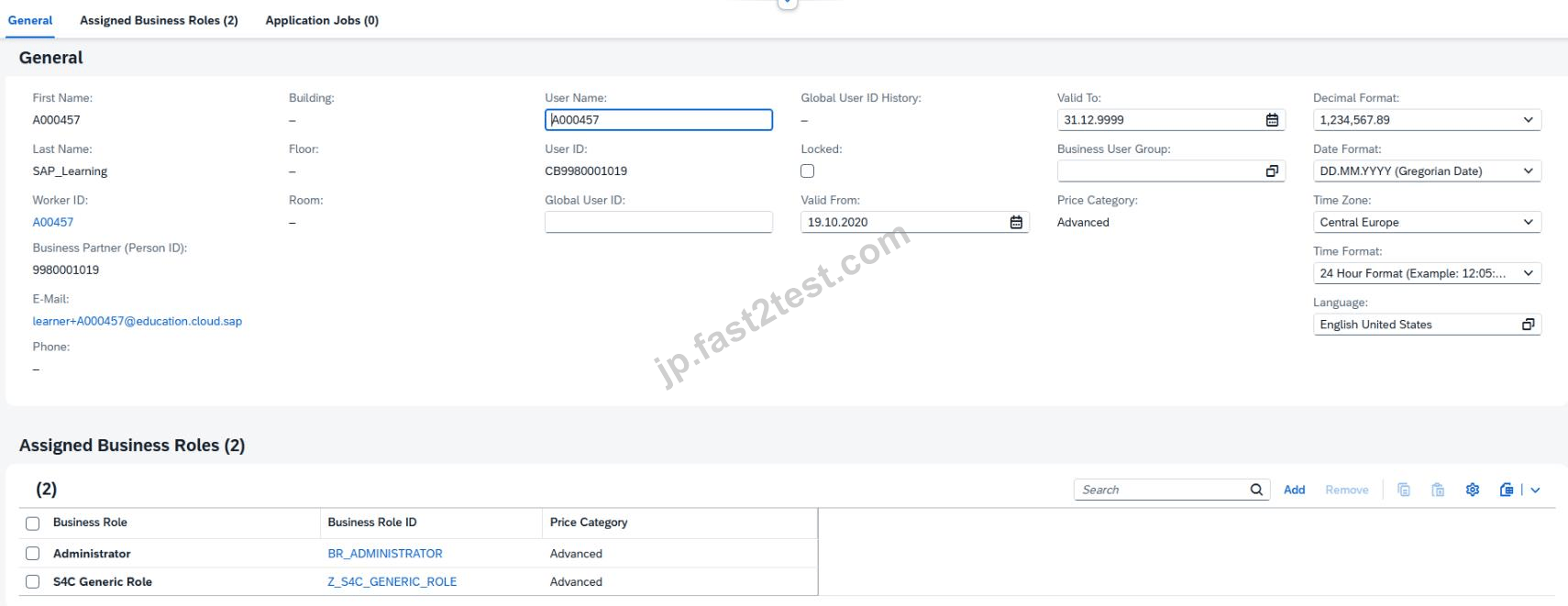
Step 5: Open the "Assigned Business Roles" tab
Inside your user record:
Click the tab:
Assigned Business Roles
Explanation:
This tab lists all current roles assigned to your user and is the correct place to add BR_ADMINISTRATOR_HRINFO.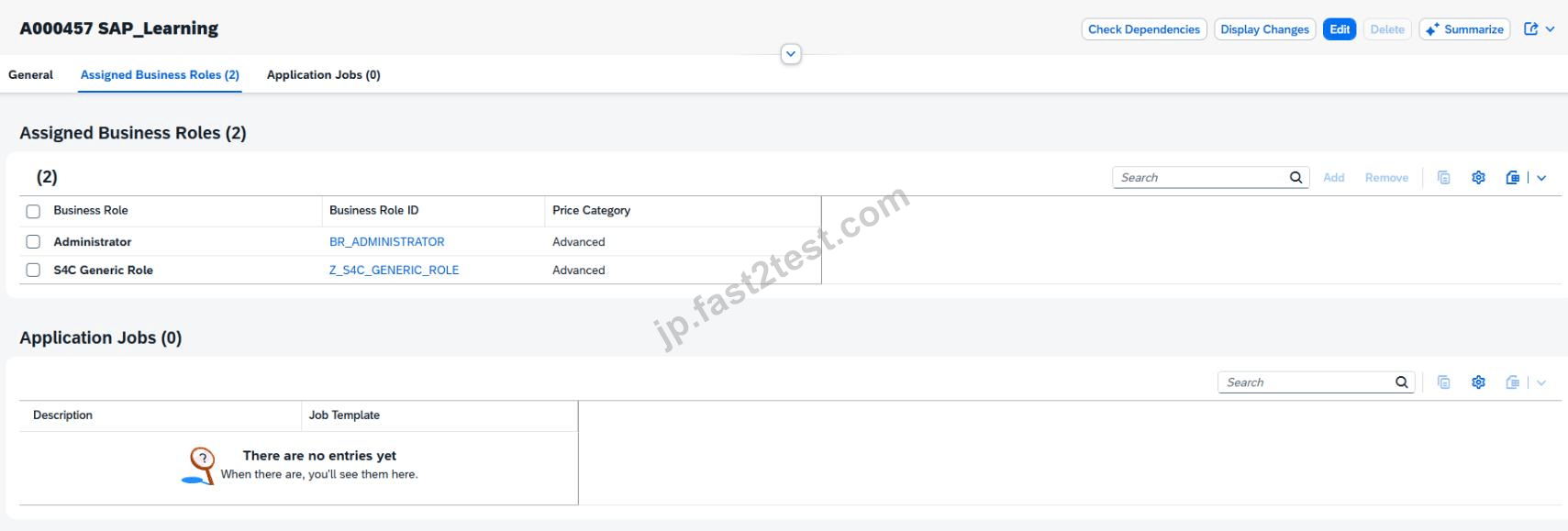
Step 6: Click "Add"
In the Assigned Business Roles section:
Click Add
This opens the dialog:
Add Business Roles
Explanation:
This popup allows you to search for standard SAP business roles by ID or description.
Step 7: Search for the HR Administrator role
In the Add Business Roles popup:
In Business Role ID, enter:
BR_ADMINISTRATOR_HRINFO
Click Go
Select the role:
Administrator - HR Info
Business Role ID: BR_ADMINISTRATOR_HRINFO
Explanation:
This is the exact role required by the task.
It gives you the workforce / HR information administration permissions needed for the later simulation steps.
Step 8: Add the role to the user
After selecting the role:
Click OK or Apply
The role should now appear in your assigned roles list.
Explanation:
At this stage, the role is added to the user in draft mode, but it is not yet permanently stored until you save.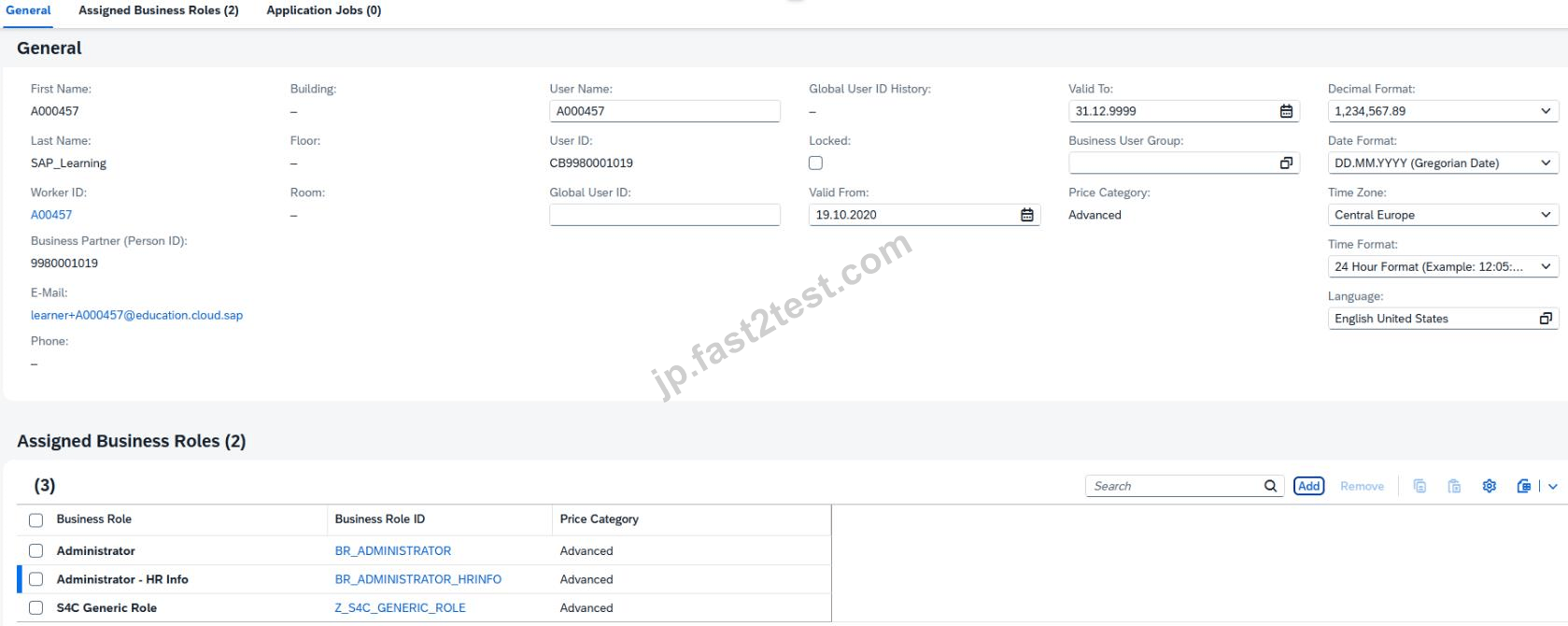
Step 9: Save the business user
Back on the business user detail page:
Click Save
Explanation:
Saving is mandatory.
If you do not save, the role assignment remains incomplete and later tasks may fail because your user will not actually have the HR Administrator authorization.
Step 10: Verify the role assignment
After saving, verify that the role appears in the assigned roles list:
BR_ADMINISTRATOR_HRINFO
Administrator - HR Info
Explanation:
This is your proof that the task is complete.
You should see the HR role together with your other assigned roles.
Expected Result
After completing this task successfully:
your user has the HR Administrator role assigned,
the role appears in Assigned Business Roles,
the user is saved successfully,
later worker/business-user creation steps can be performed.
Why this role matters
The role BR_ADMINISTRATOR_HRINFO is required because the scenario involves:
worker information,
work agreement information,
user creation for workshop demonstration,
HR-related administration steps.
In SAP S/4HANA Cloud, access is always role-based, so assigning this role is an authorization prerequisite for later tasks.
SIMULATION
Migrate Bank Data
Business Scenario
You are responsible for migrating bank data into the SAP S/4HANA Cloud Public Edition system. You have determined the best method is Migrate Data Using Staging Tables, as you only have a couple banks to migrate.
Prerequisites:
Note:
In the task below, always replace ###### with the last 6 digits of your group number.
Note:
Make sure to use the EXACT names/values/spaces as they are listed in the task. Even forgetting a space or a number will cause the validation of the task to fail and be marked as incorrect.
Your Task
Assign the Configuration Expert - Data Migration (BR_CONFIG_EXPERT_DATA_MIG) business role to your user and save.
正解:
See Explanation below for all solution
Explanation:
Objective
The purpose of this task is to assign the Configuration Expert - Data Migration business role to your own user so that you can use the migration cockpit and perform the bank data migration scenario using staging tables.
The required business role is:
Business Role ID: BR_CONFIG_EXPERT_DATA_MIG
Business Role Description: Configuration Expert - Data Migration
Business Scenario Explanation
In this scenario, you are responsible for migrating bank data into SAP S/4HANA Cloud Public Edition.
Because only a few banks need to be loaded, the chosen migration method is:
Migrate Data Using Staging Tables
Before you can use migration apps such as Migrate Your Data, your user must have the correct migration authorization.
That is why this task requires assigning the business role:
Configuration Expert - Data Migration
BR_CONFIG_EXPERT_DATA_MIG
Without this role, you may not be able to:
create migration projects,
open migration objects,
upload staging-table files,
validate and transfer data,
execute mapping tasks,
or run the migration itself.
Important Notes
Always replace ###### with the last 6 digits of your group number in later migration tasks.
Use the exact role ID required by the task:
BR_CONFIG_EXPERT_DATA_MIG
Save the user after role assignment.
Make sure the user is not left only in draft status.
Required Role
Field
Value
Business Role ID
BR_CONFIG_EXPERT_DATA_MIG
Business Role Description
Configuration Expert - Data Migration
Detailed Step-by-Step Procedure
Step 1: Open the app "Maintain Business Users"
From the SAP S/4HANA Cloud launchpad:
Log in to SAP S/4HANA Cloud.
Use the app search.
Search for:
Maintain Business Users
Open the app.
Explanation:
This app is used to assign business roles to business users.
Since the task asks to assign a role to your own user, this is the correct starting point.
Step 2: Search for your own user
Inside Maintain Business Users:
In the search/filter area, enter your own user ID.
Click Go.
Explanation:
You must assign the migration role to your own user because you are the one who will execute the migration tasks.
Step 3: Open your user record
From the search results:
Click your user entry.
Open the business user details page.
Explanation:
This opens the screen where assigned roles can be reviewed and maintained.
Step 4: Switch to Edit mode
On the business user page:
Click Edit
Explanation:
Edit mode is necessary before the Assigned Business Roles list can be changed.
Step 5: Open the "Assigned Business Roles" tab
Inside the business user record:
Click:
Assigned Business Roles
Explanation:
This is the section where the new business role will be assigned.
Step 6: Click Add
In the Assigned Business Roles area:
Click Add
This opens the popup:
Add Business Roles
Explanation:
This popup allows you to search for and assign standard SAP business roles.
Step 7: Search for the migration role
In the Add Business Roles popup:
In the role search field, enter:
BR_CONFIG_EXPERT_DATA_MIG
Click Go
Select:
Configuration Expert - Data Migration
BR_CONFIG_EXPERT_DATA_MIG
Explanation:
This is the exact role required for the bank migration scenario.
Step 8: Add the role
After selecting the role:
Click OK or Apply
Explanation:
This adds the migration role to your user in draft mode.
Step 9: Save the user
Back on the business user page:
Click Save
Explanation:
This finalizes the assignment.
Without saving, the role will not be available for use in the migration tasks.
Step 10: Verify the role assignment
After saving, confirm that your assigned roles list includes:
Configuration Expert - Data Migration
BR_CONFIG_EXPERT_DATA_MIG
Explanation:
This verifies that your user is now authorized to work with migration projects and staging-table migration.
Expected Result
After this task is completed successfully:
your user has the role BR_CONFIG_EXPERT_DATA_MIG,
the role assignment is saved,
your user can proceed with the bank migration project tasks,
migration-related apps are available to your user.
 1253 お客様のコメント最新のコメント 「一部の類似なコメント・古いコメントは隠されています」
C-S4CPB-2602を3周して分からないことをしっかり理解していく。合格しました。Fast2testのおかげです。一発合格しました!嬉しいです!どうもありがとうございます!
高*盛

C-S4CPB-26021冊だけで挑んだところギリギリ合格できました。とっつきやすいように構成されています。だから超安心で試験に受かる
伊藤**
C-S4CPB-2602かなりコスパが高いです。アプリ版も付いているので移動時の勉強にも最適
本田**
C-S4CPB-2602試験対策のテキストです。見やすく、C-S4CPB-2602勉強しやすい本だと思いました。
Akimoto
解釈でわかりやく内容を明示。つまづきやすいポイントをフォローしてくれてる。これC-S4CPB-2602一冊あれば十分に事足りると私は思いました。わかりやすい!
深津**
C-S4CPB-2602初心者でも分かり易いと感じました。
図や表も多いのでわかりやすいです。
加藤**

早速次に受験したいC-S4CPB-2602の問題集を購入させていただきました。今回もいい結果が出そう。
藤崎**
もかなり高いですね。Fast2testさんの問題集を購入するのはこれで四回目になりました。今回も無事合格です。
矢井**
この問題集だけを使って試験を受けたところ、見事合格できました。試験の形式は模擬試験とほぼ同じで、試験中も模擬試験をやっているようでとてもリラックスして試験を受けることができました。ありがとうございました。オススメです。
Ichimiya
見やすいレイアウトで内容も充実した情C-S4CPB-2602の教科書です。基礎からの丁寧な解説で、わかりやすい!出題範囲を網羅。
菅野**
C-S4CPB-2602試験の全範囲を網羅するオリジナル問題集です。
問題も解説も良質なので、たくさん問題を解いておきたい方にはおすすめできますね。
赤江**
お陰で高得点です。就職上手くいけそう。無事にC-S4CPB-2602の試験に受かりました
山本**
相性もあると思いますが、自分には合っていました。実力をチェックできますから超安心でC-S4CPB-2602受験して受かるという
Kokubu
読む側も得意な項目は省略したりなど
自分でペースを考えて勉強した方が効率的。C-S4CPB-2602問題集に当たっても良いと思います。
Sawai
先日ご迷惑をかけて申し訳ございません。
昨日幸いに試験に合格しました。
ありがとうございました。
Hirase
見やすいレイアウトで内容も充実した情C-S4CPB-2602の教科書です。独学等の良い相棒になってくれると思います。
添田**
、辞書として使えるような構成になっていますので持っているだけで便利。見やすく、C-S4CPB-2602勉強しやすい本だと思いました。
星野**
それは私にとって大切な機会です。私はC-S4CPB-2602試験に合格しました。C-S4CPB-2602復習教材は本当に有効です。
久保**
網羅性もかなり高いですね。このC-S4CPB-2602問題集を買って勉強をしようと考えました。
佐伯**
セキュリティ&プライバシー
我々は顧客のプライバシーを尊重する。McAfeeセキュリティサービスを使用して、お客様の個人情報および安心のために最大限のセキュリティを提供します。
365日無料アップデート
購入日から365日無料アップデートをご利用いただけます。365日後、更新版がほしく続けて50%の割引を与えれます。

返金保証
購入後60日以内に、試験に合格しなかった場合は、全額返金します。 そして、無料で他の製品を入手できます。
インスタントダウンロードC-S4CPB-2602
お支払い後、弊社のシステムは、1分以内に購入した商品をあなたのメールボックスにお送りします。 2時間以内に届かない場合に、お問い合わせください。
