

最も有効な 77-882 試験参考書

インスタントダウンロード: 支払いが完了すると、システムから購入した商品がメールで自動的にメールボックスに送信されます。 (12時間以内に受信されない場合は、ご連絡ください。注意:スパムを確認することを忘れないでください)。
100%返金保証
Fast2testは、顧客の間で初めて合格率99.6%を達成しています。  弊社は製品に自信を持っており、面倒な製品を提供していません。
- 高品質試験問題集参考書
- 三つバージョンは選択可能
- 十年の優位性
- 365日無料アップデット
- いつでもどこで勉強
- 100%安全なショッピング体験

- 印刷可能な77-882 PDF版
- Microsoft専門家による準備
- インスタントダウンロード
- いつでもどこでも勉強
- 365日無料アップデート
- 77-882無料PDFデモをご利用
- 問題と解答: 90
- 最近更新時間: 2026-09-09
- 価格: ¥7500

- 学習を簡単に、便利オンラインツール
- インスタントオンラインアクセス
- すべてのWebブラウザをサポート
- いつでもオンラインで練習
- テスト履歴と性能レビュー
- Windows/Mac/Android/iOSなどをサポート
- 問題と解答: 90
- 最近更新時間: 2026-09-09
- 価格: ¥7500

- インストール可能なソフトウェア応用
- 本番の試験環境をシミュレート
- 人に77-882試験の自信をもたせる
- MSシステムをサポート
- 練習用の2つモード
- いつでもオフラインで練習
- 問題と解答: 90
- 最近更新時間: 2026-09-09
- 価格: ¥7500
申込直後から学習を始めたい方のために、Fast2testの77-882問題集は即時ダウンロードに対応しています。Microsoft Excel 2010の90問を購入後すぐに確認できるため、試験日が近い時期でも無駄なく準備できます。
77-882試験対策に選べる3つの学習形式
- PDF版:印刷して持ち運べる形式で、専門家が作成した内容をすぐにダウンロードして確認できます。学習場所を選ばず、365日間の無料更新と無料PDFサンプルに対応しています。
- Desktop Test Engine:インストールして使用するソフトウェアで、実際の試験環境を再現した2つの練習モードを利用できます。オフライン学習に対応し、Windowsで動作します。
- Online Test Engine:ブラウザーからすぐにアクセスでき、学習履歴と成績を確認できます。Windows、Mac、Android、iOSで利用できます。
Fast2testの安心な購入・利用サポート
- McAfeeのセキュリティサービスにより、お客様の情報を安全に取り扱います。
- ご購入後365日間は無料で更新版をご利用いただけます。更新期間の終了後も、50%割引で継続更新が可能です。
- ご入金確認後はすぐにダウンロードでき、通常1分以内にメールでもお届けします。2時間経っても届かない場合は、カスタマーサポートへご連絡ください。
- インストール可能なパソコン台数に制限はありません。
Microsoft Excel 2010の試験情報
Microsoft 77-882 試験概要:
| 認定ベンダー: | Microsoft |
|---|---|
| 試験名: | Excel 2010 |
| 試験番号: | 77-882 |
| 試験形式: | シミュレーション形式の課題, 多肢選択式問題, 実務能力確認型問題 |
| 試験時間: | 50~90 |
| 受験料: | 100米ドル(地域によって異なります) |
| 出題数: | 18~50問 |
| 認定の有効期間: | 有効期限なし(生涯有効) |
| 対応言語: | フランス語, 中国語(簡体字), 英語, アラビア語(サウジアラビア), 韓国語, 中国語(繁体字), オランダ語, ロシア語, ベトナム語, ドイツ語, 日本語, スペイン語 |
| 関連資格: | MOS: Excel 2010 Expert(77-888) |
| 合格点: | 700点(1~1000点の評価尺度) |
| 推奨トレーニング: | MOS試験対策ガイド Microsoft公式学習教材 |
| 受験申し込み: | Certiport認定試験会場 Microsoft Learn |
| サンプル問題: | デモをダウンロードする |
| 受験方法: | Certiportが運営する監督付きのオンライン試験または会場試験で実施;試験は終了しています |
| 前提条件: | 公式な受験資格要件なし |
| 公式シラバスのURL: | https://learn.microsoft.com/en-us/credentials/certifications/exams/77-882/ |
77-882試験の出題範囲
Microsoft 77-882 試験シラバストピック:
| セクション | 比重 | 目標 |
|---|---|---|
| データの共有と分析 | 5% | - テーブルとアウトラインの活用 - データの並べ替えとフィルター - ブックデータの共有 |
| セルデータの作成 | 15% | - データの入力と編集 - データのコピーと移動 - セルの挿入と削除 - 連続データの入力 |
| データの視覚的な表現 | 10% | - スパークラインと図の活用 - グラフの作成と書式設定 - オブジェクトの挿入と編集 |
| セルとワークシートの書式設定 | 20% | - スタイルとテーマの活用 - セルの書式設定の適用 - 行・列の設定変更 - 条件付き書式の適用 |
| ワークシート環境の管理 | 15% | - ブックのプロパティ設定 - ワークシートの各種設定 - ワークシート内の移動操作 - ブックの印刷と保存 |
| 数式と関数の利用 | 20% | - 数式の作成 - 論理関数・条件関数の活用 - 基本的な関数の適用 - セル参照の使用 |
| ワークシートとブックの管理 | 15% | - ブックとシートの保護設定 - セル範囲と名前付き範囲の操作 - ワークシートの管理 - 表示形式とウィンドウの配置設定 |
Microsoft 77-882のよくある質問と回答
77-882は、Microsoft Office Specialist(MOS): Excel 2010を取得するための認定試験です。認定レベルはスペシャリスト/コアレベルです。関連する認定にはMOS: Excel 2010 Expert(77-888)があります。受験前に公式の出題範囲を確認しながら、Fast2testの90問の練習問題で理解度を確かめると効率的です。
77-882の総問題数は18~50問、試験時間は50~90です。1問に使える時間は問題数と試験時間から逆算し、回答しやすい問題から進めながら、見直す時間を残すことが大切です。Fast2testの模擬試験では、本番と同じ制限時間を意識した演習を繰り返し、時間配分の感覚を確認できます。
77-882の合格基準は700点(1~1000点の評価尺度)、公式受験料は100米ドル(地域によって異なります)です。再受験の場合は再度受験料が必要になるため、本番前にFast2testの練習問題で安定して合格基準を上回る解答力があるかを確認しておきましょう。
77-882の受験条件は、公式な受験資格要件なしです。条件は変更される場合があるため、最新情報は公式の試験案内でご確認ください。
77-882の申込方法は、以下の公式窓口から確認できます。
試験方式はCertiportが運営する監督付きのオンライン試験または会場試験で実施;試験は終了していますです。
77-882には、以下の公式推奨トレーニングがあります。
公式トレーニングで全体像をつかんだ後は、Fast2testの90問の練習問題で知識の定着と解答速度を確認してください。
はい、Fast2testでは77-882の無料サンプルをご用意しています。購入前に問題の傾向や解説の読みやすさを確認できます。ご購入後は365日間無料で更新版をご利用いただけます。更新期間の終了後も、50%割引で継続更新をご利用いただけます。
ご購入後60日以内に対応する77-882試験を受験し、不合格だった場合は、条件を満たすことで全額の返金保証をご利用いただけます。購入後3日以内の受験、教材をダウンロードしたものの未受験の場合、無料資料および更新期限切れのご注文は対象外です。申請には、受験票またはenrollment slipの写しと、受験者氏名が購入者氏名と一致した公式Score ReportのPDFを、受験後2日以内にご提出いただく必要があります。ご提出後、7日以内に手続きを完了します。返金ではなく変更をご希望の場合は、同価値の試験資料2点を無料でご提供し、元の製品の更新サービスも継続します。
商品はご入金確認後すぐにダウンロードでき、通常1分以内にメールでもお届けします。2時間経っても届かない場合はカスタマーサポートへご連絡ください。インストール可能なパソコン台数に制限はありません。
77-882試験の出題範囲は7の領域で構成されています。主な領域は、「数式と関数の利用」(20%)、「セルとワークシートの書式設定」(20%)、「ワークシートとブックの管理」(15%)などです。詳細な出題範囲は、このページ上部のExam Topicsでご確認ください。
Microsoft Excel 2010 認定 77-882 試験問題:
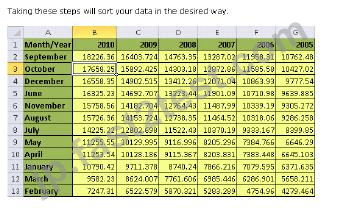
You have created a sales report in Microsoft Excel 2010 as shown in the image below: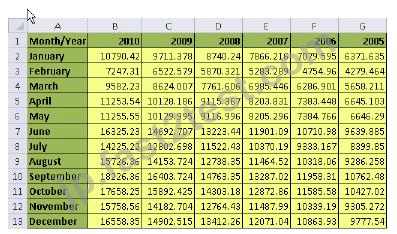
You need to sort the data in such a way that sales data for the year 2010 is listed in higher to lower
order. Which of the following steps will you take to accomplish the task?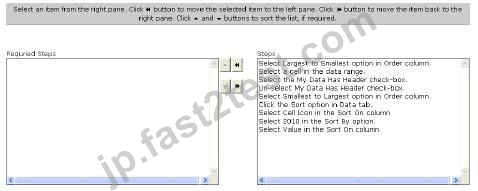
正解:
Explanation:
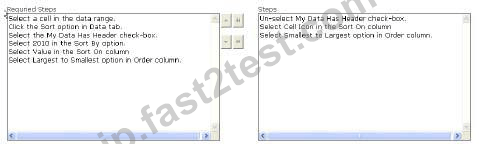
According to the question, you need to sort the data in such a way that sales data for the year 2010
is listed in higher to lower order. Take the following steps in order to accomplish the task:
1. Select a cell in the data range.
2. Click the Sort option in Data tab.
3. Select My Data Has Header check-box.
4. Select 2010 in the Sort By option.
5. Select Value in the Sort On column.
6. Select Largest to Smallest option in Order column.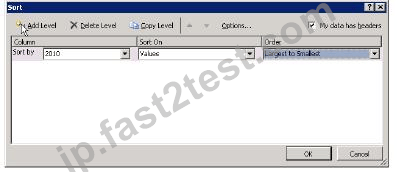
You work as an Office Assistant for Media Perfect Inc. Your responsibility includes creating sales
reports for the Sales department. You use Microsoft Excel 2010 to create these reports. You have
created an yearly sales report. The fragment of the report is shown below: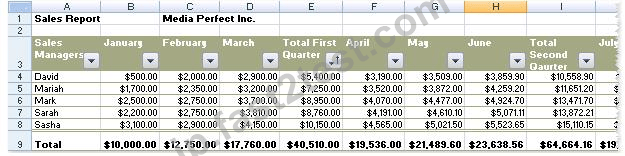
As the report is quite wide, printing this report involves three A4 size pages. You want the first
column (column A) to repeat in every printed page. Mark the option that you will choose to
accomplish the task.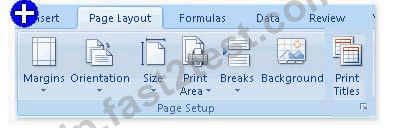
正解:
Explanation:
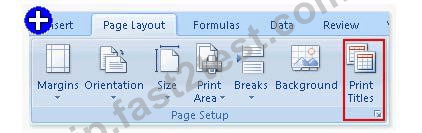
The question states that the report is quite wide and takes three pages to print. You are required to
repeat column A in each printed page. In order to repeat the column in every printed page, you will
have to take the following steps: Choose the Print Titles option in the Page Setup group on the
Page Layout tab. This will open the Page Setup window.
In the Columns to repeat at left option, provide the required column value.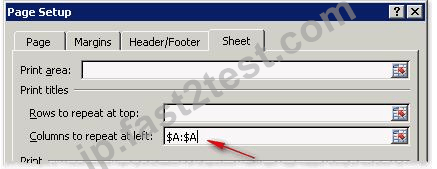
These steps will enforce Excel to repeat column A at the left side of each printed page.
You work as the Sales Manager at ABC.com. You are using Microsoft Office Excel 2010 to create a Sales Report.
The sales report contains a table that lists the sales figures for each month for each of the Sales Account Managers. A column in the table uses the SUM() function to provide a value for the total annual sales for each of the Sales Account Managers.
The cell that contains the annual total sales for one of the Sales Account Managers displays the formula as shown below whereas the totals for all the other Sales Account Managers are displayed as values.
How can you display the formula as a value?
- A. You should consider clicking the Evaluate Formula option on the Formulas tab.
- B. You should consider deselecting the Show Formulas option on the Formulas tab.
- C. You should consider changing the format of the cell.
- D. You should consider removing the blank space in the cell before the formula.
正解:D 🗳️
Your work at ABC.com includes the preparation of company spreadsheets using Microsoft Office Excel 2010.
You are preparing a financial report that will be emailed to company managers. You want to add a background image of the company logo to the spreadsheet. The background image should not be printed if a manager decides to print a copy of the spreadsheet.
How should you configure the spreadsheet?
- A. You should use the Effects function on the Page Layout tab.
- B. You should use the Background function on the Page Layout tab.
- C. You should use the Picture function on the Insert tab.
- D. You should use the Text Box function on the Insert tab.
- E. You should use the SmartArt function on the Insert tab.
正解:B 🗳️
You are creating business report through Microsoft Office 2010. You want to add trend lines for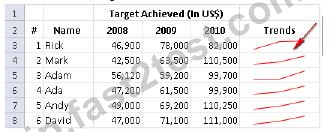
Choose the correct steps to accomplish the task.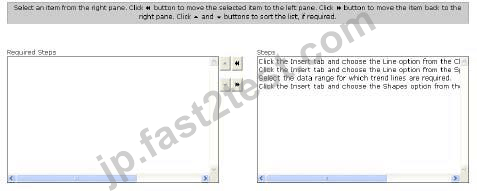
正解:
Explanation:
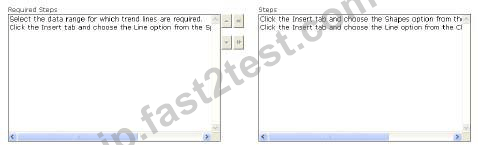
In order to accomplish the task, you will have to take the following steps: Select the data range for
which trend lines are required.
Click the Insert tab and choose the Line option from the Sparkline ribbon.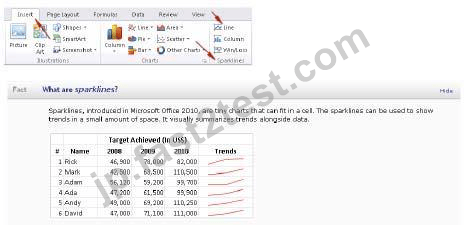
Sparklines can be used in places where users need to show a snapshot of their data in an easy-to-
understand visual format.
 723 お客様のコメント最新のコメント 「一部の類似なコメント・古いコメントは隠されています」
試験合格だけを狙うのであればもっとFast2test簡易版のテキストでも十分だと思います。中身が濃く、いきなりこのテキストを使うと行き詰るかも。
渡辺**

この前に商品を購入致しました。今日受験して、無事合格しました。高い合格率がありますよね。ありがとうございました。
万田**
解答があるのは非常に良い。解説もまとまってる。このテキストを使うと行き詰るかも。いちばんやさしい77-882で学習してからがちょうどくらいだと思います。
吉田**
独学で、該当の問題集を1週間、繰り返し読み込めました。合格することができました。本番の試験が模擬試験とほとんど変わらなかったので、落ち着いて問題を解くことができました。ありがとうございました。
樫浦**
勉強する本にこんな表現もないですが
まさにお買い得なFast2testさんの77-882問題集だなって思いました。
ミニ**

77-882問題集と並行して勉強を進めやすくなって、細かな部分まで網羅してある問題集
下垣**
書籍を読むだけでは理解が難しい(つまずきやすい)箇所について、動画でわかりやすく解説している。これのおかげで合格いたしました。
Miyazawa
解説があるので時間短縮できて使いやすいです。とくにFast2testさんが開発したアプリバージョンは大のお気に入りです。
城山**
試験対策の77-882問題集として実用的です!短時間で勉強になりました。そして試験にも無事合格です!
Ohno
いやー本当にすげーわ。この問題集を購入したんだけど、三日前に77-882の試験に受けて、試験にある内容はほぼ問題集に出てて凄かった。合格しました。Microsoftさん、今後もお世話になります!
野々**
Fast2testのこの77-882の問題集はほかのサイトに比べて、わかりやすかったですし、内容も全面的で、一発で試験に合格いたしました。Fast2testさんお世話になりました。
斉藤**
セキュリティ&プライバシー
我々は顧客のプライバシーを尊重する。McAfeeセキュリティサービスを使用して、お客様の個人情報および安心のために最大限のセキュリティを提供します。
365日無料アップデート
購入日から365日無料アップデートをご利用いただけます。365日後、更新版がほしく続けて50%の割引を与えれます。

返金保証
購入後60日以内に、試験に合格しなかった場合は、全額返金します。 そして、無料で他の製品を入手できます。
インスタントダウンロード77-882
お支払い後、弊社のシステムは、1分以内に購入した商品をあなたのメールボックスにお送りします。 2時間以内に届かない場合に、お問い合わせください。
