

オーバー 11429+ 人満足している顧客
最も有効な 070-698 試験参考書

 クリック」
クリック」インスタントダウンロード: 支払いが完了すると、システムから購入した商品がメールで自動的にメールボックスに送信されます。 (12時間以内に受信されない場合は、ご連絡ください。注意:スパムを確認することを忘れないでください)。
100%返金保証
Fast2testは、顧客の間で初めて合格率99.6%を達成しています。  弊社は製品に自信を持っており、面倒な製品を提供していません。
- 高品質試験問題集参考書
- 三つバージョンは選択可能
- 十年の優位性
- 365日無料アップデット
- いつでもどこで勉強
- 100%安全なショッピング体験

- 印刷可能な070-698 PDF版
- Microsoft専門家による準備
- インスタントダウンロード
- いつでもどこでも勉強
- 365日無料アップデート
- 070-698無料PDFデモをご利用
- 問題と解答: 180
- 最近更新時間: 2026-09-11
- 価格: ¥7500

- 学習を簡単に、便利オンラインツール
- インスタントオンラインアクセス
- すべてのWebブラウザをサポート
- いつでもオンラインで練習
- テスト履歴と性能レビュー
- Windows/Mac/Android/iOSなどをサポート
- 問題と解答: 180
- 最近更新時間: 2026-09-11
- 価格: ¥7500

- インストール可能なソフトウェア応用
- 本番の試験環境をシミュレート
- 人に070-698試験の自信をもたせる
- MSシステムをサポート
- 練習用の2つモード
- いつでもオフラインで練習
- 問題と解答: 180
- 最近更新時間: 2026-09-11
- 価格: ¥7500
Fast2testでは、070-698対策に印刷できるPDF、Desktop Test Engine、Online Test Engineの3形式をご用意しています。Microsoft Installing and Configuring Windows 10の180問の練習問題を、自宅でも外出先でもライフスタイルに合わせて学べます。
070-698試験対策に選べる3つの学習形式
- PDF版:印刷して持ち運べる形式で、専門家が作成した内容をすぐにダウンロードして確認できます。学習場所を選ばず、365日間の無料更新と無料PDFサンプルに対応しています。
- Desktop Test Engine:インストールして使用するソフトウェアで、実際の試験環境を再現した2つの練習モードを利用できます。オフライン学習に対応し、Windowsで動作します。
- Online Test Engine:ブラウザーからすぐにアクセスでき、学習履歴と成績を確認できます。Windows、Mac、Android、iOSで利用できます。
Fast2testの安心な購入・利用サポート
- McAfeeのセキュリティサービスにより、お客様の情報を安全に取り扱います。
- ご購入後365日間は無料で更新版をご利用いただけます。更新期間の終了後も、50%割引で継続更新が可能です。
- ご入金確認後はすぐにダウンロードでき、通常1分以内にメールでもお届けします。2時間経っても届かない場合は、カスタマーサポートへご連絡ください。
- インストール可能なパソコン台数に制限はありません。
Microsoft Installing and Configuring Windows 10の試験情報
Microsoft 070-698 試験概要:
| 認定ベンダー: | Microsoft |
|---|---|
| 試験名: | Windows 10 のインストールと構成 |
| 試験番号: | 70-698 |
| 試験形式: | パフォーマンスベース問題, 選択式 |
| 関連資格: | Microsoft 365 Certified: Modern Desktop Administrator Associate Microsoft 70-697 Windows デバイスの構成 |
| 対応言語: | English |
| サンプル問題: | デモをダウンロードする |
| 受験方法: | 試験会場での受験(この試験は廃止されました。ロールベースの MD-100 / MD-101 パスに移行されています。) |
| 前提条件: | 受験者は、Windows 10 コアサービスのインストール、構成、管理、および保守の経験があることが求められます。 |
| 公式シラバスのURL: | https://learn.microsoft.com/previous-versions/mcp/exams/70-698 |
070-698試験の出題範囲
Microsoft 070-698 試験シラバストピック:
| セクション | 比重 | 目標 |
|---|---|---|
| Windows の実装 | 30-35% | - インストール要件の準備 - デバイスとデバイスドライバーの構成 - エンタープライズ環境における Windows の実装 - Windows 10 のインストール - インストール後の構成の実行 |
| コアサービスの構成とサポート | 30-35% | - データアクセスと使用の構成 - リモート管理の構成 - ストレージの構成 - アプリの実装 - ネットワークの構成 |
| Windows の管理と保守 | 30-35% | - Windows の監視 - 認可と認証の構成 - システムとデータの回復の構成 - 更新プログラムの構成 - 高度な管理ツールの構成 |
Microsoft 070-698のよくある質問と回答
070-698は、MCSA: Windows 10を取得するための認定試験です。認定レベルはアソシエイト(MCSAレベル相当)です。関連する認定にはMicrosoft 70-697 Windows デバイスの構成、Microsoft 365 Certified: Modern Desktop Administrator Associateがあります。受験前に公式の出題範囲を確認しながら、Fast2testの180問の練習問題で理解度を確かめると効率的です。
070-698の受験条件は、受験者は、Windows 10 コアサービスのインストール、構成、管理、および保守の経験があることが求められます。です。条件は変更される場合があるため、最新情報は公式の試験案内でご確認ください。
はい、Fast2testでは070-698の無料サンプルをご用意しています。購入前に問題の傾向や解説の読みやすさを確認できます。ご購入後は365日間無料で更新版をご利用いただけます。更新期間の終了後も、50%割引で継続更新をご利用いただけます。
ご購入後60日以内に対応する070-698試験を受験し、不合格だった場合は、条件を満たすことで全額の返金保証をご利用いただけます。購入後3日以内の受験、教材をダウンロードしたものの未受験の場合、無料資料および更新期限切れのご注文は対象外です。申請には、受験票またはenrollment slipの写しと、受験者氏名が購入者氏名と一致した公式Score ReportのPDFを、受験後2日以内にご提出いただく必要があります。ご提出後、7日以内に手続きを完了します。返金ではなく変更をご希望の場合は、同価値の試験資料2点を無料でご提供し、元の製品の更新サービスも継続します。
商品はご入金確認後すぐにダウンロードでき、通常1分以内にメールでもお届けします。2時間経っても届かない場合はカスタマーサポートへご連絡ください。インストール可能なパソコン台数に制限はありません。
070-698試験の出題範囲は3の領域で構成されています。主な領域は、「Windows の実装」(30-35%)、「Windows の管理と保守」(30-35%)、「コアサービスの構成とサポート」(30-35%)などです。詳細な出題範囲は、このページ上部のExam Topicsでご確認ください。
Microsoft Installing and Configuring Windows 10 認定 070-698 試験問題:
You are the administrator for a company. All devices run Windows 10 Enterprise build 1703.
You plan to deploy Windows Hello for Business to all devices. You must use Microsoft Azure Active Directory (Azure AD) and manage the devices with Microsoft Intune.
During the deployment process, all devices must be automatically enrolled in mobile device management (MDM) when the device is joined to Azure AD.
You need to ensure that devices are automatically enrolled in MDM.
What should you do?
- A. Configure Azure Multi-Factor Authentication for the user accounts
. Update the Windows 10 devices to build 1709. - B. Obtain an Azure AD Premium license for each user account.
- C. Implement Active Directory Federation Services (AD FS) with an on-premises Active Directory Domain Services (AD DS) environment.
正解:B 🗳️
解説: (Fast2test メンバーにのみ表示されます)
: 175
Note: This question is part of a series of questions that present the same scenario. Each question in the series contains a unique solution that might meet the stated goals. Some question sets might have more than once correct solution, while others might not have a correct solution.
A company has a client device that runs Windows 10 Pro. The device has a folder named Folder1. The folder is configured using the following settings: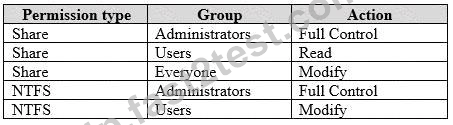
A user reports that they cannot change documents when accessing them over the network.
You need to ensure that the users can change documents in the folder.
Solution: You set the Everyone group share permission to Full Control.
Does the solution meet the goal?
- A. Yes
- B. No
正解:B 🗳️
You are the system administrator for a company. All devices run Windows 10. Employees use Microsoft OneDrive to sync files to their local devices by using Files On-Demand.
The human resources (HR) department has a folder named HRO and a folder named Reports. All files and subfolders of HRO are marked as Always keep on this device. All files and subfolders of Reports are marked Online-only.
An employee reports that they recently deleted a file in the Reports folder.
You need to quickly restore the file. What should the user do?
- A. Go to the OneDrive portal and restore the file from the Recycle Bin.
- B. Use the settings option in the OneDrive sync client.
- C. Restore the file from the Recycle Bin on the desktop.
- D. Run the RestoreUev-Backup Windows PowerShell cmdlet and restore the file.
正解:A 🗳️
Note: This question is part of a series of questions that use the same scenario. For your convenience, the scenario is repeated in each question. Each question presents a different goal and answer choices, but the text of the scenario exactly the same in each question in this series.
Start of repeated scenario
Your network contains a single Active Directory domain named contoso.com. All computers are members of the domain and run the 64-bit version of Windows 10 Enterprise.
On a test computer named Computer_Test1, you pin several company-specific applications in a group named Contoso Apps, and then you export the start menu layout to a file named contoso.xml.
You install Client Hyper-V on a computer named Computer6.
You identity the following requirements.
*Install the Hyper V feature on a computer named Computer1.
*Use virtual smart card authentication on a computer named Computer2.
*Enable Secure Boot on a computer named Computer3.
*Connect a computer named Computer4 to a projector by using Miracast.
*Ensure that a user named User 1 can use keyboard shortcuts by pressing one key at a time.
*Ensure that you can share the clipboard between Computer6 and the virtual machines running on Computer6.
*Add the Contoso Apps group to the Start menu of a computer named Computer7.
End of repeated scenario.
Which hardware feature must Computer2 support?
- A. Second Level Address Translation (SLAT)
- B. a smart card reader
- C. Trusted Platform Module (TPM)
- D. Unified Extensible Firmware Interface (UEFI)
正解:C 🗳️
解説: (Fast2test メンバーにのみ表示されます)
You have five computers that run Windows 8.
You need to perform an upgrade installation of Windows 10 on the computers.
What are two possible ways to achieve the goal? Each correct answer presents a complete solution.
- A. Start the computers from Windows PE, and then run setup.exe from a network share that contains the Windows 10 installation source files.
- B. Start the computers from a bootable USB drive that contains the Windows 10 source files.
- C. Apply updates by using Windows Update.
- D. While signed in to Windows 8, run setup.exe from a network share that contains the Windows 10 installation source files.
- E. Apply an image of Windows 10 by running imagex.exe.
正解:B 🗳️
解説: (Fast2test メンバーにのみ表示されます)
 1053 お客様のコメント最新のコメント 「一部の類似なコメント・古いコメントは隠されています」
070-698問題集ぽく、この一冊でだけで合格できました。Fast2testありがとうございました。
石山**

Fast2testの参考書で070-698試験問題をすぐ解くことで,知識が定着し応用力もついてそのまま合格しました。
林*美
070-698試験用のテキストです。試験合格しました。よかったです。ありがとうございました。
Morikawa

こちらFast2testの070-698問題集、レイアウトが絶妙で解説が丁寧で分かりやすいのでしっかりと頭に入ってきます。
Kuranuki
Fast2testいちばんやさしい、とうたうだけあって、丁寧に解説されています。
効率的にまとまっている070-698参考書だと思います。
Taniguchi
実際に070-698試験は、どの本でもあてはまることかと思いますが、載っている内容の8分のよんぐらいが出る印象でした。
Miyauchi
図解も豊富で理解しやすい構成となっており、これ1冊で出題範囲を完全カバーしている。
麻生**
070-698習得しやすいですね。今回は合格なので、次回受験する070-697もここFast2testで購入させて頂きます。
Satou
070-698試験を合格しました。よかったんです。
引き続き問題集を購入していきたいと思います。
今後ともよろしくお願いします。
Fujitani
過去問でどのくらいの結果が出るか楽しみです。
070-698の問題を解きながら解説も理解できるので学び易いと思います。Microsoft好き
Ogawa
無事合格です。Fast2testおかげです。本当にお世話になりました。
試験の内容にほぼあってて凄すぎた。
Imai
本問題集学習し、070-698合格しました。Fast2testの説明は遥かにわかりやすいのでよいです。
小川**
この070-698は初心者にとってはわかりやすい素晴らしい問題集になっております。試験に受かりましたよ。
Hazuki
この度、貴社の製品を使い勉強して、070-698を見事で合格しました。かなりの的中率でした。ありがとうございました。
Kataoka
解釈でわかりやく内容を明示。つまづきやすいポイントをフォローしてくれてるFast2test。試験に合格できる分は大きいと思います
华原**
独学で合格できました。嬉しくて泣きそうです。
Fast2testさん、大変お世話になりました。ありがとうございました!
三宅**
セキュリティ&プライバシー
我々は顧客のプライバシーを尊重する。McAfeeセキュリティサービスを使用して、お客様の個人情報および安心のために最大限のセキュリティを提供します。
365日無料アップデート
購入日から365日無料アップデートをご利用いただけます。365日後、更新版がほしく続けて50%の割引を与えれます。

返金保証
購入後60日以内に、試験に合格しなかった場合は、全額返金します。 そして、無料で他の製品を入手できます。
インスタントダウンロード070-698
お支払い後、弊社のシステムは、1分以内に購入した商品をあなたのメールボックスにお送りします。 2時間以内に届かない場合に、お問い合わせください。
